Crucial MX300 SSD – Missing RX Track Component After SATA Repair

theRipon

Nov 19, 2025
2
Joined
Nov 19, 2025
Messages
2
20251119_105949.jpgScreenshot_20251119_110144_Gallery.jpg

Hi everyone,
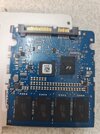
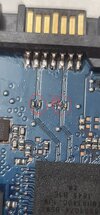
I’m trying to repair my Crucial MX300 1TB SSD. One of the SATA connector pins detached from the PCB, so I resoldered it. While probing the RX line with a multimeter, I accidentally knocked off a tiny surface-mounted component. There are four identical components on the RX and TX tracks—likely zero-ohm resistors or small capacitors.


I measured the remaining three in resistance mode and got "OL" across their legs. The SSD now works via an external USB adapter, but file transfers are slow. When connected internally via SATA, it’s not detected in Windows Disk Management.


I’ve attached a close-up image showing the damaged area. Can anyone help identify the missing component or suggest how to restore proper SATA functionality?


Thanks in advance!
 

Harald Kapp

Moderator
Moderator
Nov 17, 2011
14,270
Joined
Nov 17, 2011
Messages
14,270
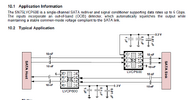
According to this typical application circuit, the missing component would be a 10 nF capacitor. A capacitor would show OL on a multimeter in Ω mode.
1763541694098.png

I recommend you get a new SSD, copy the data from the old SSD to the new one as long as the old one still is accessibel (even if it is slow). Then discard the old SSD. After the "repair" the reliability of the old SSD is probably very much reduced.
 

theRipon

Nov 19, 2025
2
Joined
Nov 19, 2025
Messages
2
Thanks so much for your help—I really appreciate it. I'll give your suggested fix a try and let you know how it goes.
 
Top