
Jotrinelectronic1
- Oct 17, 2023
- 5
- Joined
- Oct 17, 2023
- Messages
- 5
In the realm of electronics, the 7-segment decoder IC plays a pivotal role by converting binary or Binary-Coded Decimal (BCD) input into a format suitable for displaying numbers on a 7-segment display. These ICs are indispensable for translating digital data into a visual representation.
Components Required
Before embarking on the cascading process, ensure you have the following components at your disposal:
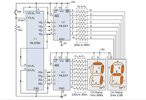
Step-by-Step Cascading Guide
Now, let's delve into the specifics of cascading two 7-segment decoder ICs together.
1. Power Supply
Commence by connecting the power supply (5V) to the VCC and GND pins of both 7-segment displays and the two 7-segment decoder ICs. This furnishes the necessary voltage for operation.
2. BCD Input Source
Link your BCD input source (e.g., DIP switches or a microcontroller) to the BCD input pins of the first 7-segment decoder IC. This source will transmit the numerical data to be displayed.
3. First 7-Segment Display
Connect the common cathode or common anode of the first 7-segment display to the respective pins on the first 7-segment decoder IC.
Link each segment (a, b, c, d, e, f, g, and DP) of the first display to the IC's corresponding segment outputs.
Insert a current-limiting resistor (usually 330-470 ohms) in series with each segment to safeguard the LEDs.
4. Cascading Connection
Establish the connection by linking the LT (Lamp Test) and BI/BO (Blanking Input/Output) pins of the first 7-segment decoder IC to the corresponding pins on the second IC. This connection facilitates the cascading operation.
5. Second 7-Segment Display
Connect the common cathode or common anode of the second 7-segment display to the respective pins on the second 7-segment decoder IC.
Attach each segment of the second display to the IC's corresponding segment outputs.
Incorporate current-limiting resistors as required.
6. Testing
Apply power to the circuit and input the desired BCD data. Both 7-segment displays should now accurately exhibit the corresponding numbers.
Conclusion
The skill of cascading two 7-segment decoder ICs proves invaluable when undertaking projects that demand multiple 7-segment displays. This arrangement enables you to display a broader range of numbers, rendering it ideal for applications like digital clocks, scoreboards, and more.
Now that you are well-versed in the process of cascading two 7-segment decoder ICs, you can elevate your electronics projects and effortlessly present numerical information.
Components Required
Before embarking on the cascading process, ensure you have the following components at your disposal:
- Two 7-segment displays
- Two 7-segment decoder ICs (commonly 7447, 7448, or similar)
- BCD input source (e.g., DIP switches or a microcontroller)
- Resistors (typically 330-470 ohms)
- Power supply (5V)
Step-by-Step Cascading Guide
Now, let's delve into the specifics of cascading two 7-segment decoder ICs together.
1. Power Supply
Commence by connecting the power supply (5V) to the VCC and GND pins of both 7-segment displays and the two 7-segment decoder ICs. This furnishes the necessary voltage for operation.
2. BCD Input Source
Link your BCD input source (e.g., DIP switches or a microcontroller) to the BCD input pins of the first 7-segment decoder IC. This source will transmit the numerical data to be displayed.
3. First 7-Segment Display
Connect the common cathode or common anode of the first 7-segment display to the respective pins on the first 7-segment decoder IC.
Link each segment (a, b, c, d, e, f, g, and DP) of the first display to the IC's corresponding segment outputs.
Insert a current-limiting resistor (usually 330-470 ohms) in series with each segment to safeguard the LEDs.
4. Cascading Connection
Establish the connection by linking the LT (Lamp Test) and BI/BO (Blanking Input/Output) pins of the first 7-segment decoder IC to the corresponding pins on the second IC. This connection facilitates the cascading operation.
5. Second 7-Segment Display
Connect the common cathode or common anode of the second 7-segment display to the respective pins on the second 7-segment decoder IC.
Attach each segment of the second display to the IC's corresponding segment outputs.
Incorporate current-limiting resistors as required.
6. Testing
Apply power to the circuit and input the desired BCD data. Both 7-segment displays should now accurately exhibit the corresponding numbers.
Conclusion
The skill of cascading two 7-segment decoder ICs proves invaluable when undertaking projects that demand multiple 7-segment displays. This arrangement enables you to display a broader range of numbers, rendering it ideal for applications like digital clocks, scoreboards, and more.
Now that you are well-versed in the process of cascading two 7-segment decoder ICs, you can elevate your electronics projects and effortlessly present numerical information.

