PharoahRamses
- Nov 26, 2025
- 4
- Joined
- Nov 26, 2025
- Messages
- 4
Hey everybody, i'm a new poster.
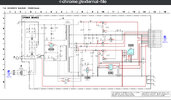
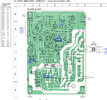
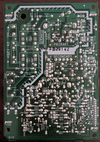
Recently I managed to acquire a Sony DVP-CX777ES 400 DVD Changer. The device worked completely fine after an initial repair of some simple belts inside the machine. Long story short I used a keyboard with LEDS (which seem to have drawn too much power innapropirately) with a PS/2 Adapter to plug into the front Keyboard Input on the front of the machine. This caused the device to shut off instantly and no longer turn on. Upon opening the shell nothing seemed to be blown, burnt or swollen. I used AI to help assist in a DIY repair that had me replace a part called an MIP2E5DMY. Which didn't work even with my proper soldering technique. After replacing this part it caused the main fuse on the PSU to blow. AI then told me that it was on backwards and had me flip it around, same thing, fuse blew. You'll be able to see the incorrectly placed part and also a missing fuse, pay no mind to those in my image of the PSU below. (Im gonna flip it back around and solder it properly). Also note that the fuse only began to blow after I changed the part, I don't know what this means.
The only thing I am fairly certain of is that there's a short on the 5V line. I did a test while the power supply was plugged in and nothing was coming through the 5V Line on the PSU.
I'm at a loss and i'd like to restore the device back to normal since buying a donor machine is at minimum $200.
Any help is appreciated, I can elaborate more on what happened if needed. Thanks.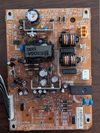
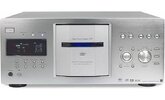
Recently I managed to acquire a Sony DVP-CX777ES 400 DVD Changer. The device worked completely fine after an initial repair of some simple belts inside the machine. Long story short I used a keyboard with LEDS (which seem to have drawn too much power innapropirately) with a PS/2 Adapter to plug into the front Keyboard Input on the front of the machine. This caused the device to shut off instantly and no longer turn on. Upon opening the shell nothing seemed to be blown, burnt or swollen. I used AI to help assist in a DIY repair that had me replace a part called an MIP2E5DMY. Which didn't work even with my proper soldering technique. After replacing this part it caused the main fuse on the PSU to blow. AI then told me that it was on backwards and had me flip it around, same thing, fuse blew. You'll be able to see the incorrectly placed part and also a missing fuse, pay no mind to those in my image of the PSU below. (Im gonna flip it back around and solder it properly). Also note that the fuse only began to blow after I changed the part, I don't know what this means.
The only thing I am fairly certain of is that there's a short on the 5V line. I did a test while the power supply was plugged in and nothing was coming through the 5V Line on the PSU.
I'm at a loss and i'd like to restore the device back to normal since buying a donor machine is at minimum $200.
Any help is appreciated, I can elaborate more on what happened if needed. Thanks.