How to disable DT9205A auto power off?

fredtt695

Jan 4, 2024
13
Joined
Jan 4, 2024
Messages
13
Hi guys, newbie over here.
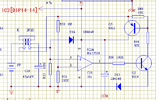
I wanted to understand how i can remove the nasty auto power off feature from my multimeter. It's a DT-9205A. Every time after a while (even while measuring) it'll automatically power off itself. I understand that this mechanism is triggered by certain circuit like that in the diagram.
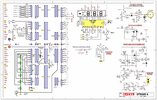
dt9205a_excel_multimeter_sch.jpgpower-off circuit.png

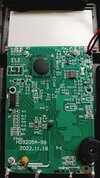
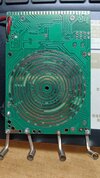
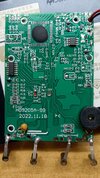
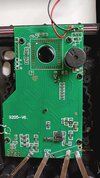
But I can neither fully understand it nor apply it to my actually multimeters. I mean, I kinda understand that the dual operational amplifier decided whether it'll be on or off, but the actual board confused me. it's shown in the attached pictures also.
I'll try to get other multimeter that satisfy my demand, but i also wanna try to do the modification. Any help is appreciated.IMG_20240105_000744.jpgIMG_20240105_000806.jpg
 

kellys_eye

Jun 25, 2010
6,512
Joined
Jun 25, 2010
Messages
6,512
Increase the value of C19 to make it stay on longer (put another capacitor in parallel with it).
 

fredtt695

Jan 4, 2024
13
Joined
Jan 4, 2024
Messages
13
Increase the value of C19 to make it stay on longer (put another capacitor in parallel with it).
I cannot locate C19 via the negative pole(the soldering point right next to "C6") :v
if i go down, i got the buzzer
if i go left, i suspect it goes to LM358 and R27 and Q2(M6)
 

fredtt695

Jan 4, 2024
13
Joined
Jan 4, 2024
Messages
13
I cannot locate C19 via the negative pole(the soldering point right next to "C6") :v
if i go down, i got the buzzer
if i go left, i suspect it goes to LM358 and R27 and Q2(M6)
everything is located on one side btw
 

fredtt695

Jan 4, 2024
13
Joined
Jan 4, 2024
Messages
13
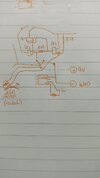
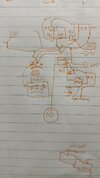
Now I somehow figured out that the right picture(power part) is equivalent to the circuit diagram i draw. Any ideas how i can locate everything?1704390559619.jpeg
 
Last edited:

fredtt695

Jan 4, 2024
13
Joined
Jan 4, 2024
Messages
13
Why did you label it as C19 then? According to the 'actual' schematic it's C16.

To bypass it entirely you need to short the collector-emitter of Q2.
I didn't draw any of the schematic above. i found those 2 on the internet as reference.
And thx for the suggeestion. i'll try to locate Q2's actual location, except... which one should i short (sry)
 

kellys_eye

Jun 25, 2010
6,512
Joined
Jun 25, 2010
Messages
6,512
Disabling the auto-off function is entirely your choice but it would be far better to simply lengthen it to the point at which you are happy - changing the capacitor C16 from 47uF to 470uF would extend the on time by a factor of 10x
 

fredtt695

Jan 4, 2024
13
Joined
Jan 4, 2024
Messages
13
Disabling the auto-off function is entirely your choice but it would be far better to simply lengthen it to the point at which you are happy - changing the capacitor C16 from 47uF to 470uF would extend the on time by a factor of 10x
i would try to parallel another capacitor over the timing capacitor then.
it's just kinda frustrating while searching for it. I highly suspect that my actual multimeter does not follows the given schematic above.
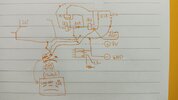
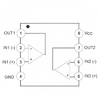
here's my progress of analyzing the actually circuit of the right board. and another pic of LM358's diagram
IMG_20240105_192826.jpg1_1.png
 

kellys_eye

Jun 25, 2010
6,512
Joined
Jun 25, 2010
Messages
6,512
My advice is based on the assumption that the schematic and board overlay are correct. Given the timing circuit notes that the timing components are R63/C16 and the highest numerical resistor designation I can see on the actual board is only R53 I don't know where to go from here.....

Are there parts on the other side of the board you still have screwed into the case? If not then the schematic/board is completely at odds and therefore you're pretty much on your own here and trying to reverse engineer the schematic - with poor results.
 

fredtt695

Jan 4, 2024
13
Joined
Jan 4, 2024
Messages
13
My advice is based on the assumption that the schematic and board overlay are correct. Given the timing circuit notes that the timing components are R63/C16 and the highest numerical resistor designation I can see on the actual board is only R53 I don't know where to go from here.....

Are there parts on the other side of the board you still have screwed into the case? If not then the schematic/board is completely at odds and therefore you're pretty much on your own here and trying to reverse engineer the schematic - with poor results.
welp, i guess i'll have to hope that i can match them with my actual board or i'll have to learn everything else b4 i can fully understand the mechanism....

what i was trying was actually reverse engeering the PCB, and yes, every components are located on one side :)
i can provide one of the board i have as the other one is even worse and i wanna leave it alone :>
I guess it'll be better if i can reshape the pic and throw them into gimp so i can do a better analysis
IMG_20240105_195423.jpgIMG_20240105_195436.jpg
 

fredtt695

Jan 4, 2024
13
Joined
Jan 4, 2024
Messages
13
fine i was supposed to do my dishes but there you go. i actually put them into gimp so we can analysis better :v
here's the file i'll be using if you're interested. runs with gimp 2.10.36
 

kellys_eye

Jun 25, 2010
6,512
Joined
Jun 25, 2010
Messages
6,512
The schematic shown shows IC2 and IC3 both to be quad comparators that are only usually available in 14- or 16-pin packages.

Given there are TWO such devices on the schematic and the board only has ONE 14-pin device (marked as a 14-pin logic gate 74HC04) the schematic clearly is not what you think it is.
 

fredtt695

Jan 4, 2024
13
Joined
Jan 4, 2024
Messages
13
The schematic shown shows IC2 and IC3 both to be quad comparators that are only usually available in 14- or 16-pin packages.

Given there are TWO such devices on the schematic and the board only has ONE 14-pin device (marked as a 14-pin logic gate 74HC04) the schematic clearly is not what you think it is.

I'm sure i haven't mistake 74HC04 and LM324 (yet.). I think the manufacturer of my multimeter got lazy and decided to use LM358 instead of LM324. not sure why but the hand-made diagram was based on LM358 part. which (i think) will do the same thing as LM324, except there must be some difference.

(Let's ignore one of the multimeter that has merely 1 IC as i think there's no way i can make any difference on that.)
but i thought LM358, IC2 and IC3 are Op-amp. Did I missed something?
 

kellys_eye

Jun 25, 2010
6,512
Joined
Jun 25, 2010
Messages
6,512
The LM358 is a dual comparator so will provide (potentially) the functionality for ONE of the services shown in the schematic. If the meter can actually measure capacitance (does it?) then that function alone requires four comparators.

Also, given that the unit requires the AC-to-DC converter, that itself uses one op-amp so, with only ONE LM358 fitted we can only guess at what the other half of the LM358 is being used for!

I think you're on a hiding to nothing unless you get the proper schematic.
 

fredtt695

Jan 4, 2024
13
Joined
Jan 4, 2024
Messages
13
The LM358 is a dual comparator so will provide (potentially) the functionality for ONE of the services shown in the schematic. If the meter can actually measure capacitance (does it?) then that function alone requires four comparators.

Also, given that the unit requires the AC-to-DC converter, that itself uses one op-amp so, with only ONE LM358 fitted we can only guess at what the other half of the LM358 is being used for!

I think you're on a hiding to nothing unless you get the proper schematic.
well yeah, it magically can measure capacitance. actually, it's capable of measuring AC/DC Current/Voltage and capacitance, hfe.
maybe you're right, the mechanism of timeout might be binding w/ other components and that literally gives me no chance of finding the correct schematic or doing any modification.

but welp, i'll try to contact the seller and see if they have the right schematic. or i might just analysis the board myself as well. I mean I did the same thing to another PCB before. it's not like i can't take another 90 hrso_Olol

anyway i think i can generate the right schematic even if i can't find one. i just don't have the sufficient knowledge of understanding how it works.
the hand-drawn schematic above was a work of me staring at my board like hell. is it gonna help?
 

Bluejets

Oct 5, 2014
7,374
Joined
Oct 5, 2014
Messages
7,374
Could make suggestion to bridge out c/e of the pnp high side transistor but....is it Q2 or Q3...supplied schematics are different.
 

fredtt695

Jan 4, 2024
13
Joined
Jan 4, 2024
Messages
13
i'll try to analysis the actual schematics when i'm complete free to do so. but just in case, do you have any suggestion about the software? I mean, what software do you recommend for generating the schematic with the format you familiar with?
I'm a open-source software guy, would be nice if i can get some OSS like KiCAD or something else.
 

Bluejets

Oct 5, 2014
7,374
Joined
Oct 5, 2014
Messages
7,374
Try EasyEda.
Once applied as a schematic, one can generate a pcb and even have it made if that takes your fancy.
 
Top