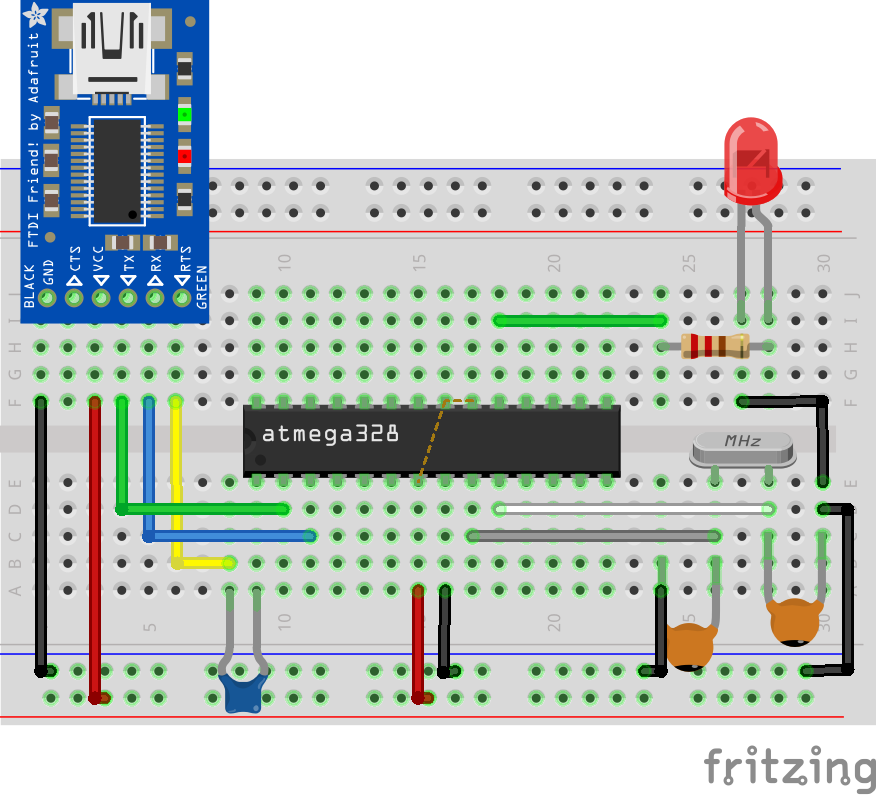
programming the atmega 328p microcontroller previous article on this subject

petercl141

Apr 4, 2022
14
Joined
Apr 4, 2022
Messages
14
The article provided a way to program the 328 without using an arduino board. Several things I didn't understand about downloading. It says to name the port the 'usb to serial/ ttl adaptor' is connected to. What port would this be? Also it says to name the board type. What is the board type? And where do I put these things in on my computer?

  I have not seen the previous article about getting a bootloader onto the 328. I have found  a 328 available at Jaycar that already has the bootloader installed.

Can somebody give me the answers to the above. Perhaps the guy that wrote the article. Thanks in advance.


HarryA1

Mar 4, 2009
481
Joined
Mar 4, 2009
Messages
481
"What is the board type?"

Note: when programming the Atmega328p MCU using the Arduino IDE, the matching board type you have to select is the “Arduino Duemilanove or Nano w/ ATmega328” board.

:What port would this be? I take it to be the comport related to the IDE and PC. Shown in [tools] menu of the IDE.

Connected to pins: 1,2,& 3 on the ATmega32 chip.

https://www.electronics-lab.com/wp-content/uploads/2018/09/programming-Uno-on-breadboard.png

 For others the article is here: https://www.electronics-lab.com/project/programming-atmega328p-microcontroller-with-arduino-ide/

 
Last edited by a moderator:

petercl141

Apr 4, 2022
14
Joined
Apr 4, 2022
Messages
14
"What is the board type?"

Note: when programming the Atmega328p MCU using the Arduino IDE, the matching board type you have to select is the “Arduino Duemilanove or Nano w/ ATmega328” board.

:What port would this be? I take it to be the comport related to the IDE and PC. Shown in [tools] menu of the IDE.

Connected to pins: 1,2,& 3 on the ATmega32 chip.

https://www.electronics-lab.com/wp-content/uploads/2018/09/programming-Uno-on-breadboard.png

 For others the article is here: https://www.electronics-lab.com/project/programming-atmega328p-microcontroller-with-arduino-ide/


petercl141

Apr 4, 2022
14
Joined
Apr 4, 2022
Messages
14
In this scenario I am programming directly to the atmega 328p through its bootloader. I have already programmed the 328 and tested the code by programming to the nano board. Then looking up the board manager on the arduino ide I see mega and mega 2560. Could this mean the Atmega 328p for direct programming? I sure wish the author of this article could have given this further info to be able to program directly to 328 through its bootloader. 

  The very good schematic with this article shows the connections from the 'usb to serial/ttl adaptor' to the 328. 

Another problem I see is that the port reference is faded out in my IDE tools menu. So I can't enter a port. 


HarryA1

Mar 4, 2009
481
Joined
Mar 4, 2009
Messages
481
If you look  in the IDE at [tools] -> boards you will see the Nano and the Duemilanove. You  will not see the port listed until you select the board and have a board or adapter connected.  The Meg2560 has a different  AVR microcontroller; an  ATmega2560.

If you search on Youtube for the FT232RL (the USB to serial/TTL Adapter) you  will find  numerous  videos.

Speaking of ports, the current port is shown in the IDE in [Tools] also in the Preferences file. The Preferences file can be found [file] -> Preferences. That brings up a pop up window containing the path to the file. Near the bottom of the file can be seen the comport listed in two places. Also in the Device Manager it is listed under Ports(COM & LPT).  Device Manager is via [Windows] + [x]. Sometimes you can edit the Preferences file to bring the comport inline with the device port iIf the IDE gets confused. You may  know this but others may not.

(I screwed up the fonts by cut and past again)

 
Last edited by a moderator:

petercl141

Apr 4, 2022
14
Joined
Apr 4, 2022
Messages
14
Thanks Harry. When I pick Duemilanove on the board manager I get at the bottom of my screen Duemilanove on com3. Previously it was nano on com3. My arduino nano board. So that looks sweet. The port is mentioned. This is without connecting the adaptor board as you suggest to get the port.

Hoping I will get the same port mentioned when I connect the adaptor board so that I wont have to change the com.


Elijah Green

Apr 27, 2022
1
Joined
Apr 27, 2022
Messages
1
If you look  in the IDE at [tools] -> boards you will see the Nano and the Duemilanove. You  will not see the port listed until you select the board and have a board or adapter connected.  The Meg2560 has a different  AVR microcontroller; an  ATmega2560.

If you search on Youtube for the FT232RL (the USB to serial/TTL Adapter) you  will find  numerous  videos.

Speaking of ports, the current port is shown in the IDE in [Tools] also in the Preferences file. The Preferences file can be found [file] -> Preferences. That brings up a pop up window containing the path to the file. Near the bottom of the file can be seen the comport listed in two places. Also in the Device Manager it is listed under Ports(COM & LPT).  Device Manager is via [Windows] + [x]. Sometimes you can edit the Preferences file to bring the comport inline with the device port iIf the IDE gets confused. You may  know this but others may not.

(I screwed up the fonts by cut and past again)

helpful tips. In the beginning, I also use draw.io on Google Drive to create a flowchart of each scene. In addition to the visual component and visual design, I have recently started studying computer programming and at https://studyhippo.com/essay-examples/computer-programming/ I find very useful information in this area. It helps me improve my skills.
Thanks a lot for the explanation.

 
Last edited by a moderator:

Debra Lee

Jul 6, 2022
3
Joined
Jul 6, 2022
Messages
3
In relation to ports, the Preferences file's Preferences section also displays the current port in the IDE's [Tools] section. You'll find the Preferences file under [file] -> Preferences. A pop-up window containing the file's path appears after clicking that. It is possible to see the comport listed twice near the bottom of the file. Additionally, it appears under Ports in Device Manager (COM & LPT). Use [Windows] + [x] to access Device Manager. Occasionally, if the IDE becomes confused, you can update the preferences file to align the connection with the device port. Others might not be aware of this as you are. gmail

 
Top