onethreenine
- Sep 24, 2025
- 1
- Joined
- Sep 24, 2025
- Messages
- 1
I've rather brashly stuck my hand up to help out with lighting and props for my kids' theatre performance. I need to simulate a flaming whip and a fire in a fireplace and I know enough to be dangerous and probably not enough to get the job done. I had the bright idea of getting a 5m ws2811 based rope that will do the trick for both if controlled right. I've got the programming down, but running two different programs off a single Arduino is a bit beyond me, so I've got two and loaded the appropriate code to each. I'm running the whole rig off a battery pack, which I tested and works just fine with one board and the rope.
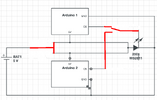
So far so good. Now I need to mount it all up and provide a mechanism to switch between the two boards, powering one board plus the lights at a time. I was thinking I could do it with a 3 position switch and I've mocked up a very rough diagram of the circuit.
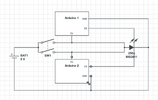
(D5 is the control feed to the LEDs, it's distinct from the power loop, but I figured it should be represented)
But I feel like I'm setting myself up for either a pratfall or a damp squib when each side of the switch is powering the lights and I think in the process putting the whole circuit in series, and leaving the nominally "off" board as a path of less resistance than a string of 250 ws2811s.
Am I best to switch the light and boards separately, or is there something I can add to essentially isolate the two sides of the circuit? The switch I have provides NC and NO terminals, but I can't map the logic to use that to deal with the issue. I was thinking I could wire the lights up to both sides of the NO, which would leave the lights always powered and the boards switched using the NC, but I don't know if that's going to leave the same problem in place.
Any help would be gratefully received by me, the Greater Northland Amateur Theatre, and about 80 kids involved in the show.
So far so good. Now I need to mount it all up and provide a mechanism to switch between the two boards, powering one board plus the lights at a time. I was thinking I could do it with a 3 position switch and I've mocked up a very rough diagram of the circuit.
(D5 is the control feed to the LEDs, it's distinct from the power loop, but I figured it should be represented)
But I feel like I'm setting myself up for either a pratfall or a damp squib when each side of the switch is powering the lights and I think in the process putting the whole circuit in series, and leaving the nominally "off" board as a path of less resistance than a string of 250 ws2811s.
Am I best to switch the light and boards separately, or is there something I can add to essentially isolate the two sides of the circuit? The switch I have provides NC and NO terminals, but I can't map the logic to use that to deal with the issue. I was thinking I could wire the lights up to both sides of the NO, which would leave the lights always powered and the boards switched using the NC, but I don't know if that's going to leave the same problem in place.
Any help would be gratefully received by me, the Greater Northland Amateur Theatre, and about 80 kids involved in the show.