Advice on LCD display for Picaxe project.

HellasTechn

Apr 14, 2013
1,579
Joined
Apr 14, 2013
Messages
1,579
P.S.
http://www.picaxe.com/downloads/axe133.bas.txt
Here is the code for the 18M2 to act as slave interface. I guess i could adjust it for use with the 20M2 Picaxe i already have. Then connect it with the chineese LCD i bought from e-bay. I will wire it as shown in page 5 of this PDF.
http://www.picaxe.com/docs/axe133.pdf

So far i have not been able to modify the (18m2 chip) code for use with a 20M2.

I am going to need some help on this one.
 

CDRIVE

Hauling 10' pipe on a Trek Shift3
May 8, 2012
4,960
Joined
May 8, 2012
Messages
4,960
Is the PE editor throwing errors? If so where?

Chris
 

HellasTechn

Apr 14, 2013
1,579
Joined
Apr 14, 2013
Messages
1,579
Yes.
Syntax error on line 85 at/before position 9
Error: Pin C.6 is input only

at line 36 i changed c.6 to c.1

C.1 is symbol spare1 = C.1 ; spare output 1 (line 32)
 

HellasTechn

Apr 14, 2013
1,579
Joined
Apr 14, 2013
Messages
1,579
Here is the code as i changed it so far

; AXE133 Serial LCD/OLED using PICAXE-18M2
; Emulates basic serial operation of the popular AXE033 module
; CPS, May 2011
; v2 18/01/2012

#picaxe 20M2

; ********************************************
; Note you must uncomment just one of these two options
; depending on whether you have an LCD or OLED module
;#define use_OLED
#define use_LCD
; ********************************************


; Supported Commands
; 0-7, 8-15 CGRAM characters
; 16-252 normal ASCII characters, according to selected character map table
; 253, X display 16 character pre-saved message from EEPROM memory, X can be 0-15
; 254, X LCD command, X can be 0 to 255
; 255, X control outputs C.2, C.1, C.0 (via lower 3 bits of X)
; So, if using a backlit LCD with the active low transistor driver
; on output C.2, then 255,%000 switches backlight on and 255,%100 switches off


#define use_welcome ; display the welcome message upon power up
symbol line_length = 16 ; change to 20 for displays with 20 character lines

symbol baud = N2400_16 ; Serial baud rate 2400,N,8,1. Note main program runs at 16MHz

symbol spare0 = C.0 ; spare output 0
symbol spare1 = C.1 ; spare output 1
symbol spare2 = C.2 ; spare output 2 (or optional backlight)
symbol backlight = C.2 ; optional backlight control for backlit LCDs, active low
symbol RX = C.5 ; serial receive pin
symbol enable = C.1 ; LCD enable
symbol rs = C.7 ; LCD RS


; LCD data pins are on B.0 to B.7

; Store the 16 character user defined messages in EEPROM data memory
; First two messages are optionally used as welcome message

; If using a display with 20 characters you will need to edit
; the start addresses to be multiples of 20 (currently at 16)
; and add 4 characters to each message.
; Please remember 4 line displays always use the strange 1-3-2-4 layout.

#ifdef use_OLED
EEPROM $00, (" Serial OLED ") ; store msg in the EEPROM memory
#else
EEPROM $00, (" Serial LCD ") ; store msg in the EEPROM memory
#endif


EEPROM $10, (" www.picaxe.com ") ; store msg in the EEPROM memory

EEPROM $20, ("This is msg 2 ") ; store msg in the EEPROM memory
EEPROM $30, ("This is msg 3 ") ; store msg in the EEPROM memory
EEPROM $40, ("This is msg 4 ") ; store msg in the EEPROM memory
EEPROM $50, ("This is msg 5 ") ; store msg in the EEPROM memory
EEPROM $60, ("This is msg 6 ") ; store msg in the EEPROM memory
EEPROM $70, ("This is msg 7 ") ; store msg in the EEPROM memory
EEPROM $80, ("This is msg 8 ") ; store msg in the EEPROM memory
EEPROM $90, ("This is msg 9 ") ; store msg in the EEPROM memory
EEPROM $A0, ("This is msg 10 ") ; store msg in the EEPROM memory
EEPROM $B0, ("This is msg 11 ") ; store msg in the EEPROM memory
EEPROM $C0, ("This is msg 12 ") ; store msg in the EEPROM memory
EEPROM $D0, ("This is msg 13 ") ; store msg in the EEPROM memory
EEPROM $E0, ("This is msg 14 ") ; store msg in the EEPROM memory
EEPROM $F0, ("This is msg 15 ") ; store msg in the EEPROM memory

;initialise LCD
init:
gosub LCD_init ; initialise LCD

; display welcome message if desired
#ifdef use_welcome
let b1 = 0 ; message 0 on top line
gosub msg ; do it

low rs ; command mode
let pinsB = 192 ; move to line 2, instruction 192
pulsout enable,1 ; pulse the enable pin to send data.
high rs ; character mode again

let b1 = 1 ; message 1 on bottom line
gosub msg ; do it
#endif

; main program loop, runs at 16MHz

main:

serin RX,baud,b1 ; wait for the next byte

; NB keep character mode test as first item in this list to optimise speed
if b1 < 253 then
let pinsB = b1 ; output the data
pulsout enable,1 ; pulse the enable pin to send data.
goto main ; quickly loop back to top
else if b1 = 254 then
low rs ; change to command mode for next character
serin RX,baud,b1 ; wait for the command byte
let pinsB = b1 ; output the data
pulsout enable,1 ; pulse the enable pin to send data.
high rs ; back to character mode
goto main ; quickly loop back to top
else if b1 = 253 then
serin RX,baud,b1 ; wait for the next byte
gosub msg ; do the 16 character message
goto main ; back to top
else ; must be 255
serin RX,baud,b1 ; wait for the next byte
let pinsC = b1 & %00000111 | %10000000
; output the data on C.0 to C.1, keep RS high
goto main ; back to top
end if


; power on LCD initialisation sub routine
LCD_init:
let dirsC = %11000111 ; PortC 0,1,2,6,7 all outputs
let dirsB = %11111111 ; PortB all outputs


#ifdef use_OLED
; Winstar OLED Module Initialisation
; according to WS0010 datasheet (8 bit mode)

pause 500 ; Power stabilistation = 500ms

; Function set - select only one of these 4 character table modes
;let pinsB = %00111000 ; 8 bit, 2 line, 5x8 , English_Japanese table
let pinsB = %00111001 ; 8 bit, 2 line, 5x8 , Western_European table1
;let pinsB = %00111010 ; 8 bit, 2 line, 5x8 , English_Russian table
;let pinsB = %00111011 ; 8 bit, 2 line, 5x8 , Western_European table2

pulsout enable,1 ;

let pinsB = %00001100 ; Display on, no cursor, no blink
pulsout enable,1

let pinsB = %00000001 ; Display Clear
pulsout enable,1
pause 7 ; Allow 6.2ms to clear display

setfreq m16 ; now change to 16Mhz

let pinsB = %00000010 ; Return Home
pulsout enable,1

let pinsB = %00000110 ; Entry Mode, ID=1, SH=0
pulsout enable, 1


#else
; Standard LCD Module Initialisation
pause 15 ; Wait 15ms for LCD to reset.

let pinsB = %00110000 ; 8 bit, 2 line
pulsout enable,1 ; Send data by pulsing enable
pause 5 ; Wait 5 ms
pulsout enable,1 ; Send data 48 again

setfreq m16 ; now change to 16Mhz

let pinsB = %00111000 ; LCD - 8 bit, 2 line, 5x8
pulsout enable,1

let pinsB = %00000001 ; Clear Display
pulsout enable,1
pause 8 ; 8 = 2ms at 16MHz

let pinsB = %00000010 ; return home
pulsout enable,1

let pinsB = %00000110 ; Entry mode
pulsout enable,1
pause 1

let pinsB = %00001100 ; Display on, no cursor, no blink
pulsout enable,1
#endif

high rs ; Leave in character mode
return


; display message from EEPROM sub routine
; message number 0-15 must be in b1 when called
; uses (alters) b1, b2, b3, b4
msg:
let b2 = b1 & %00001111 * line_length
; EEPROM start address is 0 to 15 multiplied by 16
let b3 = b2 + line_length - 1 ; end address is start address + (line_length - 1)
for b4 = b2 to b3 ; for 16 times
read b4,b1 ; read next character from EEPROM data memory into b1
let pinsB = b1 ; output the data
pulsout enable,1 ; pulse the enable pin to send data.
next b4 ; next loop
return

; Check end user has defined just one type of display
#ifndef use_OLED
#ifndef use_LCD
#error "Oops - no OLED / LCD type defined at top of program!"
#endif
#endif

#ifdef use_OLED
#ifdef use_LCD
#error "Oops - both OLED / LCD types defined at top of program!"
#endif
#endif
 

CDRIVE

Hauling 10' pipe on a Trek Shift3
May 8, 2012
4,960
Joined
May 8, 2012
Messages
4,960
Let's take one thing at a time. I changed only two lines of code and it syntax tested OK. These are lines 45 and 49.

Chris
Code:
; *******************************
; ***** Sample Header File  *****
; *******************************
;    Filename:        
;    Date:            
;    File Version:    
;    Written by:
;    Function:      
;    Last Revision:
;    Target PICAXE:  20M2
; *******************************


; AXE133 Serial LCD/OLED using PICAXE-20M2
; Emulates basic serial operation of the popular AXE033 module
; CPS, May 2011
; v2 18/01/2012

#picaxe 20M2

; ********************************************
; Note you must uncomment just one of these two options
; depending on whether you have an LCD or OLED module
;#define use_OLED
#define use_LCD
; ********************************************


; Supported Commands
; 0-7, 8-15    CGRAM characters
; 16-252    normal ASCII characters, according to selected character map table
; 253, X    display 16 character pre-saved message from EEPROM memory, X can be 0-15
; 254, X    LCD command, X can be 0 to 255
; 255, X    control outputs C.2, C.1, C.0 (via lower 3 bits of X)
;        So, if using a backlit LCD with the active low transistor driver
;        on output C.2, then 255,%000 switches backlight on and 255,%100 switches off


#define use_welcome    ; display the welcome message upon power up
symbol line_length = 16    ; change to 20 for displays with 20 character lines

symbol baud = N2400_16    ; Serial baud rate 2400,N,8,1. Note main program runs at 16MHz

symbol spare0     = C.0 ; spare output 0
symbol spare1     = C.6 ; spare output 1
symbol spare2     = C.2 ; spare output 2 (or optional backlight)
symbol backlight     = C.2 ; optional backlight control for backlit LCDs, active low
symbol RX        = C.5    ; serial receive pin
symbol enable     = C.1    ; LCD enable
symbol rs         = C.7    ; LCD RS


; LCD data pins are on B.0 to B.7

; Store the 16 character user defined messages in EEPROM data memory
; First two messages are optionally used as welcome message

; If using a display with 20 characters you will need to edit
; the start addresses to be multiples of 20 (currently at 16)
; and add 4 characters to each message.
; Please remember 4 line displays always use the strange 1-3-2-4 layout.

#ifdef use_OLED      
EEPROM $00, ("  Serial OLED   ")     ; store msg in the EEPROM memory
#else
EEPROM $00, ("   Serial LCD   ")     ; store msg in the EEPROM memory
#endif


EEPROM $10, (" www.picaxe.com ")     ; store msg in the EEPROM memory

EEPROM $20, ("This is msg 2   ")     ; store msg in the EEPROM memory
EEPROM $30, ("This is msg 3   ")     ; store msg in the EEPROM memory
EEPROM $40, ("This is msg 4   ")     ; store msg in the EEPROM memory
EEPROM $50, ("This is msg 5   ")     ; store msg in the EEPROM memory
EEPROM $60, ("This is msg 6   ")     ; store msg in the EEPROM memory
EEPROM $70, ("This is msg 7   ")     ; store msg in the EEPROM memory
EEPROM $80, ("This is msg 8   ")     ; store msg in the EEPROM memory
EEPROM $90, ("This is msg 9   ")     ; store msg in the EEPROM memory
EEPROM $A0, ("This is msg 10  ")     ; store msg in the EEPROM memory
EEPROM $B0, ("This is msg 11  ")     ; store msg in the EEPROM memory
EEPROM $C0, ("This is msg 12  ")     ; store msg in the EEPROM memory
EEPROM $D0, ("This is msg 13  ")     ; store msg in the EEPROM memory
EEPROM $E0, ("This is msg 14  ")     ; store msg in the EEPROM memory
EEPROM $F0, ("This is msg 15  ")     ; store msg in the EEPROM memory

;initialise LCD
init:
    gosub LCD_init         ; initialise LCD

; display welcome message if desired
#ifdef use_welcome  
    let b1 = 0            ; message 0 on top line
    gosub msg            ; do it

    low rs            ; command mode
    let pinsB = 192        ; move to line 2, instruction 192
    pulsout enable,1      ; pulse the enable pin to send data.
    high rs            ; character mode again
  
    let b1 = 1            ; message 1 on bottom line
    gosub msg            ; do it
#endif      
      
; main program loop, runs at 16MHz

main:

    serin RX,baud,b1            ; wait for the next byte

    ; NB keep character mode test as first item in this list to optimise speed
    if b1 < 253 then
        let pinsB = b1         ; output the data
        pulsout enable,1      ; pulse the enable pin to send data.
        goto main            ; quickly loop back to top
    else if b1 = 254 then
        low rs                  ; change to command mode for next character
        serin RX,baud,b1        ; wait for the command byte
        let pinsB = b1         ; output the data
        pulsout enable,1      ; pulse the enable pin to send data.
        high rs            ; back to character mode
        goto main            ; quickly loop back to top
    else if b1 = 253 then
        serin RX,baud,b1        ; wait for the next byte
        gosub msg            ; do the 16 character message
        goto main            ; back to top
    else ; must be 255
        serin RX,baud,b1        ; wait for the next byte
        let pinsC = b1 & %00000111 | %10000000
                        ; output the data on C.0 to C.1, keep RS high
        goto main            ; back to top
    end if


; power on LCD initialisation sub routine
LCD_init:
    let dirsC = %11000111    ; PortC 0,1,2,6,7 all outputs
    let dirsB = %11111111    ; PortB all outputs


#ifdef use_OLED
    ; Winstar OLED Module Initialisation
    ; according to WS0010 datasheet (8 bit mode)

    pause 500             ; Power stabilistation = 500ms

    ; Function set - select only one of these 4 character table modes
    ;let pinsB = %00111000     ; 8 bit, 2 line, 5x8 , English_Japanese table
    let pinsB = %00111001     ; 8 bit, 2 line, 5x8 , Western_European table1
    ;let pinsB = %00111010     ; 8 bit, 2 line, 5x8 , English_Russian  table
    ;let pinsB = %00111011     ; 8 bit, 2 line, 5x8 , Western_European table2
  
    pulsout enable,1      ;
      
    let pinsB = %00001100    ; Display on, no cursor, no blink
    pulsout enable,1    

    let pinsB = %00000001     ; Display Clear
    pulsout enable,1
    pause 7            ; Allow 6.2ms to clear display

    setfreq m16            ; now change to 16Mhz

    let pinsB = %00000010     ; Return Home
    pulsout enable,1

    let pinsB = %00000110     ; Entry Mode, ID=1, SH=0
    pulsout enable, 1


#else  
    ; Standard LCD Module Initialisation
    pause 15             ; Wait 15ms for LCD to reset.

    let pinsB = %00110000     ; 8 bit, 2 line
    pulsout enable,1      ; Send data by pulsing enable
    pause 5             ; Wait 5 ms
    pulsout enable,1          ; Send data 48 again
    pulsout enable,1      ; Send data 48 again
  
    setfreq m16            ; now change to 16Mhz

    let pinsB = %00111000     ; LCD  - 8 bit, 2 line, 5x8
    pulsout enable,1
          
    let pinsB = %00000001    ; Clear Display
    pulsout enable,1    
    pause 8            ; 8 = 2ms at 16MHz
  
    let pinsB = %00000010     ; return home
    pulsout enable,1

    let pinsB = %00000110    ; Entry mode
    pulsout enable,1    
    pause 1          

    let pinsB = %00001100    ; Display on, no cursor, no blink
    pulsout enable,1    
#endif
  
    high rs            ; Leave in character mode
    return


; display message from EEPROM sub routine
; message number 0-15 must be in b1 when called
; uses (alters) b1, b2, b3, b4
msg:
    let b2 = b1 & %00001111 * line_length
                        ; EEPROM start address is 0 to 15 multiplied by 16
    let b3 = b2 + line_length - 1 ; end address is start address + (line_length - 1)
    for b4 = b2 to b3            ; for 16 times
        read b4,b1            ; read next character from EEPROM data memory into b1
        let pinsB = b1         ; output the data
        pulsout enable,1      ; pulse the enable pin to send data.
    next b4                ; next loop
    return
  
; Check end user has defined just one type of display
#ifndef use_OLED
#ifndef use_LCD
#error "Oops - no OLED / LCD type defined at top of program!"
#endif
#endif

#ifdef use_OLED
#ifdef use_LCD
#error "Oops - both OLED / LCD types defined at top of program!"
#endif
#endif
 

HellasTechn

Apr 14, 2013
1,579
Joined
Apr 14, 2013
Messages
1,579
Ok. I understand your changes. Thankyou for that.
I will now breadboard it and see...

I guess i will leave CON1 unconnected. C.5 is serin pin, all the other are clear i think.
 

CDRIVE

Hauling 10' pipe on a Trek Shift3
May 8, 2012
4,960
Joined
May 8, 2012
Messages
4,960
Ok. I understand your changes. Thankyou for that.
I will now breadboard it and see...

I guess i will leave CON1 unconnected. C.5 is serin pin, all the other are clear i think.
Admittedly I didn't examine and scrutinize the entire app. I settled for acceptance in the syntax check.

Chris
 

HellasTechn

Apr 14, 2013
1,579
Joined
Apr 14, 2013
Messages
1,579
Same here :)

Software simulation is not easy to understand if you have not builded the code yourself.
I have the breadboard ready for the test. i will report back as soon as i am done.
 

CDRIVE

Hauling 10' pipe on a Trek Shift3
May 8, 2012
4,960
Joined
May 8, 2012
Messages
4,960
I just whisked off an email to my contact at DesignSoft that makes my favorite schematic capture/spice simulator TINA. I love Picaxe but TINA doesn't support them. This forces me to use PicaxeVSM, which is not a Picaxe product. It's a scaled down version of PROTEUS/ISIS. It's a clunky app which I hate using. If TINA supported Picaxe I would have drawn and simulated your circuit using a 20M2 and LCD already.

Chris
 

HellasTechn

Apr 14, 2013
1,579
Joined
Apr 14, 2013
Messages
1,579
I understand... Thank you anyway !

My first attempt failed. I used the 20m2 with the code as you mdified it and without a master picaxe to send data. I wired the 20m2 and the lcd module according to the diagram and nothing happened (no backlight on).


On the lcd there are two pins marked A and K for anode and cathode of the LED backlight. I am not sure how to connect them because the diagram is for the OLED module. That explains why backlight was off.
After going through the code i noticed that pin C.2 is reserved for enableing backlight "active low signal" but still i am not sure where to connect C.2 to.
 
Last edited:

HellasTechn

Apr 14, 2013
1,579
Joined
Apr 14, 2013
Messages
1,579
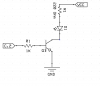
I am going to need a transistor driver for the led since the one that came with the display unit was mounted on the I2C interface board which i removed. So VCC needs to be fed to A and a PNP transistor with collector to K, emmiter to GND and base through 1k resistor to base.
 

CDRIVE

Hauling 10' pipe on a Trek Shift3
May 8, 2012
4,960
Joined
May 8, 2012
Messages
4,960
I am going to need a transistor driver for the led since the one that came with the display unit was mounted on the I2C interface board which i removed. So VCC needs to be fed to A and a PNP transistor with collector to K, emmiter to GND and base through 1k resistor to base.

Not quite like that. If you're using a PNP that turns on when the Picaxe pin goes low you want the Emitter connected to "K" and the Collector connected to GND. Don't forget a 1KΩ between the picaxe pin and the transistor Base.

Chris
 

CDRIVE

Hauling 10' pipe on a Trek Shift3
May 8, 2012
4,960
Joined
May 8, 2012
Messages
4,960
Hey, just had a thought! Why mess with PNPs when you can just invert the code by making C.2 normally low and bringing it high to turn on a NPN? In this case the Collector will be connected to "K" and Emitter connected to GND. A 1K base resistor still applies.

Chris
 

HellasTechn

Apr 14, 2013
1,579
Joined
Apr 14, 2013
Messages
1,579
It is just easyer to use a NPN than alter the code. I currently use a bc558 and backlight works, Well kind of, C.2 is pulsing hi - low and i dont know why. I hope i have not burned C.2 because i forgot to add the 1k resistor to transistor's base...:confused:
 
Last edited:

HellasTechn

Apr 14, 2013
1,579
Joined
Apr 14, 2013
Messages
1,579
Ok now that i dont get. C.2 only pulses from 0V to 1.5V when i connect it with the BC558 base.
 

Attachments

  • transistor driver.png
    transistor driver.png
    11 KB · Views: 82

HellasTechn

Apr 14, 2013
1,579
Joined
Apr 14, 2013
Messages
1,579
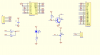
Check this out, it is the diagram of the LCD I2C module as i bought it :
 

Attachments

  • LCD I2C diagram.png
    LCD I2C diagram.png
    83.3 KB · Views: 88
Top