GrahamHarrison
- May 22, 2026
- 2
- Joined
- May 22, 2026
- Messages
- 2
shim and hot glue or kapton tape is the way to go.Before soldering, You can try this hack.
- Insert the Cable: Carefully slide the ribbon cable into the FPC connector.
- Shim the Cable: Cut a tiny, thin piece of plastic (like from a piece of tape backing or a shim) to match the width of the ribbon cable.
- Wedge it in: Plac.e this shim on top of the ribbon cable inside the socket to force the cable pins against the board's metal contacts.
- Tape or Glue: Lay down a piece of masking tape over the top of the connection to hold the shim securely in place, or use a hot glue gun for a longer-lasting hold.
51-pin FPC/FFC connector![]()
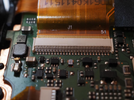
Hi All - I wonder if anyone can identify this connector. It is a 51-way SM display ribbon connector on the main board of a Panasonic Lumix camera (LX100), and has lost its clamp bar. I would dearly like to replace it and get the camera working again. Any help appreciated.
This is one of the FFC connectors that are often used to connect embedded cameras to their main boards. Unikeyic has many of them. You can check their list to get the exact pin configuration and measurement that you're looking for.View attachment 70133
Hi All - I wonder if anyone can identify this connector. It is a 51-way SM display ribbon connector on the main board of a Panasonic Lumix camera (LX100), and has lost its clamp bar. I would dearly like to replace it and get the camera working again. Any help appreciated.
It looks like a 51-pin FPC/FFC LCD connector with the locking bar missing. Panasonic lists a 51-pin connector (K1MY51BA0667) for the LX100, so that may be the relevant part. I’d compare the pitch and contact orientation before replacing it. The LCD ribbon connection is documented in the LX100 repair guide as well.View attachment 70133
Hi All - I wonder if anyone can identify this connector. It is a 51-way SM display ribbon connector on the main board of a Panasonic Lumix camera (LX100), and has lost its clamp bar. I would dearly like to replace it and get the camera working again. Any help appreciated.