Linksprite-Yuki
- Aug 20, 2016
- 34
- Joined
- Aug 20, 2016
- Messages
- 34
ZigBee device list
Motion detector
Smoke sensor


Door detector
Water Detector


Temperature and Humidity Sensor
CO Sensor


These ZigBee node devices support ZHA standard protocol.
Linker ZigBee gateway module is one kind of Linker modules which can communicate with up to 32 ZigBee node devices. It is powered by Marvell 88MZ100 ZigBee microcontroller SoC chip. This ZigBee offers advantages for many application scenarios, including lighting control, smart metering, home/building automation, remote controls and health care applications.
Tutorial
we will show how to interface Deepcam ZigBee sensors using the Linker ZigBee gateway.
Prerequisites
Commands to communicate with ZigBee sensor
1. Set Permit Join
Attribute Name
Type
Note
CMD Length
Uint8
0x02
CMD ID
Uint8
0x75
Permit Join
Uint8
0x00 – Always off; 0xFF – Always on; Other values – Turn on permit join for a period of time
Example
2. New Device Joined Indication
Sent after ZigBee gateway sends Transport Key to the joining device or received a ZDP Device Announcement.
Attribute name
Type
Note
CMD Length
Uint8
0x0E
CMD ID
Uint8
0xFC
Flag
Uint8
0x02
Sub CMD ID
Uint8
0xE1 -Gateway Special command
Short Addr
Uint16
IEEE MAC Addr
Uint64
Capability
Uint8
0xFF – If this indication is sent after Transport Key; Other values – If this indication is sent after receiving the joining device’s Dev Annce
Example Transport Key has been sent to a node whose short address is 0x443B and IEEE address is 00:50:43:C9:9F:21:90:6C [UART] 0E FC 02 E1 3B 44 6C 90 21 9F C9 43 50 00 FF
3. Get Gateway MAC Address
Get Gateway IEEE Address Request
Attribute name
Type
Note
CMD Length
Uint8
0x02
CMD ID
Uint8
0x14
Sub CMD ID
Uint8
0x6F
Get Gateway IEEE Address Response
Attribute name
Type
Note
CMD Length
Uint8
0x0C
CMD ID
Uint8
0x15
Flag
Uint8
0x02
Reserved
Uint8
0x00
Sub CMD ID
Uint8
0x6F
IEEE MAC Address Length
Uint8
0x08
IEEE MAC Addr
Uint64
Example
4. Set APS Header Parameters
Note:Before sending any other commands in this section, the first step is to set the APS(Application Support Sublayer) Header parameters for the next ZCL(ZigBee Cluster Library) command.
Attribute name
Type
Note
CMD Length
Uint8
0x0C
CMD ID
Uint8
0xFC-ZCL Request
Flag
Uint8
0x02-ZCL Special Command
Sub CMD ID
Uint8
0x01 – Set APS Params
Profile ID
Uint16
0x0104 -Home Automation
Src Endpoint
Uint8
Dest Endpoint
Uint8
Fixed to 0x02 for group mode
Dest Addr Mode
Uint8
0x01-group address; 0x02 – node short address
Dest Addr
Uint16
Tx Options
Uint8
0x02
Radius
Uint8
0x0A
Example
5. ZDP bind
ZDP(ZigBee Device Profile) Bind Request
Attribute name
Type
Note
CMD Length
Uint8
0x16
CMD ID
Uint8
0xD8
Source IEEE Address
Uint64
Source Endpoint
Uint8
Cluster ID
Uint16
Destination Address Mode
Uint8
0x01 – 16-bit group address for Destination Address and Destination Endpoint Not present;0x03 – 64-bit extended address for Destination Address and Destination Endpoint present
Destination Address
Uint64
Destination Endpoint
Uint8
Example:
6. Read ZCL Attribute Request and response
Request
Attribute name
Type
Note
CMD Length
Uint8
0x08
CMD ID
Uint8
0xFC
Flag
Uint8
0x00-From ZCL Client to ZCL server
Cluster ID
Uint8
0x00 0x05
Command ID
Uint16
0x00
Attribute Number
Uint8
0x01
Start Attribute ID
Uint16
0x01 0x00
Response
Attribute name
Type
Note
CMD Length
Uint8
0x08
CMD ID
Uint8
0xFC
Flag
Uint8
0x03
Cluster ID
Uint8
0x00 0x05
Command ID
Uint8
0x01
Attribute ID
Uint16
0x01 0x00
State
Uint8
0x01
Data type
Uint8
0x31
Zone Type
Uint16
Example
Sensor Name
Zone Type
Door Detector
0x15 0x00
Motion Detector
0x0d 0x00
Water sensor
0x2a 0x00
Smoke sensor
0x28 0x00
7. Report configuration
Request
Attribute name
Type
Note
CMD Length
Uint8
0x18
CMD ID
Uint8
0xFC
Flag
Uint8
0x00
Cluster ID
Uint8
0x01 0x00
Command ID
Uint8
0x06
Attribute Number
Uint8
0x01
Attribute ID
Uint16
0x21 0x00
Data Type
Uint8
0x20- Uint8
Minimal Reporting Time
Uint16
0x0A 0x00
Maximum Reporting Time
Uint 16
0x0A 0x00
Data
Uint8
0x01
Timeout
Uint16
0x00 0x00
Response
Attribute name
Type
Note
CMD Length
Uint8
0x06
CMD ID
Uint8
0xFD
Flag
Uint8
0x00
Cluster ID
Uint8
0x01 0x00
Command ID
Uint8
0x06
State
Uint8
0x00
Example
8. Device Alarm Reporting
Attribute name
Type
Note
CMD Length
Uint8
0x15
CMD ID
Uint8
0xFE
Flag
Uint8
0x01
Cluster ID
Uint8
0x00 0x05
Command ID
Uint8
0x00
Source Endpoint
Uint8
0x01
Source address type
Uint8
0x02-Short address
Source address
Uint16
Reserved
Uint32
0x00 0x01 0x00 0x00
Zone State
Uint16
0x21 0x00
Reserved
Uint24
0x00 0x00 0x00
Example [UART]15 FE 01 00 05 00 01 02 7B D0 00 D0 00 01 00 00 21 00 00 00 00 00
Sensor state
Sensor Name
Open/Activated
Door Detector
0x20 0x00
Motion Detector
0x21 0x00
Water sensor
0x21 0x00
9. Battery level reporting
Attribute name
Type
Note
CMD Length
Uint8
0x13
CMD ID
Uint8
0xFE
Flag
Uint8
0x03
Cluster ID
Uint8
0x01 0x00
Command ID
Uint8
0x0A
Source Endpoint
Uint8
0x01
Source address type
Uint8
0x02-Short address
Source short address
Uint16
Unkown
Uint16
0x00 0x4B
Reserved
Uint32
0x00 0x01 0x00 0x00
Zone State
Uint16
0x21 0x00
Data Type
Uint8
0x20-Uint8
Battery Level
Uint8
Example Receive: [UART] 13 FE 03 01 00 0A 01 02 6D 4B 00 4B 00 01 00 00 21 00 20 BC
Battery level = (0xBC/2) %= 94%
10. Unbind Device
Request
Attribute name
Type
Note
CMD Length
Uint8
0x0C
CMD ID
Uint8
0xE4
IEEE Address
Uint64
0x00 0x00 0x00 0x00 0x00 0x00 0x00 0x00
Type
Uint8
0x00
Target Short Address
Uint16
Source Endpoint
Uint8
0x01
Reponse
Attribute name
Type
Note
CMD Length
Uint8
0x0A
CMD ID
Uint8
0x7B
IEEE Address
Uint64
Type
Uint8
0x00
Example
For more details,please refer to original post
https://github.com/YaoQ/zigbee/blob/master/zigbee-sensor-tutorial.md
Motion detector
Smoke sensor
Door detector
Water Detector
Temperature and Humidity Sensor
CO Sensor
These ZigBee node devices support ZHA standard protocol.
Linker ZigBee gateway module is one kind of Linker modules which can communicate with up to 32 ZigBee node devices. It is powered by Marvell 88MZ100 ZigBee microcontroller SoC chip. This ZigBee offers advantages for many application scenarios, including lighting control, smart metering, home/building automation, remote controls and health care applications.
Tutorial
we will show how to interface Deepcam ZigBee sensors using the Linker ZigBee gateway.
Prerequisites
Commands to communicate with ZigBee sensor
1. Set Permit Join
Attribute Name
Type
Note
CMD Length
Uint8
0x02
CMD ID
Uint8
0x75
Permit Join
Uint8
0x00 – Always off; 0xFF – Always on; Other values – Turn on permit join for a period of time
Example
- Send: [UART] 02 75 1E
- Success response: [UART] 02 8A 00
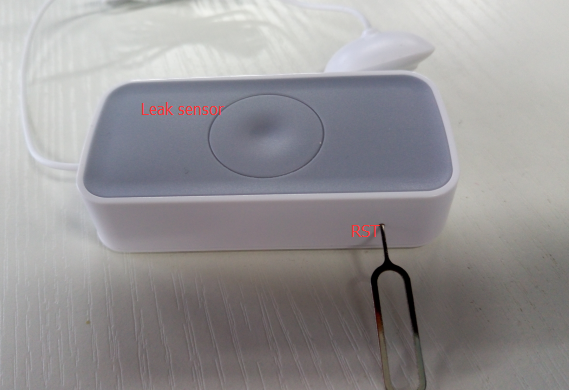
- Insert the pin to the reset hole and hold, until the green light is blinking very fast.
- If the light blinking is not fast, just release the pin and insert it again until it is blinking very fast.
- This will set the ZigBee sensor into reset mode.
- Send Set Permit Join commands to join
- After a while, gateway will get the response–** New Device Joined Indication**
2. New Device Joined Indication
Sent after ZigBee gateway sends Transport Key to the joining device or received a ZDP Device Announcement.
Attribute name
Type
Note
CMD Length
Uint8
0x0E
CMD ID
Uint8
0xFC
Flag
Uint8
0x02
Sub CMD ID
Uint8
0xE1 -Gateway Special command
Short Addr
Uint16
IEEE MAC Addr
Uint64
Capability
Uint8
0xFF – If this indication is sent after Transport Key; Other values – If this indication is sent after receiving the joining device’s Dev Annce
Example Transport Key has been sent to a node whose short address is 0x443B and IEEE address is 00:50:43:C9:9F:21:90:6C [UART] 0E FC 02 E1 3B 44 6C 90 21 9F C9 43 50 00 FF
3. Get Gateway MAC Address
Get Gateway IEEE Address Request
Attribute name
Type
Note
CMD Length
Uint8
0x02
CMD ID
Uint8
0x14
Sub CMD ID
Uint8
0x6F
Get Gateway IEEE Address Response
Attribute name
Type
Note
CMD Length
Uint8
0x0C
CMD ID
Uint8
0x15
Flag
Uint8
0x02
Reserved
Uint8
0x00
Sub CMD ID
Uint8
0x6F
IEEE MAC Address Length
Uint8
0x08
IEEE MAC Addr
Uint64
Example
- Send: [UART] 02 14 6F
- The Gateway’s IEEE Address is 00:50:43:C9:9F:26:9E:4D [UART] 0C 15 00 6F 08 4D 9E 26 9F C9 43 50 00
4. Set APS Header Parameters
Note:Before sending any other commands in this section, the first step is to set the APS(Application Support Sublayer) Header parameters for the next ZCL(ZigBee Cluster Library) command.
Attribute name
Type
Note
CMD Length
Uint8
0x0C
CMD ID
Uint8
0xFC-ZCL Request
Flag
Uint8
0x02-ZCL Special Command
Sub CMD ID
Uint8
0x01 – Set APS Params
Profile ID
Uint16
0x0104 -Home Automation
Src Endpoint
Uint8
Dest Endpoint
Uint8
Fixed to 0x02 for group mode
Dest Addr Mode
Uint8
0x01-group address; 0x02 – node short address
Dest Addr
Uint16
Tx Options
Uint8
0x02
Radius
Uint8
0x0A
Example
- Set source endpoint to 0x01, destination endpoint to 0x01, destination address to 0xAE3E. [UART] 0C FC 02 01 04 01 01 01 02 3E AE 02 0A
- Success response: 04 FD 02 01 00
5. ZDP bind
ZDP(ZigBee Device Profile) Bind Request
Attribute name
Type
Note
CMD Length
Uint8
0x16
CMD ID
Uint8
0xD8
Source IEEE Address
Uint64
Source Endpoint
Uint8
Cluster ID
Uint16
Destination Address Mode
Uint8
0x01 – 16-bit group address for Destination Address and Destination Endpoint Not present;0x03 – 64-bit extended address for Destination Address and Destination Endpoint present
Destination Address
Uint64
Destination Endpoint
Uint8
Example:
- Send: [UART] 16 D8 69 53 37 53 C9 43 50 00 01 05 00 03 1D 4F 28 0F C9 43 50 00 01
- Response: [UART] 02 D9 00
6. Read ZCL Attribute Request and response
Request
Attribute name
Type
Note
CMD Length
Uint8
0x08
CMD ID
Uint8
0xFC
Flag
Uint8
0x00-From ZCL Client to ZCL server
Cluster ID
Uint8
0x00 0x05
Command ID
Uint16
0x00
Attribute Number
Uint8
0x01
Start Attribute ID
Uint16
0x01 0x00
Response
Attribute name
Type
Note
CMD Length
Uint8
0x08
CMD ID
Uint8
0xFC
Flag
Uint8
0x03
Cluster ID
Uint8
0x00 0x05
Command ID
Uint8
0x01
Attribute ID
Uint16
0x01 0x00
State
Uint8
0x01
Data type
Uint8
0x31
Zone Type
Uint16
Example
- Send: [UART] 08 FC 00 00 05 00 01 01 00
- Success respone: [UART] 0B FE 03 00 05 01 01 00 00 31 28 00
Sensor Name
Zone Type
Door Detector
0x15 0x00
Motion Detector
0x0d 0x00
Water sensor
0x2a 0x00
Smoke sensor
0x28 0x00
7. Report configuration
Request
Attribute name
Type
Note
CMD Length
Uint8
0x18
CMD ID
Uint8
0xFC
Flag
Uint8
0x00
Cluster ID
Uint8
0x01 0x00
Command ID
Uint8
0x06
Attribute Number
Uint8
0x01
Attribute ID
Uint16
0x21 0x00
Data Type
Uint8
0x20- Uint8
Minimal Reporting Time
Uint16
0x0A 0x00
Maximum Reporting Time
Uint 16
0x0A 0x00
Data
Uint8
0x01
Timeout
Uint16
0x00 0x00
Response
Attribute name
Type
Note
CMD Length
Uint8
0x06
CMD ID
Uint8
0xFD
Flag
Uint8
0x00
Cluster ID
Uint8
0x01 0x00
Command ID
Uint8
0x06
State
Uint8
0x00
Example
- Send: [UART] 11 FC 00 01 00 06 01 00 21 00 20 0a 00 0e 00 01 00 00
- Success response: [UART] 06 FD 00 01 00 06 00
8. Device Alarm Reporting
Attribute name
Type
Note
CMD Length
Uint8
0x15
CMD ID
Uint8
0xFE
Flag
Uint8
0x01
Cluster ID
Uint8
0x00 0x05
Command ID
Uint8
0x00
Source Endpoint
Uint8
0x01
Source address type
Uint8
0x02-Short address
Source address
Uint16
Reserved
Uint32
0x00 0x01 0x00 0x00
Zone State
Uint16
0x21 0x00
Reserved
Uint24
0x00 0x00 0x00
Example [UART]15 FE 01 00 05 00 01 02 7B D0 00 D0 00 01 00 00 21 00 00 00 00 00
Sensor state
Sensor Name
Open/Activated
Door Detector
0x20 0x00
Motion Detector
0x21 0x00
Water sensor
0x21 0x00
9. Battery level reporting
Attribute name
Type
Note
CMD Length
Uint8
0x13
CMD ID
Uint8
0xFE
Flag
Uint8
0x03
Cluster ID
Uint8
0x01 0x00
Command ID
Uint8
0x0A
Source Endpoint
Uint8
0x01
Source address type
Uint8
0x02-Short address
Source short address
Uint16
Unkown
Uint16
0x00 0x4B
Reserved
Uint32
0x00 0x01 0x00 0x00
Zone State
Uint16
0x21 0x00
Data Type
Uint8
0x20-Uint8
Battery Level
Uint8
Example Receive: [UART] 13 FE 03 01 00 0A 01 02 6D 4B 00 4B 00 01 00 00 21 00 20 BC
Battery level = (0xBC/2) %= 94%
10. Unbind Device
Request
Attribute name
Type
Note
CMD Length
Uint8
0x0C
CMD ID
Uint8
0xE4
IEEE Address
Uint64
0x00 0x00 0x00 0x00 0x00 0x00 0x00 0x00
Type
Uint8
0x00
Target Short Address
Uint16
Source Endpoint
Uint8
0x01
Reponse
Attribute name
Type
Note
CMD Length
Uint8
0x0A
CMD ID
Uint8
0x7B
IEEE Address
Uint64
Type
Uint8
0x00
Example
- Send: [UART] 0C E4 00 00 00 00 00 00 00 00 00 AA BB
- Response: [UART] 0A 7B 69 53 37 53 C9 43 50 00 00

For more details,please refer to original post
https://github.com/YaoQ/zigbee/blob/master/zigbee-sensor-tutorial.md
