Dell latitude c600 laptop pentium 3 bad display

Kilowats

Jan 15, 2025
6
Joined
Jan 15, 2025
Messages
6
I am trying to find what specific part might be wrong by looking at my video.
The problem started after changing the bad metal hinges in 2010 which shouldn't have nothing to do with the problem but it hapened.

Display used to display good half of the time back in 2015 or sometimes after hitting it slightly.
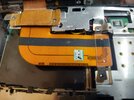
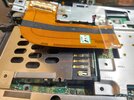
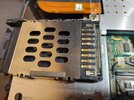
I removed the pcmcia slot thinking the display ribbon cable was shorting with that slot but after removing it(check photo) it was also showing bad display.
 

Attachments

  • 20250111_163420.jpg
    20250111_163420.jpg
    308.6 KB · Views: 2
  • 20250111_163426.jpg
    20250111_163426.jpg
    252.3 KB · Views: 2
  • 20250111_164008.jpg
    20250111_164008.jpg
    278.8 KB · Views: 2

Delta Prime

Jul 29, 2020
2,987
Joined
Jul 29, 2020
Messages
2,987
The problem started after changing the bad metal hinges in 2010 which shouldn't have nothing to do with the problem but it hapened
On the contrary, I believe it has everything to do with your problem.
It’s not your backlight and it’s not your inverter.
Your problem started because you were not strapped in…
(ESD) EectroStatic Discharge.
The human body accumulates static electrical charge it must be dissipated before working on static sensitive components like you would find in a computer.
Materials which are conductive “ like a bad metal hinge” have a very low electrical resistance, and when touched with your finger like you were doing in your video will result in a transient like (surge) discharge of static electricity which become difficult to diagnose because there could be a delayed reaction as you have just described. confidence is high that you must replace your LCD screen.
https://downloads.dell.com/Manuals/...laptop/latitude-c600_Service Manual_en-us.pdf
But before you do that, did you know?
Dell laptops have a built-in diagnostic tool that helps determine if the screen abnormality is an inherent problem with the LCD screen of the Dell laptop, the video card (GPU), or the display settings on the computer. Good luck to you.
 

Kilowats

Jan 15, 2025
6
Joined
Jan 15, 2025
Messages
6
the problem was the second flex cable inside the lcd panel, I got perfect image for few minutes then a little bad then good again, it wasn't static maybe? I will try getting by with this flex cable I'm sure i can fix it by examining it without buying a used one 25$
 

Kilowats

Jan 15, 2025
6
Joined
Jan 15, 2025
Messages
6
could someone tell me what this is? the screen turning the lamp/inverter off after a few seconds? the image on the crt remains working, when pressing FN CRT/LCD 3 times the image goes back to the lcd but still only a few seconds, i get perfect image now.
 
Top