Hoover Vacuum Cleaner Brush Roller Stopped Spinning

73's de Edd

Aug 21, 2015
3,730
Joined
Aug 21, 2015
Messages
3,730
Your last comment

Sorry guys maybe I have not explained it properly. The suction works perfectly fine when you detach the handle and use any of the accessories on the end of it. The brush roller on the bottom only starts rotating when you slightly pull the hoover back which activates the brush roller and it starts spinning once you push it back up again it stops. The brush roller has completely stopped working regardless of if you push it back or forward. Maybe there isn't a separate motor it's actually just one?
The brush roller on the bottom only starts rotating when you slightly pull the hoover back which activates the brush roller and it starts spinning once you push it back up again it stops.
That suggests of a mechanically produced . . . . . . engagement / disengagement of the roller brush from a shared motor.

So it sounds like the unit I describe above . .if you even have that attachment . . .would work fine.
So looks like I need to see if I can find a Hoover HL700P parts blowup manual of the main unit and see what gives on the roller brush within the main unit and see how it is activated. I'm sort of expecting a main motor . . .a la your pic . . .that uses both shaft ends, with one end constantly activating the multi stacked vacuum rotor vanes and your shown ends shaft engaging into your roller brush via belt.
It should be apparent on how that action is accomplished if the unit was placed on its side so that engagement could be examined with the motor running ? right ?
 
Last edited:

Alec_t

Jul 7, 2015
3,817
Joined
Jul 7, 2015
Messages
3,817
It should be apparent on that action is accomplished if the unit was placed on its side so that engagement could be examined with the motor running ?
Yes, that would be better than my suggestion to run the Hoover upside-down to check for brush rotation.
 

73's de Edd

Aug 21, 2015
3,730
Joined
Aug 21, 2015
Messages
3,730
Sir Bhavick . . . . .

Behold
. . . here we have a sim what somelar unit to make electro-mechanical reference to, since Hoover has been bought out and resold so many times that they don't and won't give a DAMN now of anything related to the past owner ships. Its now TTI in Asia..
At least we now can can see the past design concepts and constructed equipment.

INTERNAL PARTS LAYOUT

Our interest here will be on the Page B
ITEMS
25-----Brush roller with brush strip
13----- cogged drive belt
17 -----AC-DC motor
55 -----Brush set
12 ----- ? So called Electronic card ? (Is this REALLY being a/your units BRUSH Control Board . . . I'll just bet 'cha, that it might be ! )

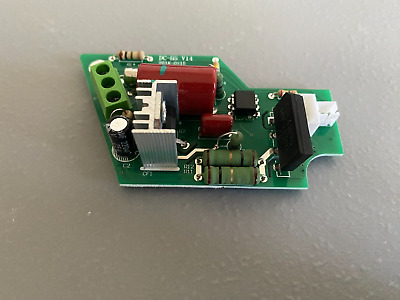
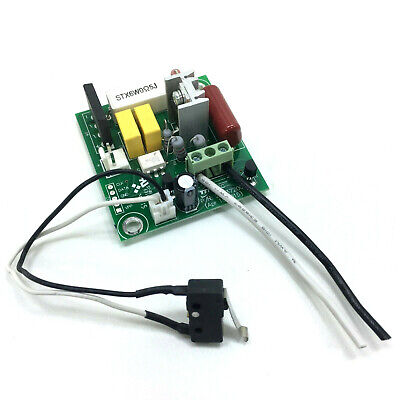
INFO ON AVAILABLE HOOVER CONTROL BOARDS USED in the past. . . . . and possibly being one that is now used on your unit.

HOOVER BRUSH CONTROL BOARD . . . . .


ANOTHER HOOVER BRUSH CONTROL BOARD . . . . .

The somewhat limited power handling capability of the micro switch will be used to provide gate drive switching to the power triac on the circuit board to then switch AC power 120VAC or 220VAC (Where you is ? ) all being at multi THOUSANDS of milliamperes of current to be able to drive that power hungry motors (especially on LOOOONG shag carpet) roller beater brush . . . so that it can keep up the beat.
That is, until you roll forward and the micro switch lever tip detects that movement and shuts off motor power.
That's assuredly using some mechano hocus pocus to interface the switch lever tip to interpret the direction of travel of the unit.
Doesn't this spiel sound logical as being your root problem.

Going back to your post #3 photo, I can see the beater brush driver motor with the all important cogged drive pulley on the right with its cogged belt surrounding it.
On its left side I see the two white brush holders and end electrical terminals.
Extreme left I see ??? shiny silver??? and a red disc? . . . if they are remotely being of any relevant consequence ? ? ?

If your meter is being just wild to get into some serious troubleshooting . . . make it do this.
NO AC power being connected whatsoever, take meter and place in AC volts and 12'ish volts range . . . if its not being auto ranging. Put a probe on each motor brush brass screw end cap and have an assistant grab mid points on each side of the belt between fingers and thumbs. Then a FIRM pull will rev up that motor as fast as will be permitted in the limited movement available. OR . . . after start up momentum is overcome, it might also be possible to reenact multiple fast moving dual finger grabs and get that little old booger r e e e e e a l l y moving . . .WHEEEEEEEEE !
A short duration reading should come up on your meter as you are now using the motor as a quasi-psuedo generator.
A rising reading and then decline related to motor speed, says your wiring, windings and brushes to commutator are not open circuit. You can also test as being DC voltage to see what that reading is also.
About time for me to await reply + any more relevant photos would also help. . . . Whilst you seek within the unit to see if it incorporates any variant of the referenced HOOVER brush control board.
BTW . . .We can see that the reference board has a white ceramic cased pigtail fuse on it DON'T get in a mad rush to immediately replace it if you find it open circuit !
I am going into my relaxed stand by mode now . . . . . .
EatingPopcorn.jpg


73's de Edd . . . . .

a Ponderance . . . . .

If 4 out of 5 people SUFFER from diarrhea . . . does that mean that the 5th one of them actually ENJOYS it?


.
 
Last edited:

Bhavick

Aug 28, 2023
12
Joined
Aug 28, 2023
Messages
12
Just an update ordered a new sensor switch off eBay, did some testing with my multi meter and I think it's that that's gone. Hopefully should be here in the next few days just hope it does the trick.


73's de Edd

Aug 21, 2015
3,730
Joined
Aug 21, 2015
Messages
3,730
The reference does not have the lever, unless the one used in your unit ALSO does not use a lever. PLUS there are both normally closed . . .OR . . .normally closed switch actions options.
 

Bhavick

Aug 28, 2023
12
Joined
Aug 28, 2023
Messages
12
The reference does not have the lever, unless the one used in your unit ALSO does not use a lever. PLUS there are both normally closed . . .OR . . .normally closed switch actions options.

yeah i already know that:)
 

73's de Edd

Aug 21, 2015
3,730
Joined
Aug 21, 2015
Messages
3,730
If so then, do you know that there are ALSO normally open units ?
 

73's de Edd

Aug 21, 2015
3,730
Joined
Aug 21, 2015
Messages
3,730
Just an update ordered a new sensor switch off eBay, did some testing with my multi meter and I think it's that that's gone.
Design wise, one would expect a normally off position until the little nub is pushed in . . . . since you mention no lever being on your selected replacement . . . . . to complete an on/closed switch circuit Then the brush controller board does the brute force power switching.
With the unit plugged in and turned on side, just shorting across the microswitch wires terminals should power up the brush motor if the control board is good and if it has no blown pigtail fuse.
Also, how about enlightening us all, on what you found was being the mechanical- voo doo involved in converting direction of movement to that microswitch ?
 

Bhavick

Aug 28, 2023
12
Joined
Aug 28, 2023
Messages
12
Changed the sensor made no different and tested the points on the motor and there is enough power going to it so not sure what to do now. Reckon a trip down to the local repair shop.
 

73's de Edd

Aug 21, 2015
3,730
Joined
Aug 21, 2015
Messages
3,730
How about some more related info. . . . since you seem to have just skipped over past queries.
Did you find either of the possible referenced circuit boards, being mounted in the unit ?
Also, the pig tail fuse that either of them incorporate ?
 

Delta Prime

Jul 29, 2020
2,987
Joined
Jul 29, 2020
Messages
2,987
Reckon a trip down to the local repair shop
Now that's very interesting. It couldn't hurt, DIY sometimes are only willing to go so far when it becomes more technical then they take it to a shop.
 
Last edited:
Top