micromacro
- Aug 4, 2012
- 12
- Joined
- Aug 4, 2012
- Messages
- 12
Hello,
I connected everything like on shematics. I made hex file after succesfull build in mikroC and burned it on pic16f628a... but all I get is black boxes in first row of my lcd.
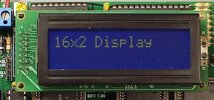
Can you tell me where am i going wrong. I have LCD with side connections like one in attachment..
*/
// LCD module connections
sbit LCD_RS at RB4_bit;
sbit LCD_EN at RB5_bit;
sbit LCD_D4 at RB0_bit;
sbit LCD_D5 at RB1_bit;
sbit LCD_D6 at RB2_bit;
sbit LCD_D7 at RB3_bit;
sbit LCD_RS_Direction at TRISB4_bit;
sbit LCD_EN_Direction at TRISB5_bit;
sbit LCD_D4_Direction at TRISB0_bit;
sbit LCD_D5_Direction at TRISB1_bit;
sbit LCD_D6_Direction at TRISB2_bit;
sbit LCD_D7_Direction at TRISB3_bit;
// End LCD module connections
// Define Messages
char text1[] = "Testing LCD";
char text2[] = "using PIC16F628A";
char text3[] = "Test successful";
char text4[] = "in 4-bit mode";
void main() {
Lcd_Init(); // Initialize LCD
do {
Lcd_Cmd(_LCD_CLEAR); // Clear display
Lcd_Cmd(_LCD_CURSOR_OFF); // Cursor off
Lcd_Out(1,3,text1); // Write message1 in 1st row
Lcd_Out(2,1,text2); // Write message1 in 2nd row
Delay_ms(3000); // delay 3s
Lcd_Cmd(_LCD_CLEAR); // Clear display
Delay_ms(1000); // delay 1s
Lcd_Out(1,2,text3); // Write message3 in 1st row
Lcd_Out(2,3,text4);
Delay_ms(3000); // delay 3s
} while(1);
}
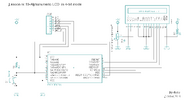
I connected everything like on shematics. I made hex file after succesfull build in mikroC and burned it on pic16f628a... but all I get is black boxes in first row of my lcd.
Can you tell me where am i going wrong. I have LCD with side connections like one in attachment..
*/
// LCD module connections
sbit LCD_RS at RB4_bit;
sbit LCD_EN at RB5_bit;
sbit LCD_D4 at RB0_bit;
sbit LCD_D5 at RB1_bit;
sbit LCD_D6 at RB2_bit;
sbit LCD_D7 at RB3_bit;
sbit LCD_RS_Direction at TRISB4_bit;
sbit LCD_EN_Direction at TRISB5_bit;
sbit LCD_D4_Direction at TRISB0_bit;
sbit LCD_D5_Direction at TRISB1_bit;
sbit LCD_D6_Direction at TRISB2_bit;
sbit LCD_D7_Direction at TRISB3_bit;
// End LCD module connections
// Define Messages
char text1[] = "Testing LCD";
char text2[] = "using PIC16F628A";
char text3[] = "Test successful";
char text4[] = "in 4-bit mode";
void main() {
Lcd_Init(); // Initialize LCD
do {
Lcd_Cmd(_LCD_CLEAR); // Clear display
Lcd_Cmd(_LCD_CURSOR_OFF); // Cursor off
Lcd_Out(1,3,text1); // Write message1 in 1st row
Lcd_Out(2,1,text2); // Write message1 in 2nd row
Delay_ms(3000); // delay 3s
Lcd_Cmd(_LCD_CLEAR); // Clear display
Delay_ms(1000); // delay 1s
Lcd_Out(1,2,text3); // Write message3 in 1st row
Lcd_Out(2,3,text4);
Delay_ms(3000); // delay 3s
} while(1);
}

