
Sometimes we need to exchange some data with another microconrtoller in close range, then we can use I2C for this job, even better, with MicroPython, we can do it in less than 5 lines of code, here is how it's done on ameba RTL8722 from Realtek,
Materials
Steps
I2C is a very common module on microcontrollers, it only takes 2 wire and able to achieve data rate at up to 3.4Mbps. It works in master-slave model and a master can simultaneously connect to up to 128 slaves, making it a very versatile communication protocol between microcontroller and sensor.
Here we are going to use Ameba as an I2C master and Arduino UNO as a slave to achieve I2C send and recv.
Before connection, make sure to upload the “Examples -> Wire -> Slave_receiver” example code to Arduino UNO.
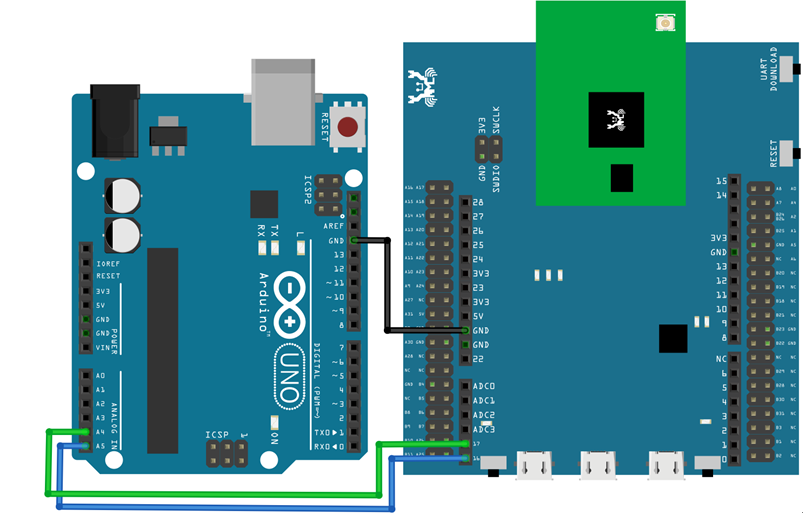
Connection is shown as follows, here we are using PA_26 as SDA pin and PA_25 as SCL.
Note: There is currently 1 set of I2C available to MicroPython user, they are
Unit
SDA
SCL
0
PA_26
PA_25
Then copy and paste the following code line by line into REPL to see their effects.
from machine import Pin, I2C
i2c = I2C(scl = "PA_25", sda = "PA_26", freq=100000) # configure I2C with pins and freq. of 100KHz
i2c.scan()
i2c.writeto(8, 123) # send 1 byte to slave with address 8
i2c.readfrom(8, 6) # receive 6 bytes from slave
Materials
- Ameba x 1, Arduino UNO x 1
Steps
I2C is a very common module on microcontrollers, it only takes 2 wire and able to achieve data rate at up to 3.4Mbps. It works in master-slave model and a master can simultaneously connect to up to 128 slaves, making it a very versatile communication protocol between microcontroller and sensor.
Here we are going to use Ameba as an I2C master and Arduino UNO as a slave to achieve I2C send and recv.
Before connection, make sure to upload the “Examples -> Wire -> Slave_receiver” example code to Arduino UNO.
Connection is shown as follows, here we are using PA_26 as SDA pin and PA_25 as SCL.
Note: There is currently 1 set of I2C available to MicroPython user, they are
Unit
SDA
SCL
0
PA_26
PA_25
Then copy and paste the following code line by line into REPL to see their effects.
from machine import Pin, I2C
i2c = I2C(scl = "PA_25", sda = "PA_26", freq=100000) # configure I2C with pins and freq. of 100KHz
i2c.scan()
i2c.writeto(8, 123) # send 1 byte to slave with address 8
i2c.readfrom(8, 6) # receive 6 bytes from slave


