
MQTT is one of the most popular IoT network protocol thanks to its light-weight and Publish-subscribe model. However, some doubts the security of MQTT as it is usually unprotected to reduce overhead, this can be easily fixed with the use of TLS (Transport Layer Security), here we are using Realtek's RTL8722 dual-band WiFi and BLE5.0 microcontroller as example and see how it achieve security with MQTT,
Preparation
Ameba x 1
Example
In this example, we connect Ameba to a MQTT broker using TLS authentication. Then send messages as a publisher and receive messages from as a subscriber. Open the MQTT example “File” -> “Examples” -> “AmebaMQTTClient” -> “MQTT_TLS”
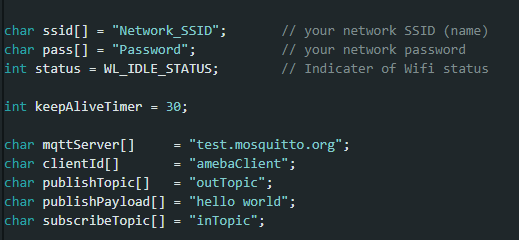
Please modify the WiFi-related parameters to connect to your WiFi network. Modify the MQTT parameters to fit your application:
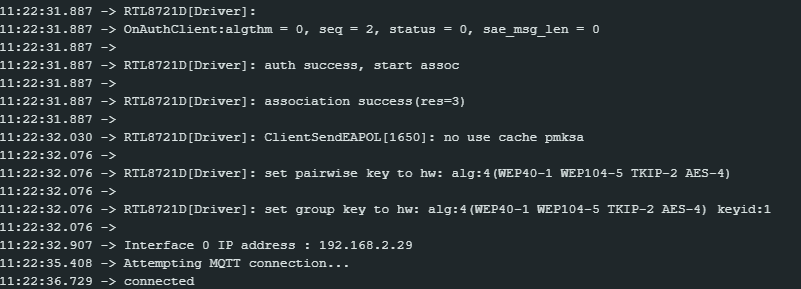
The “mqttServer” refers to the MQTT-Broker, we use the free MQTT sandbox “test.mosquitto.org” for testing. “clientId” is an identifier for MQTT-Broker to identify the connected device. “publishTopic” is the topic of the published message, we use “outTopic” in the example. The devices subscribe to “outTopic” will receive the message. “publishPayload” is the content to be published. “subscribeTopic” is to tell MQTT-broker which topic we want to subscribe to. Next, compile the code and upload it to Ameba. Press the reset button, then open the serial monitor

After Ameba is connected to MQTT server, it sends the message “hello world” to “outTopic”. To see the message, use another MQTT client. Refer to the MQTT_Basic example guide on how to setup a PC-based MQTT client. If you wish to use TLS client authentication in addition to server authentication, you will need to generate an OpenSSL private key and obtain a signed certificate from the server. For testing purposes, signed certificates can be obtained from test.mosquitto.org by following the guide at https://test.mosquitto.org/ssl/. Replace the character strings “certificateBuff” and “privateKeyBuff” with your signed certificate and OpenSSL private key, ensuring that they are formatted the same way as the shown in the example code. Also uncomment the highlighted code to enable client authentication, and to change the MQTT port number.


Preparation
Ameba x 1
Example
In this example, we connect Ameba to a MQTT broker using TLS authentication. Then send messages as a publisher and receive messages from as a subscriber. Open the MQTT example “File” -> “Examples” -> “AmebaMQTTClient” -> “MQTT_TLS”
Please modify the WiFi-related parameters to connect to your WiFi network. Modify the MQTT parameters to fit your application:
The “mqttServer” refers to the MQTT-Broker, we use the free MQTT sandbox “test.mosquitto.org” for testing. “clientId” is an identifier for MQTT-Broker to identify the connected device. “publishTopic” is the topic of the published message, we use “outTopic” in the example. The devices subscribe to “outTopic” will receive the message. “publishPayload” is the content to be published. “subscribeTopic” is to tell MQTT-broker which topic we want to subscribe to. Next, compile the code and upload it to Ameba. Press the reset button, then open the serial monitor
After Ameba is connected to MQTT server, it sends the message “hello world” to “outTopic”. To see the message, use another MQTT client. Refer to the MQTT_Basic example guide on how to setup a PC-based MQTT client. If you wish to use TLS client authentication in addition to server authentication, you will need to generate an OpenSSL private key and obtain a signed certificate from the server. For testing purposes, signed certificates can be obtained from test.mosquitto.org by following the guide at https://test.mosquitto.org/ssl/. Replace the character strings “certificateBuff” and “privateKeyBuff” with your signed certificate and OpenSSL private key, ensuring that they are formatted the same way as the shown in the example code. Also uncomment the highlighted code to enable client authentication, and to change the MQTT port number.


