Multisim simulation help

jackorocko

Apr 4, 2010
1,284
Joined
Apr 4, 2010
Messages
1,284
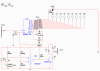
Ok so I am trying out multisim because it has a pspice model for the 4060.

I add it to the design and hooked it up exactly as the datasheet shows and what do you know? It won't work... :mad: This should be so simple it's stupid. But someone please tell me what I am doing wrong.

Link to my *.ms11
http://omploader.org/vNGRzcg
 

NickS

Apr 6, 2010
367
Joined
Apr 6, 2010
Messages
367
My philosophy with multisim has been

"If it does not work try separating components with resistors"

I just think or it as identifying the trace resistances between parts. And it has alway resolved my multisim sims. Make the resistance values very small like 1uOhm and it will not affect the behavior or your design.

I will look at your attachment a little later
 

NickS

Apr 6, 2010
367
Joined
Apr 6, 2010
Messages
367
I am using version 10 can you show me a screenshot of your schematic and tell me which simulation you are trying to run?
 

jackorocko

Apr 4, 2010
1,284
Joined
Apr 4, 2010
Messages
1,284
Thanks for taking time to help.

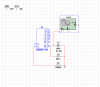
Background: What I am trying to do is use a cd4060 binary counter IC. What I am trying to simulate in multisim is the square wave produced from the connected RC network. I am working on this so I can use it to double check my math through the proof of concept of simulation.

So I have researched the problem some more and found a way to get the circuit to work as I would expect. But it really involves a 'hack' and I am not so certain that there isn't another way to fix it, but I have not found it yet. If I add in a switch between the resistor and RTC pin on the chip AND have it open before pressing play on the menu bar, then only after pressing play to start the simulation can I close the switch which will in return produce the square wave on the oscilloscope. (NOTE if the switch is closed before starting sim you get same result as if the switch was never there)

At first thought I figured maybe the cap was causing the problem. So I tried to set its initial state to zero, but still that did not do anything to the circuit.

I did use the function generator on RS pin to override the internal clock. But it would be a blessing to find a way for the 4060 to work like it was made to work.
 

Attachments

  • multisim.PNG
    multisim.PNG
    19.1 KB · Views: 5,299

jackorocko

Apr 4, 2010
1,284
Joined
Apr 4, 2010
Messages
1,284
http://omploader.org/vNGVrOQ/gamertimer_a.ms10

Here is a link to another schematic I found using a 4060. This is where I got the idea to use the switch at. If you use a oscilloscope and attach it to the RC network, it will produce a square wave right from the beginning. This is where I am completely confused... It really just doesn't make sense. The switch is in a 'closed position here when starting the sim(default is 56k resistor attatched to RTC through switch) but yet the output is as expected. It isn't until you remove the 4 pos rotarty switch that the circuit misbehaves.
 

NickS

Apr 6, 2010
367
Joined
Apr 6, 2010
Messages
367
Ok, so a common problem across many simulators is that oscillators need a kick-start.
In practice you can usually depend on environmental noise to do the trick.

I think you were on the right path with setting the initial value of the capacitor... however I think the simulator automatically sets the caps initial condition to 0 by default. Perhaps if you set it to a non zero value for the initial condition it will work.

---long pause to play with the simulation----

Ok so I stand behind what I said before but it is not the problem your circuit has. I think you had a few things miswired based on the datasheet I was looking at(and I never was able to make it work with the switch between pin RTC and Rt).

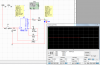
However I did get it oscillating as shown in picture based on the datasheet found here fosc = 1/(2.3*Rt*Ct)

So beside reconnecting components I also added a momentary reset switch to the reset pin but I never used it to make the simulation go... however when I took it out the sim broke again. So I think that pin cannot be left unconnected which is not uncommon.
 

Attachments

  • CropperCapture[1].jpg
    CropperCapture[1].jpg
    150.1 KB · Views: 1,762

jackorocko

Apr 4, 2010
1,284
Joined
Apr 4, 2010
Messages
1,284
Ok. well so far so good. But like always there is more to the story...

Did you also try connecting anything, whether it be another component or even a frequency counter/oscilloscope to anyone of the 4060 outputs? As soon as I do that the oscillation stops again.
 

Attachments

  • 4060_led_output_sim.PNG
    4060_led_output_sim.PNG
    79.4 KB · Views: 3,715
Last edited:

NickS

Apr 6, 2010
367
Joined
Apr 6, 2010
Messages
367
Frustrating certainly, but I think you need to connect all or none of the buffered output pins. I did an adaptation of your sim(see figure) and it worked as I would expect but if I only connect one output it did as you stated.

Hope that helps.
 

Attachments

  • CropperCapture[1].jpg
    CropperCapture[1].jpg
    141.9 KB · Views: 2,498

jackorocko

Apr 4, 2010
1,284
Joined
Apr 4, 2010
Messages
1,284
I was curious if that was the situation, I just hadn't had time to test it out myself. Thanks for doing the leg work for me. :)

Now, since this is a simulation I can safely assume I do not need to connect all the outputs in RL for this 4060 to work?

Simulations can really be a godsend when you are just starting out in electronics and are learning the trade, but at the same time, they have their own unique learning curve. Thanks for taking the time to help me out. I appreciate it.
 

NickS

Apr 6, 2010
367
Joined
Apr 6, 2010
Messages
367
I was curious if that was the situation, I just hadn't had time to test it out myself. Thanks for doing the leg work for me
I noticed that NI documentation on that issue was non-existant. Someone needs to call that sort of thing out.

Now, since this is a simulation I can safely assume I do not need to connect all the outputs in RL for this 4060 to work?
Assume nothing! Read the part datasheet carefully. If it says nothing about needing to tie all pins then you are fine. But for any part you use you should read the datasheet. It may seem a waste of time but I argue that you are wasting far more if you don't (especially for beginners).

Simulations can really be a godsend when you are just starting out in electronics and are learning the trade, but at the same time, they have their own unique learning curve.
Simm's are also very useful even for the veterans but probably for different reasons(goto menu: Simulate>Analyses to see a whole world of options left to be explored).

Thanks for taking the time to help me out. I appreciate it.
Your welcome
 

jackorocko

Apr 4, 2010
1,284
Joined
Apr 4, 2010
Messages
1,284
Nick, if you don't mind I am gonna need to pick your brain again. This is really starting to confuse the hell out of me. I did as you asked and read the datasheet this time, but I don't see where it helped me out in this situation. Maybe I am missing something simple and hopefully you can explain it to me. I am glad I caught this before I built the circuit and then not have it work, I can assure you I would have been bouncing my head off the table 20k times trying to figure out why my other orcad sim worked yet the breadboard design did not.

I bought some lm339N IC chips made by ST. I looked them up on digikey and digi links me to this datasheet found here. http://search.digikey.com/scripts/DkSearch/dksus.dll?Detail&name=497-1589-5-ND Notice how digikey list the datasheet as LM139/A LM239/A and LM339/A

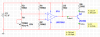
Now in multisim, I have created this simple design. see pic #1
Now if you notice in this schematic I am using a lm339AD. With this multisim model my design works like a charm. (reason I used LM339AD, it was the only model that worked with my design, all others had a >= 1V output)

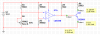
Now pic #2 is of the exact same design but a different multisim model for the lm339. This time I am using the lm339N model. now as you can see the design fails because no matter the voltage on the non-inverting input of the lm339 the output is ~1.20V. so the transistor is always conducting.

Now as I stated before, I have the ST LM339N chips sitting on my desk. But now I am concerned that my whole design is flawed because I bought the wrong chips(I will be breadboarding this design soon to test the chips). My question to you is this... What multisim model should I be using to represent the ST LM339N chip in multisim? I would think the lm339n is the model I need, but according to digikey, maybe I should be using the lm339A.

So that brings me to my next question... How do I tell according to the datasheet what model in multisim is the appropriate model to be using? How can I compare the the multisim model to the datasheet to know what I need?

edit: I thought the reason for the N was just the packaging style of the chip(DIP-14), so why do all the multisim models vary so greatly in the output given the exact same conditions for the inputs?
 

Attachments

  • lm339_multisim_A_low.PNG
    lm339_multisim_A_low.PNG
    14.8 KB · Views: 7,205
  • lm339_multisim_N.PNG
    lm339_multisim_N.PNG
    14.8 KB · Views: 3,389
Last edited:

(*steve*)

¡sǝpodᴉʇuɐ ǝɥʇ ɹɐǝɥd
Moderator
Jan 21, 2010
25,510
Joined
Jan 21, 2010
Messages
25,510
You often find LM1xx/2xx/3xx datasheets because the 1, 2, or 3 generally indicate different temperature ranges that they can operate in. See the bottom of page 3 of that datasheet for that information.

In this case, the LMx39 also comes in an 'A' variant. It appears that the only difference between the normal and the A variant is that the A variant has tighter specced inputs.

It is unusual that multisim is giving you such different answers. I'd build it and see what happens.
 

jackorocko

Apr 4, 2010
1,284
Joined
Apr 4, 2010
Messages
1,284
I got another question for you as well.

I am looking for a DPDT relay to use for my simulation. There is no model in multisim that works as a DPDT relay. So when searching google I came upon this thread here http://forums.ni.com/ni/board/message?board.id=370&thread.id=2983

I used the energized coil as the suggested, but I am not sure exactly how the no/nc_contact are supposed to hook up to work. Do you happen to know how these work? I have both the energized coil and the contact set to the same coil in the properties panel and the coil is being energized by the circuit but the contact does not switch states.

Sorry I am such a pain in the ass. Guess it's about time I got an account over at the NI forums. :)
 

NickS

Apr 6, 2010
367
Joined
Apr 6, 2010
Messages
367
Wow a lot has happened(or not happened).

I was looking at the models in multisim for the various LM339's and it looks like the postfix may have more to do with who wrote the model. LM339N for instance was written for Symmetry Design Systems and LM339AX seem to belong too TI.

The LM339 is one of those parts that is made by many different companies but any one of them should be able to swap out another(I believe). So if you have one model working but not another that may be based on some quirk in one of the models. Anyway I built up a simple comparator using the LM339N and it worked fine for me. I tried a few different things to break it but it seemed like a good model(see attached).

If you want to make extra sure you are using the right model you have two options.
(1) Edit the model file to match the performance of the chip you have data for.(this can be very hard if you don't recognize what is going on in the sim model)

(2) Goto the MFR's website (STMicro for you) and find their models if they have them.

All that said I think you have done enough background work on this part to try breadboarding it.

Are you still needing resolution on the relay? It looks like the NI board has resolution on that.
 

Attachments

  • CropperCapture[2].jpg
    CropperCapture[2].jpg
    143.6 KB · Views: 2,573

jackorocko

Apr 4, 2010
1,284
Joined
Apr 4, 2010
Messages
1,284
I'm an idiot. Let me work on this a little more and see where I end up. I'll get back to you :D

I'll post the schematic again so anyone looking on can see where I am going wrong and hopefully improve my design.
 

Attachments

  • trip_alarm_multisim.PNG
    trip_alarm_multisim.PNG
    42.6 KB · Views: 7,864
Last edited:

(*steve*)

¡sǝpodᴉʇuɐ ǝɥʇ ɹɐǝɥd
Moderator
Jan 21, 2010
25,510
Joined
Jan 21, 2010
Messages
25,510
Is that a relay driving logic?

Bad, bad move. The relay will suffer form contact bounce on open and close and will probably cause you no end of problems (that incidentally may not show up in the simulator. Have you considered using an optocoupler for this? I presume you're using the relay because the 2 halves are operating from different power supplies?

If it's the rise and fall time that is the issue, use a schmitt trigger to "square" them up.

Also beware that your bridge may alternate rapidly from one state to another when it is close to balance. You can change that behaviour with positive feedback, but that may not be what you want.
 

jackorocko

Apr 4, 2010
1,284
Joined
Apr 4, 2010
Messages
1,284
Is that a relay driving logic?

Bad, bad move. The relay will suffer form contact bounce on open and close and will probably cause you no end of problems (that incidentally may not show up in the simulator. Have you considered using an optocoupler for this?

Uhm, your totally right and I should have known better. I read about this before and should have been more aware of what I was doing. Learn from my mistakes.

No, I don't even know what an optocoupler is. I will be looking into it.

Also beware that your bridge may alternate rapidly from one state to another when it is close to balance. You can change that behaviour with positive feedback, but that may not be what you want.

In my schematic R7 will be a photocell, so it is very unlikely the bridge will ever be balanced. In fact I plan on setting the inverting ref voltage to a voltage that will be in between the high and low voltage of the non-inverting input based upon the voltage I get from the voltage dividing network of R6 and R7(photocell) when the photocell is 'lit' and when it is 'dark'. if this photocell is lit with a laser and the laser beam is tripped, it is highly unlikely that the bridge will ever be balanced for more then a few nano seconds. I don't ever want the bridge to be balanced unless it is transitioning from high to low or vice versa
For simplicity sake I am using a potentiometer in place of the photocell and using a ref voltage of 6 volts only for the simulation. I will tweak this in the final design.

I presume you're using the relay because the 2 halves are operating from different power supplies?

Nope, I plan on using the same power supply, 12 volt car battery for the whole design. Multisim is just forcing me to use VDD and VSS for the 4060. AFAIK the 4060 has a range and 12 volts falls in that range. Is there another way of doing the same thing I wanted to do with the relay and having it latch on? Thyristor/SCR as stated in my other thread where you helped me steve? I had decided against a thyristor because of the power consumption, but now that I am gonna be putting a time limit on the alarm, I can waste a few more watts.
 
Last edited:

(*steve*)

¡sǝpodᴉʇuɐ ǝɥʇ ɹɐǝɥd
Moderator
Jan 21, 2010
25,510
Joined
Jan 21, 2010
Messages
25,510
Nope, I plan on using the same power supply, 12 volt car battery for the whole design.

I haven't looked closely at what you're using the output of the photocell to do, but you may get away with connecting the output of the comparator to the 4060. However I'd prefer that you either employ a little positive feedback, or use a schmitt trigger between them.

edit: You're using it to reset the device?

Change the layout so that the fixed divider (the 2 100K resistors) are connected to the non-inverting input, and the resistor/LDR are on the inverting input. Add a 10M resistor from the output of the comparator to the non-inverting input. retain the pull-up resistor, but connect the output directly to the 4060. You may need to reverse the position of the resistor/LDR to get the device to respond correctly to light/no light as per your requirements.

This change will make the comparator switch very quickly from on to off and off to on, but it will require a slightly higher light level to switch on that to switch off. This will ensure that small variations in light level do not cause the device to turn on and off when the light level approaches the switching point.
 
Last edited:

jackorocko

Apr 4, 2010
1,284
Joined
Apr 4, 2010
Messages
1,284
I haven't looked closely at what you're using the output of the photocell to do

I am using the photocell to 'trip' the circuit. In other words, say the photocells resistance is in a state of low resistance. This is what I will consider the stable state of the circuit, it's waiting for something to do. Now if I was to 'trip' the photocell into becoming a high resistance for a fraction of a second the output of the comparator will change and go high, because the non-inverting input will have a higher voltage compared to the inverting reference voltage. For this fraction of a second that the output of the comparator is high I want to start the 4060 counting to a set period of time.

Now as far as I can tell there is no way to use the output of the comparator to drive the 4060 because it will only ever be in a high state for just a fraction of a second. that is where the 'latching relay' comes into the picture or a SCR.

again, I don't know what a schmitt trigger is so until I research the component I can't comment on this.
 
Last edited:

(*steve*)

¡sǝpodᴉʇuɐ ǝɥʇ ɹɐǝɥd
Moderator
Jan 21, 2010
25,510
Joined
Jan 21, 2010
Messages
25,510
Ah, I see now. What you want to do is arrange some logic to do the latching for you.

You'll need a way to reset it (probably when power is first applied, and at other times as required)

To do this, you should look at flip-flops -- there are many different types, but the very simplest will do the trick for you. Unfortunately you'll have to construct one from a pair of OR gates (4071) but this is trivial to do.

There are flipflops available in packages, but they are generally clocked, so they won't do exactly what you want. Anyway, it's fun to make your own :)

The modification I have suggested you try will eliminate the need for a schmitt trigger, but it's worth doing some research on them anyway.
 
Top