nogueiraat
- Apr 24, 2021
- 38
- Joined
- Apr 24, 2021
- Messages
- 38
I use a USB3.0 enclosure case, brand and model Kesu 2530 and Orico 25PW1 black, i use 2.5" HDDs models and brands Seagate ST500LM030 and WDC WD10JPVX-08JC3T5, APPLE HDD HTS541010A99E662
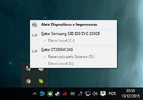
In Windows 10 and others Windows there is an eject function (safely remove hardware) when this function is executed and the HDD + case does not appear in Windows, for example "E:" even with the USB3.0 cable connected to the PC on/case. After all this happened, my hand hit the USB3.0 enclosure case and it moved on the table. Did this hit cause friction between the 2.5" HDD read/write heads and the magnetic platters, scratching them?
In Windows 10 and others Windows there is an eject function (safely remove hardware) when this function is executed and the HDD + case does not appear in Windows, for example "E:" even with the USB3.0 cable connected to the PC on/case. After all this happened, my hand hit the USB3.0 enclosure case and it moved on the table. Did this hit cause friction between the 2.5" HDD read/write heads and the magnetic platters, scratching them?


