themuffinman873
- Jan 14, 2013
- 1
- Joined
- Jan 14, 2013
- Messages
- 1
Disclaimer: I am a novice in electronics repair.
Yesterday I foolishly undertook an endeavor to open up an Epson home projector because the lens was pointed downward and the picture was being partially blocked by the case of the projector. To get to the mount of the lens I had to remove the case and the main circuit board. I made sure to mark where everything goes so I could put it all back together but when attempting to reassemble I found that the ribbon cables do not reattach as I had imagined. From what I understand from taking it apart is that the ribbon cable slides into a small plastic housing that has all the contact points for the ribbon, and then a small plastic "wedge" is inserted from the other end to wedge the ribbon cable into place so that it does not slip out again. When I removed the ribbons originally I simply popped the wedge out (the opposite direction of the housing) and then I could easily just pull the ribbon the other direction and it came right out of the housing without any resistance.
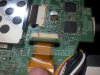
Now when I try to reinsert the ribbon into the housing it only goes in about half way into the housing (while the wedge is present or removed). I have tried a bit of brute force and soft tipped tweezers to try and get this sucker in there, but no dice. The projector does not work with the ribbons only half way in so I cannot simply glue or tape them on as they are. I am willing to break off the plastic housing and secure the ribbons permanently if necessary but was hoping somebody had a better idea as to how to fix this. Attached are pictures (you can see two of the ribbons both with the same problem).
Photo: 194459: Shows how far the ribbons will go into the housing (the red marks should be flush)
Photo: 194429: Shows the ribbons thickness
Photo: 194456: Shows the "wedge" piece
Sorry for the long post my friends,
Thank you in advanced
Yesterday I foolishly undertook an endeavor to open up an Epson home projector because the lens was pointed downward and the picture was being partially blocked by the case of the projector. To get to the mount of the lens I had to remove the case and the main circuit board. I made sure to mark where everything goes so I could put it all back together but when attempting to reassemble I found that the ribbon cables do not reattach as I had imagined. From what I understand from taking it apart is that the ribbon cable slides into a small plastic housing that has all the contact points for the ribbon, and then a small plastic "wedge" is inserted from the other end to wedge the ribbon cable into place so that it does not slip out again. When I removed the ribbons originally I simply popped the wedge out (the opposite direction of the housing) and then I could easily just pull the ribbon the other direction and it came right out of the housing without any resistance.
Now when I try to reinsert the ribbon into the housing it only goes in about half way into the housing (while the wedge is present or removed). I have tried a bit of brute force and soft tipped tweezers to try and get this sucker in there, but no dice. The projector does not work with the ribbons only half way in so I cannot simply glue or tape them on as they are. I am willing to break off the plastic housing and secure the ribbons permanently if necessary but was hoping somebody had a better idea as to how to fix this. Attached are pictures (you can see two of the ribbons both with the same problem).
Photo: 194459: Shows how far the ribbons will go into the housing (the red marks should be flush)
Photo: 194429: Shows the ribbons thickness
Photo: 194456: Shows the "wedge" piece
Sorry for the long post my friends,
Thank you in advanced