Viewsonic VX3276-2K-mhd monitor Power failure

upstandin

Dec 23, 2024
4
Joined
Dec 23, 2024
Messages
4
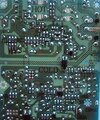
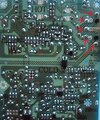
I see a few of these power boards have issues, this has power going to it, but only a blue light flashes behind its power button. It did power on intermittently then stopped showing any display. No expanded capacitors or burn marks evident, is there just one component causing it not to operate ?
 

Attachments

  • 20241223_114942[1].jpg
    20241223_114942[1].jpg
    219.5 KB · Views: 14
  • 20241223_115031[1].jpg
    20241223_115031[1].jpg
    209.6 KB · Views: 13

Bluejets

Oct 5, 2014
7,374
Joined
Oct 5, 2014
Messages
7,374
Maybe....maybe not....Q100 looks like soot mrrk from beneath.
There could be more power sections as the board shown only has 12v out.
What readings do you get there to begin with?
 

upstandin

Dec 23, 2024
4
Joined
Dec 23, 2024
Messages
4
There was no evidence of soot, I was hoping someone has fixed this issue, as many replacement boards have been sold, but I don't wish to be faced with the same problem again.
 

Attachments

  • 20241223_151843[1].jpg
    20241223_151843[1].jpg
    219.5 KB · Views: 15
  • 20241223_151918[1].jpg
    20241223_151918[1].jpg
    241 KB · Views: 12

Bluejets

Oct 5, 2014
7,374
Joined
Oct 5, 2014
Messages
7,374
but I don't wish to be faced with the same problem again.
Power boards are inherently the centre of failure.

Components there work hard under usually hot conditions.

OK...no soot...what about the rest of my queries?

No short on the main q100 mosfet?.....diode shorts....... capacitor esr gone high?
 
Last edited:

Delta Prime

Jul 29, 2020
2,989
Joined
Jul 29, 2020
Messages
2,989
Belated welcome to Maker Pro.
It did power on intermittently then stopped showing any display
Turn off the monitor, unplug the power cord then plug it back in.
Turn on the monitor and do a factory reset see if that helps.
I was hoping someone has fixed this issue
Do you know how to solder and use a multimeter?
You could be the one who solves
this problem for someone else.
You took it apart to take photos.
It’s a very good start.
Do you have the owners manual?
Can you please confirm in the photo those little specs circled in red,if that is loose solder or solder balls, solder splatter,thank you.
IMG_0149.jpeg
 
Last edited:

H2814D

Nov 4, 2017
258
Joined
Nov 4, 2017
Messages
258
Look closely at the marked photo and check those solder joints on your PCB. A couple of them look bad, but it is hard to tell from here. It could just be the lighting.

And just so you know, a capacitor does not have to be bulging or leaking to be bad. As mentioned above, they could develop an out of tolerance ESR and you really can't see that. I would suggest checking every solder joint closely before replacing parts. That there is some indication of operation (blue light flashing) is leading toward bad solder joints. Check those first and reflow the solder if they appear cracked in any way. Then come back and let us know what you found.
 

Attachments

  • Inked Photo.jpeg
    Inked Photo.jpeg
    191.5 KB · Views: 11

upstandin

Dec 23, 2024
4
Joined
Dec 23, 2024
Messages
4
Belated welcome to Maker Pro.

Turn off the monitor, unplug the power cord then plug it back in.
Turn on the monitor and do a factory reset see if that helps.

Do you know how to solder and use a multimeter?
You could be the one who solves
this problem for someone else.
You took it apart to take photos.
It’s a very good start.
Do you have the owners manual?
Can you please confirm in the photo those little specs circled in red,if that is loose solder or solder balls, solder splatter,thank you.


Attachments

  • 20241224_162613[1].jpg
    20241224_162613[1].jpg
    234.6 KB · Views: 12

upstandin

Dec 23, 2024
4
Joined
Dec 23, 2024
Messages
4
For some reason these specks appear in my camera, but there's nothing showing, even using a magnifying glass. I don't have a any spec sheet, and unsure how this model can perform a factory reset, as nothing shows on screen when turned on..
 
Top