Designing a Time Delayed Relay

KrisBlueNZ

Sadly passed away in 2015
Nov 28, 2011
8,393
Joined
Nov 28, 2011
Messages
8,393
Referring to your schematic in post #145, when CN1-1-2 is positive relative to CN1-1-1, the PIC will see a high level at pin 2. So the PIC will see a signal with roughly 50% duty cycle, at mains frequency, on that pin.
 

chopnhack

Apr 28, 2014
1,576
Joined
Apr 28, 2014
Messages
1,576
Referring to your schematic in post #145, when CN1-1-2 is positive relative to CN1-1-1, the PIC will see a high level at pin 2. So the PIC will see a signal with roughly 50% duty cycle, at mains frequency, on that pin.
Is that through the bottom right diode of the bridge, reverse biasing the zener, to the bottom rail and then through C13?
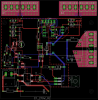
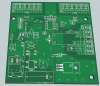
Here is a revision of the board layout. Let me know what you think, thanks!

upload_2014-9-26_1-51-30.png
 

KrisBlueNZ

Sadly passed away in 2015
Nov 28, 2011
8,393
Joined
Nov 28, 2011
Messages
8,393
OK, on the schematic in post #144 (not 145, sorry), look at the bottom two diodes in the bridge rectifier. The two that are connected to CN1-1-2.

The left one will conduct if CN1-1-2 tries to go more negative than the 0V rail. The right one conduct if CN1-1-2 tries to go more postive than the +48V rail. Between the two of them, CN1-1-2 is clamped to be between about -0.7V and about +48.7V relative to the 0V rail.

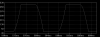
So from the point of view of all the circuitry, which operates relative to the 0V rail, that point (CN1-1-2) alternates between those two voltages, at mains frequency. It is not a perfect square wave. Here's what it looks like in simulation.

cn1-1-2 waveform.png

R11 limits the current that can flow from that pin into the PIC, to prevent damage and misoperation, and C13 provides a bit of filtering in case there is some noise on the mains supply. Firmware should also perform basic filtering so that if transitions are detected on that input that are closer together than, say, 10 ms, they would be ignored.

That layout is looking better. You can still move components a lot closer together. Aligning THT resistors in the same direction will help with this. They can be spaced at 0.1" pitch.

I don't like the track from pin 7 of the left hand Allegro chip. It should be further inside the groundplane area, so it's protected from influence from the high-voltage area through capacitive coupling within the PCB and from creepage along the underside of the PCB.

It's looking good though!
 

chopnhack

Apr 28, 2014
1,576
Joined
Apr 28, 2014
Messages
1,576
OK, on the schematic in post #144 (not 145, sorry), look at the bottom two diodes in the bridge rectifier. The two that are connected to CN1-1-2.

The left one will conduct if CN1-1-2 tries to go more negative than the 0V rail. The right one conduct if CN1-1-2 tries to go more postive than the +48V rail. Between the two of them, CN1-1-2 is clamped to be between about -0.7V and about +48.7V relative to the 0V rail.

So from the point of view of all the circuitry, which operates relative to the 0V rail, that point (CN1-1-2) alternates between those two voltages, at mains frequency. It is not a perfect square wave. Here's what it looks like in simulation.

View attachment 15551

R11 limits the current that can flow from that pin into the PIC, to prevent damage and misoperation, and C13 provides a bit of filtering in case there is some noise on the mains supply. Firmware should also perform basic filtering so that if transitions are detected on that input that are closer together than, say, 10 ms, they would be ignored.

That layout is looking better. You can still move components a lot closer together. Aligning THT resistors in the same direction will help with this. They can be spaced at 0.1" pitch.

I don't like the track from pin 7 of the left hand Allegro chip. It should be further inside the groundplane area, so it's protected from influence from the high-voltage area through capacitive coupling within the PCB and from creepage along the underside of the PCB.

It's looking good though!
Thanks for the explanation Kris. I had a thought, to help me memorize that - the negative voltage acts like suction, so it "draws" the more positive side to conduct across the left diode :)

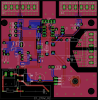
I like your thought on the track being outside the ground plane! I redid the tracks for both allegro chips taking advantage of repositioning the capacitors a tad. I also redid the resistors by U1 - I had forgotten to use the ground plane to gain some space there. Sometimes Eagle makes electrical connections between pins that are not according to the schematic, but are probably electrically correct, but it makes me wonder sometimes.. I get concerned that they are not exactly the same if they are not in the correct order, but I am sure some algorithm is incorporated that makes sure that they are equivalent. I included the ground plane drawn in to show you where those connections are being made. If its not clear I can redraw it without. I added some vias in the ground planes to make sure that all places were continuous.

upload_2014-9-26_9-5-34.png
 

KrisBlueNZ

Sadly passed away in 2015
Nov 28, 2011
8,393
Joined
Nov 28, 2011
Messages
8,393
Hey, that's looking a lot better!

The path between R14 and C14 is live, so you should move the top side fill away from it.

I don't see any other obvious problems with it.

In most cases, the order in which components are connected to a particular net is not important, and Eagle is allowed to run tracks between any pads or vias that are supposed to be electrically connected together. If you're worried that it has done something wrong, can you give me the circuit references so I know what area to look at?
 

chopnhack

Apr 28, 2014
1,576
Joined
Apr 28, 2014
Messages
1,576
Hey, that's looking a lot better!

The path between R14 and C14 is live, so you should move the top side fill away from it.

I don't see any other obvious problems with it.

Thanks! I hope I can get this done before the year is out ;-P

That is a good catch, thanks again!!

I made a few more changes, funny how after stepping away and coming back you can see a whole new world of possibilities!
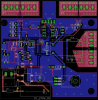
The traces to the PIC looked clumsy and I wanted to increase the trace width - I noticed that if I did, I might have some issues below the LED jumper. I moved the jumper and associated passives, a little neater.Trace 7 of U1 terminates into the red ground plane fill - which is not shown that is why it looks like its just hanging in space.
upload_2014-9-26_14-45-52.png
 
Last edited:

KrisBlueNZ

Sadly passed away in 2015
Nov 28, 2011
8,393
Joined
Nov 28, 2011
Messages
8,393
Yeah, every update is visibly a lot better than the last one.

It's often easiest to see potential optimisations when the display is as simple and uncluttered as possible. Try turning off everything except the through-hole layer and one copper layer. Then repeat for the other layer. In each case you will see simple and obvious improvements you can make.

Edit: disable all the copper pours too.
 

chopnhack

Apr 28, 2014
1,576
Joined
Apr 28, 2014
Messages
1,576
Thanks guys for the encouragement. I am happy to see that this is moving along. I did try without the ground pours and was able to tweak a little more. Nothing of major importance, just cleaning up the pic traces and location of jumper.

I guess at this stage I should print off the schematic and review each connection to make sure nothing was misapplied. Probably a good idea to review each component's physical outline with the BOM and availability of such items. Is there anything else I should be doing before placing an order for the boards? Am I near that phase or am I jumping ahead?
 

KrisBlueNZ

Sadly passed away in 2015
Nov 28, 2011
8,393
Joined
Nov 28, 2011
Messages
8,393
I think that's all you need to do before you send it off, apart from a clearance check on the PCB. The layout software should be able to do this.

Can you generate netlists from the schematic and the PCB then compare them? That's a quick way to check that they match. A netlist is a file, usually human-readable, that represents the schematic or PCB as a list of nets. Each net is a list of component pins that are connected together. There are many formats. Your layout program MAY be able to verify the layout against the netlist created from the schematic; otherwise you may be able to generate netlists from both, and compare them manually or with a netlist comparing program (these may be available free; I don't know.)

The advantage of using netlists rather than checking visually is that the PCB software knows what is really connected to what. You could miss an overlap or a left-over track if you do it visually, but the PCB software won't miss it.
 

chopnhack

Apr 28, 2014
1,576
Joined
Apr 28, 2014
Messages
1,576
I think that's all you need to do before you send it off, apart from a clearance check on the PCB. The layout software should be able to do this.

Can you generate netlists from the schematic and the PCB then compare them? That's a quick way to check that they match. A netlist is a file, usually human-readable, that represents the schematic or PCB as a list of nets. Each net is a list of component pins that are connected together. There are many formats. Your layout program MAY be able to verify the layout against the netlist created from the schematic; otherwise you may be able to generate netlists from both, and compare them manually or with a netlist comparing program (these may be available free; I don't know.)

The advantage of using netlists rather than checking visually is that the PCB software knows what is really connected to what. You could miss an overlap or a left-over track if you do it visually, but the PCB software won't miss it.
Awesome idea, I did see somewhere a listing for netlists. I will go check it out. I was reviewing this very long thread, LOL and saw a reference I made to the Allegro evaluation board using 1500mm sq per side of 2 oz. copper for the connection to the pins!!! I am going to download that document again and review what they are referring to. I am not sure if I could free up that much space, it may be possible...
 

chopnhack

Apr 28, 2014
1,576
Joined
Apr 28, 2014
Messages
1,576
Ok, found it:
upload_2014-9-26_20-46-39.png

I am not sure how to approach this, I have a thought that hardly any work is being done through the chip. Its acting as a conduit, so power losses would come from resistance. What are your thoughts on this?
 

KrisBlueNZ

Sadly passed away in 2015
Nov 28, 2011
8,393
Joined
Nov 28, 2011
Messages
8,393
My thoughts are that your thoughts are right :)

Any power dissipation in the current path through the ACS712 will be due to imperfect conduction, i.e. resistance. Not all of this will necessarily be perfectly "ohmic", i.e. it won't all have a constant value for R in V = I R or P = I2 R, (in other words, R will vary somewhat depending on I), but I think that's a close enough approximation. So power dissipation and heating will be roughly proportional to I2.

That evaluation board is designed for devices that can measure up to ±30A DC. At 30A DC, I2 is going to be many times higher than I2 in your application. Can you estimate your RMS current? Even if it's 10A RMS, that's three times less current, so nine times less power and heat.

Also the evaluation board is just that. Don't assume that you need to duplicate it exactly for any particular application.

Your board already has large copper areas on both sides, with thermal vias. I think this will be ample for your application.
 

chopnhack

Apr 28, 2014
1,576
Joined
Apr 28, 2014
Messages
1,576
My thoughts are that your thoughts are right :)
Yea!
Any power dissipation in the current path through the ACS712 will be due to imperfect conduction, i.e. resistance. Not all of this will necessarily be perfectly "ohmic", i.e. it won't all have a constant value for R in V = I R or P = I2 R, (in other words, R will vary somewhat depending on I), but I think that's a close enough approximation. So power dissipation and heating will be roughly proportional to I2.

That evaluation board is designed for devices that can measure up to ±30A DC. At 30A DC, I2 is going to be many times higher than I2 in your application. Can you estimate your RMS current? Even if it's 10A RMS, that's three times less current, so nine times less power and heat.

Also the evaluation board is just that. Don't assume that you need to duplicate it exactly for any particular application.

Your board already has large copper areas on both sides, with thermal vias. I think this will be ample for your application.
I agree with you, I just wanted to be sure that I wasn't overlooking something important at this phase.
Currently, the largest device I would use to trigger the switch shows 10A full load rating @220V. I assume that it runs on about 8A.

How do you know the board was spec'ed for DC amps?
I found that Eagle has a DRC and ERC function and it states that the schematic and board are consistent - would that be the same as netlist equivalence?
Looking at the entrance of the mains to the board, is there a difference as to which side get the neutral and which side gets the "hot"? I think the side with the fusible resistor should get the hot, but if the signal switches between positive and negative, does that mean that the neutral has potential across it when the hot wire goes more negative, thus "sucking" a potential across it and neutral?
 
Last edited:

KrisBlueNZ

Sadly passed away in 2015
Nov 28, 2011
8,393
Joined
Nov 28, 2011
Messages
8,393
How do you know the board was spec'ed for DC amps?
I assume it was, because the highest-rated device is rated for "±30A" and there's no reason to assume that it was designed to work with AC only. It continuously converts live-side current into an output value, so it can be used with AC and DC, and many of the applications for this device would be DC - for example, monitoring current into and out of a large battery.
I found that Eagle has a DRC and ERC function and it states that the schematic and board are consistent - would that be the same as netlist equivalence?
Yes. The DRC will also include a clearance check.
Looking at the entrance of the mains to the board, is there a difference as to which side get the neutral and which side gets the "hot"? I think the side with the fusible resistor should get the hot, but if the signal switches between positive and negative, does that mean that the neutral has potential across it when the hot wire goes more negative, thus "sucking" a potential across it and neutral?
Right, the side with the fusible resistor should be connected to phase aka live aka hot, if there's a way to distinguish phase from neutral at the wall plug/socket. I'm not sure how it works in the U.S. Here we use the MEN (multiple earthed neutral) system where neutral is earthed at the switchboard, so neutral is the "safe" side. Phase goes alternately positive and negative relative to neutral (and therefore also relative to earth), but there is no voltage between neutral and earth, so neutral is always the "safe" side.
I know the U.S. used to use 2-pin reversible plugs. Have they now been superseded with polarised plugs? Polarised plugs with earth pins?
 

chopnhack

Apr 28, 2014
1,576
Joined
Apr 28, 2014
Messages
1,576
Right, the side with the fusible resistor should be connected to phase aka live aka hot, if there's a way to distinguish phase from neutral at the wall plug/socket. I'm not sure how it works in the U.S. Here we use the MEN (multiple earthed neutral) system where neutral is earthed at the switchboard, so neutral is the "safe" side. Phase goes alternately positive and negative relative to neutral (and therefore also relative to earth), but there is no voltage between neutral and earth, so neutral is always the "safe" side.
I know the U.S. used to use 2-pin reversible plugs. Have they now been superseded with polarised plugs? Polarised plugs with earth pins?

I believe so, most plugs now have a wider blade for the neutral and a smaller blade for the hot.

Going back over the thread - will we need a heatsink for the tip29c? If there is only 13.8mA on the 48V rail - then collector current times c-e voltage should equal power dissipated, no? I get 0.66 watts. TA at 25deg C says 2 W, the TIP shouldnt get warm at this level.

Thanks again :)
 

KrisBlueNZ

Sadly passed away in 2015
Nov 28, 2011
8,393
Joined
Nov 28, 2011
Messages
8,393
The maximum load from the circuitry to the right of the main smoothing capacitor, i.e. the relay coil and the switching regulator, is about 13.2mA. But that doesn't relate to the TIP29C. The TIP29C regulates that voltage rail by absorbing the power that comes in through the feed capacitor but isn't used by the load circuitry. This power is highest when the relay is OFF, because the relay coil is the largest load.

In typical conditions (115 VAC input, 1 µF input capacitor, typical load through the switching converter) with the relay OFF, the RMS current through the TIP29C is 21 mA and mean dissipation is 1.0W. In worst case conditions with the relay OFF, RMS current is 28.5 mA and mean dissipation is 1.4W.

The TIP29C may be rated for 2W dissipation but that doesn't change the laws of physics where heat transfer is concerned. You still need to dissipate up to 1.4W into the surrounding air, with little airflow, and keep the package temperature low enough to prevent damage to the PCB and nearby components. To keep the package temperature below, say, 75 °C, you need a total thermal resistance to ambient of less than 35 °C/W. If that can't be achieved with PCB copper, you'll need a heatsink.
 

chopnhack

Apr 28, 2014
1,576
Joined
Apr 28, 2014
Messages
1,576
The maximum load from the circuitry to the right of the main smoothing capacitor, i.e. the relay coil and the switching regulator, is about 13.2mA. But that doesn't relate to the TIP29C. The TIP29C regulates that voltage rail by absorbing the power that comes in through the feed capacitor but isn't used by the load circuitry. This power is highest when the relay is OFF, because the relay coil is the largest load.

In typical conditions (115 VAC input, 1 µF input capacitor, typical load through the switching converter) with the relay OFF, the RMS current through the TIP29C is 21 mA and mean dissipation is 1.0W. In worst case conditions with the relay OFF, RMS current is 28.5 mA and mean dissipation is 1.4W.

The TIP29C may be rated for 2W dissipation but that doesn't change the laws of physics where heat transfer is concerned. You still need to dissipate up to 1.4W into the surrounding air, with little airflow, and keep the package temperature low enough to prevent damage to the PCB and nearby components. To keep the package temperature below, say, 75 °C, you need a total thermal resistance to ambient of less than 35 °C/W. If that can't be achieved with PCB copper, you'll need a heatsink.

I'm glad you explained that, because I definitely didn't get it... work in progress, LOL :rolleyes::)
I think I found a heatsink that might work with space constraints and be sufficient to take care of the heat.
504102B00000G/HS104-1-ND/5832

This model provided the most dissipation for the least C increase - 2W/40deg C for the size.
 
Top