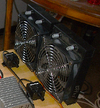
What are the 3 wires of a computer fan hooked to?

HANKMARS

Jul 28, 2019
517
Joined
Jul 28, 2019
Messages
517
I have a fan with 3 wires. A black, red and yellow. Most often, yellow is a 12 volt line so I hooked yellow wire to +12 and black wire to ground but fan does not run. What is the proper wiring scheme?
 

HANKMARS

Jul 28, 2019
517
Joined
Jul 28, 2019
Messages
517
Red is 12V+, black is GND/neg- and yellow is the signal wire.
Be sure that yours is 12V as some are 5V.
Thank you. I applied 12 V+ to the red wire and the fan does indeed run. Second question; From reading customer reviews of this cooler, I gathered that the fan has two speeds. Is the fan speed determined by a signal on the yellow wire? e.g. 0 V = low speed and 12 V+ = high speed? By the time you read this, I most likely will have tried applying a signal to the yellow wire. The reason I was not this brazen with moving my 12 volts to the red wire is because experience has taught me that applying 12 V to a 5 V motor winding generally damages the winding. I have already had 12 V on yellow wire and fan still operates so I am moderately confident that the experiment will not destroy my fan.
 

Attachments

  • RADIATOR COOLER FAN SIDE.png
    RADIATOR COOLER FAN SIDE.png
    254.4 KB · Views: 1

bertus

Moderator
Nov 8, 2019
3,837
Joined
Nov 8, 2019
Messages
3,837
Hello,

The yellow wire can have several functions depending on the fan type number.
There are fans that show pulses on the yellow wire from a tach sensor.
There are fans that need a pwm signal on the yellow wire to control the speed of the fan.
There are fans that use the yellow wire as an alarm signal when the fanspeed drops below a certain level.

Read the datasheet of the fan for the function of the yellow wire.

Bertus
 

roughshawd

Jul 13, 2020
616
Joined
Jul 13, 2020
Messages
616
A fan is sometimes designed to speed up or slow down based on the cooling needs of the system. That way you don't over cool the CPU creating monitor interference. Usually the third wire is a clock wire that gives RPM. The red being hot, and the black being not, if you put a small power supply in line with an LED on the signal line, it should flash everytime the motor turns 1 RPM...= solid on LED, but not suggested!
 

HANKMARS

Jul 28, 2019
517
Joined
Jul 28, 2019
Messages
517
Hello,

The yellow wire can have several functions depending on the fan type number.
There are fans that show pulses on the yellow wire from a tach sensor.
There are fans that need a pwm signal on the yellow wire to control the speed of the fan.
There are fans that use the yellow wire as an alarm signal when the fanspeed drops below a certain level.

Read the datasheet of the fan for the function of the yellow wire.

Bertus
The radiator/fan combo was purchased from amazon. They have no spec data so I went to the supplier site who also had no data. I believe the supplier was DIYhz. In the product reviews, one of the customers mentioned that the fan performed well at low speed as well as high speed. I will try to ask a question of him through the amazon site.
 

HANKMARS

Jul 28, 2019
517
Joined
Jul 28, 2019
Messages
517
Project update. I powered up the unit with only 4 Peltier devices active. Ambient temp was 87 degrees F. At 60 seconds the cold coil was at 61 degrees F. After I received my new 100 A DC to DC converter, whose sole purpose is to supply required current to remaining 6 Peltier devices, I wired it in appropriately. Again the ambient temp was 87 when I powered on the unit. Prior to 60 seconds running, the water on the cold side of the device stopped flowing. I assume the water had frozen in the thermal block. Cold coil read 48 at that point. I purchased two bottles of 91% isopropyl alcohol solution. I will dilute that to a 70% solution which should give me lowest freezing point. I'm anxious to see how cold I can get the cold coil.
 
Top