Assistance with the voice changer using AP8072 IC

Electronically curious

Mar 19, 2023
9
Joined
Mar 19, 2023
Messages
9
I'm currently prototyping the device using the breadboard and I replaced the AP8072 IC with RTS0072. While testing it, the speaker only produces nosie and when trying to speak into the microphone, it doesn't work. I rechecked the wiring and the components but they're all in good condition and correct. I currently needed assistance with it and will appreciate it if you could provide some assistance with it. Thank you. 


HarryA1

Mar 4, 2009
481
Joined
Mar 4, 2009
Messages
481
Without a schematic of your circuit and a closeup photo of your circuit it is not possible to help you.


Electronically curious

Mar 19, 2023
9
Joined
Mar 19, 2023
Messages
9
Hi there, thank you for replying and willing to assist me. I will provide the schematic of the circuit and a closeup photo of my prototype as soon as I get back. I will also upload the list of components I used to prototype the device. The circuit is based on a voice changer project which can be found in this link: Voice Changer - Electronics-Lab.com

 
Last edited by a moderator:

admin2

Administrator
Administrator
Mar 13, 2015
184
Joined
Mar 13, 2015
Messages
184
Can you confirm that the MIC polarity is correct? Also, check that you have adjusted the potentiometers to a low setting, while set them to a high level may saturate the amplifier.


Electronically curious

Mar 19, 2023
9
Joined
Mar 19, 2023
Messages
9
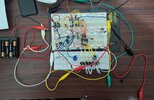
Hi there, thank you for replying. I had switched the polarity of the MIC and they still don't work either way. I also had adjusted the potentiometers to a low setting unless I connect it wrong. I took a photo of my prototype and hopefully you could see it well and also my BOM.Bill of Material (BOM).pdfPXL_20230321_045459159~2.jpg


Attachments

  • Bill of Material (BOM).pdf
    48 KB · Views: 1

HarryA1

Mar 4, 2009
481
Joined
Mar 4, 2009
Messages
481
I looked at your photo in  photoshop where I could enlarge it, looks okay from what I can see of it.

Check the voltage at the speaker and pin 6 of the LM386 for the 6 volts. Also check the voltages at the mic. and pins 11 & 12 at the RTS0072 for the 4.7 volts off the Zener diode. It is best to check voltages at the IC pins if you can. Also you could in similar manner check the ground connections with the meter. Could be a bad RS0072 ?


Electronically curious

Mar 19, 2023
9
Joined
Mar 19, 2023
Messages
9
Okay thank you. I got back and I measured them.

Speaker: 6.136V

Pin 6 of LM386: 6.169V

Mic: 1.585V

Pin 11 & 12 of the RTS0072: 1.693V

Pin 1, 2, 8, and 9 of the RTS0072: 0.797V

Ground connections: Around 0.000V

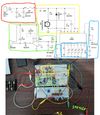
I can see that there's something wrong around the yellow area but I'm not sure why. Are you able to assist me with it?


HarryA1

Mar 4, 2009
481
Joined
Mar 4, 2009
Messages
481
The 1.69 volts at pins 11 & 12 suggest the Zener diode is in the wrong orientation. The 1.69 volts is the forward voltage not the reverse voltage of 4.7 volts you are looking for.  If not try popping out the RTS0072 and recheck the voltage, perhaps it is shorted.


Rajsbom

Aug 19, 2022
3
Joined
Aug 19, 2022
Messages
3
HI, 

 Voltage @ Pin 11 and 12 should be 4.5V, if not then check 

 If zener diode is shorted or installed reverse, or IC is shorted.


Electronically curious

Mar 19, 2023
9
Joined
Mar 19, 2023
Messages
9
Thank you all for the assistances. Yep, I had fixed the problem with the Zener diode and now the voltages at the pin 11 &12 are now 3.793 v but the device still doesn't function as intended. 

Is the voltage still too low?


HarryA1

Mar 4, 2009
481
Joined
Mar 4, 2009
Messages
481
 I would work on the voltage first. Although the specs, say 3.0V 5.0V for the RTS0072 ,there must be problem somewhere.

The condenser mic. should not be drawing any current, try disconnecting it then recheck the voltage. Pop out the RTS0072 also.

Specs. for the chip are here (see the second circuit which is like the one you are using):

https://www.experimentalistsanonymous.com/diy/Datasheets/RTS0072.pdf


Electronically curious

Mar 19, 2023
9
Joined
Mar 19, 2023
Messages
9
Okay, I had check the condenser mic and it's not drawing any current since the Zener diode voltage remained the same if I take out the mic and put it back. But I do notice that if I took out the RTS0072 chip. The voltage increased a bit but when I put it back, it decreases.


Electronically curious

Mar 19, 2023
9
Joined
Mar 19, 2023
Messages
9
Okay, I had check the condenser mic and it's not drawing any current since the Zener diode voltage remained the same if I take out the mic and put it back. But I do notice that if I took out the RTS0072 chip. The voltage increased a bit but when I put it back, it decreases.

Unless it's supposed to do that.

I also noticed that if I touched some of the jumper wires, the speaker produces different tones.

 
Last edited by a moderator:

HarryA1

Mar 4, 2009
481
Joined
Mar 4, 2009
Messages
481
In circuit 2 for the RTS0072 note they have an RC sub-circuit at pins 1 and 2, I would try that. Also note at pin 16 there is a resistor Rb to prevent pin 16 being pulled to ground. Perhaps required? Note it uses a 4.3 volt Zener; it must work okay with that voltage.

 
Top