
We often get asked how to attach images. There are 4 ways.
1. Linking to images
There are three ways.The first is to click on the button that looks like this:
 and type in the URL of an image. (Realistically you'll cut and paste it). Make sure the image is available to everyone. If it is a private image on our facebook page (for instance) only toy will see it. The image will appear in-line with your message. If the image is ever removed or changed, it will be removed or changed here too.
2. Attatching images
The second method is to click the button to manage attachments. It looks like this:
 . (If you can't see that in the toolbox, you'll need to change to the advanced editor using this button
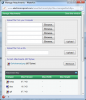
 .) An image of the form is displayed below. You can then browse to an image, or drag and drop it onto the form. Once you've done that, press
 , then close the form. There are limits to the size of the image (and indeed the types of files that can be uploaded). The advantage is that if the original image ever changes or is removed, this will remain here. However the image appears as an icon at the bottom of the message.

3. Combination
This is a combination of the above methods and is often used by members who have been using the forums for some time. Follow the process (2) above. If you look below the editor there are links to your attached images. Right click on the image you want and save the URL. In your message follow step (1) above to display the image in-line.
4. Linking to URL
Once you have a URL, you can use the Insert Link function (
 button) to insert a link to it. This is the worst possible method. Similarly bad are linking to your facebook page, linking to a download site, etc. Only use this method if ALL of the others fail. Be warned that far fewer people will bother looking at your image.
This posting uses method (3) for most images. In a normal posting (this isn't a normal posting) you would see several image icons below this point.
1. Linking to images
There are three ways.The first is to click on the button that looks like this:
2. Attatching images
The second method is to click the button to manage attachments. It looks like this:
3. Combination
This is a combination of the above methods and is often used by members who have been using the forums for some time. Follow the process (2) above. If you look below the editor there are links to your attached images. Right click on the image you want and save the URL. In your message follow step (1) above to display the image in-line.
4. Linking to URL
Once you have a URL, you can use the Insert Link function (
This posting uses method (3) for most images. In a normal posting (this isn't a normal posting) you would see several image icons below this point.
Attachments


Last edited:


