Hi everyone
I am new to the "hobby" of electronic projects. (VERY new!)
Also, my background in electronics is basically zero
I just finished my first project: A FM Transmitter Kit using a BA1404 IC.
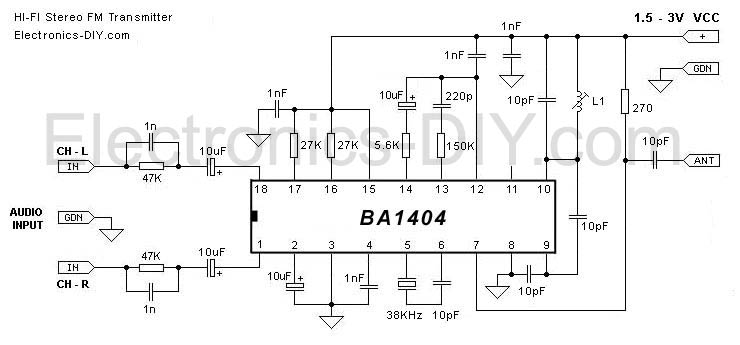
Here is the schematic:
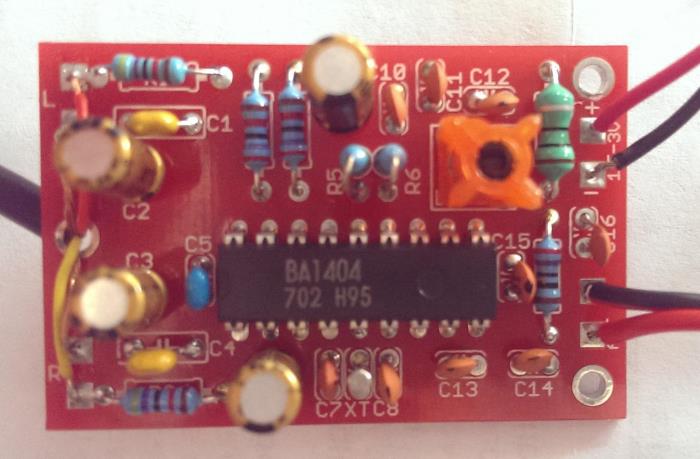
And a photo of my finished project:
Further details on the website I bought it from here:
http://electronics-diy.com/BA1404_Stereo_FM_Transmitter.php
-----
And here is my problem:
The device works half the time. However it behaves slightly erratically and I have no idea why.
Half the time when it is powered up and transmitting, the transmitted signal is extremely noisy. You can still hear the transmitted music but the noise is unbearable.
However, if I lightly touch the Ceramic Capacitor at position C15 with the tip of my finger, the noise disappears completely and I have a crystal clear transmission.
The other half of the time I have the opposite: The signal is clear and when I touch the same capacitor it turns noisy immediately until I stop touching it.
I have double checked the soldering on that capacitor and it seems fine.
The capacitor at C15 is 10pF.
If anyone can shed some light on the problem I will be very gratefull!!
Thanks in advance and hopefully this is the start of a fruitfull new hobby!! (I already started playing with an Arduino!)
Regards
Andrew
I am new to the "hobby" of electronic projects. (VERY new!)
Also, my background in electronics is basically zero
I just finished my first project: A FM Transmitter Kit using a BA1404 IC.
Here is the schematic:

And a photo of my finished project:

Further details on the website I bought it from here:
http://electronics-diy.com/BA1404_Stereo_FM_Transmitter.php
-----
And here is my problem:
The device works half the time. However it behaves slightly erratically and I have no idea why.
Half the time when it is powered up and transmitting, the transmitted signal is extremely noisy. You can still hear the transmitted music but the noise is unbearable.
However, if I lightly touch the Ceramic Capacitor at position C15 with the tip of my finger, the noise disappears completely and I have a crystal clear transmission.
The other half of the time I have the opposite: The signal is clear and when I touch the same capacitor it turns noisy immediately until I stop touching it.
I have double checked the soldering on that capacitor and it seems fine.
The capacitor at C15 is 10pF.
If anyone can shed some light on the problem I will be very gratefull!!
Thanks in advance and hopefully this is the start of a fruitfull new hobby!! (I already started playing with an Arduino!)
Regards
Andrew


