Not knowing your experience level one thing I advise for folks getting started
in the game is for I/O pins putting a series R with connections to the pin, 2 - 5K.
In case they have other higher V's in design and accidentally short one of those
pins to the higher V, destroying the part. The R limits current usually saving part.
For 10 - 20V kinds of environment. Usually most apps the R does not affect
appreciably whats going on.
Also that module actually has 2 5LP processors on it, one that is for program/debug,
the other the target. Once project done you snap off the program/debug portion. You
can use that to program / debug other designs or as standalone. But standalone severe
GPIO limitation, eg. chip pins not wired out on that board piece. Still can be used so dont
throw it away. Generally I leave them on for most projects, in case much later a change needs
to be done. I do a lot of one off designs so its handy to leave on.
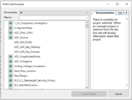
Lastly when you use PSOC Creator and want to look at example projects click "Find Code
Example", and then when you see a project you want to try click the little globe icon to left
of name, that will download it, then you can double click and open the project file.
Lastly lastly go thru the PSOC 101 video series to get a feel for the IDE.
When dragging and dropping components out of the chip catalog a right click takes you to
datasheet, in there is a section describing all the API f() calls you can use to manipulate in
real time the component.
Regards, Dana.