Temperature Control using DHT11 and arduino

JamesSmith

Nov 15, 2024
6
Joined
Nov 15, 2024
Messages
6
Hello everyone,
After experimenting with Arduino for some time, I decided to create something a little more practical this time. I want to design a fan system that is temperature-controlled (sounds interesting :D).
The strategy is:
To keep an eye on the room temperature, use a DHT11 sensor. If the temperature goes above, let’s say, 30°C, the fan should turn on.
If it goes below 30°C, the fan should turn off. (A cool but optional concept) I want to use an LCD to show the temperature.
The problem is that, although I had assumed this would be easy, I've encountered a few obstacles. When the temperature approaches 30°C, the fan continues to turn on and off too frequently.
Is it possible to prevent this abrupt switching? The fan I'm using has a 5V DC motor, however, when I switch it on via the Arduino pin, it doesn't spin correctly. Is a relay or something else required? I'm considering adding a color-changing LED (blue for normal, red for hot), but I'm not sure how to get it to work with the DHT11 and fan simultaneously. How can I prevent the fast ON/OFF problem? I'm not sure what "hysteresis" is or how to use it, but someone suggested it. Is there any method to supply the fan with power? It appears that the Arduino pin is not strong enough to manage it directly. I would be very grateful for some advice. I feel like I’m close, However, there are too many little problems preventing me from completing this project.
Thank you very much in advance!
P.S. It would be great if someone could provide a nice, beginner-friendly instruction on hysteresis or how to utilize relays with Arduino. I can share my project if required.
 

bertus

Moderator
Nov 8, 2019
3,835
Joined
Nov 8, 2019
Messages
3,835
Hello,

You can stop the frequent switching by adding a hysteresis.
Start the fan at 31 degrees and stop the fan at 29 degrees, as example.

Bertus
 

Harald Kapp

Moderator
Moderator
Nov 17, 2011
14,271
Joined
Nov 17, 2011
Messages
14,271
the fan continues to turn on and off too frequently.
Is it possible to prevent this abrupt switching?
hysteresis is explained e.g. by Wikipedia (and many other sources).
Here's the gist of it: Turn the fan on at 30.5 °, turn it off at 29.5 °. This is hysteresis of 1 °C.

how to utilize relays with Arduino
Many examples are freely available on the internet. Look up "Arduino relay".
 

danadak

Feb 19, 2021
1,063
Joined
Feb 19, 2021
Messages
1,063
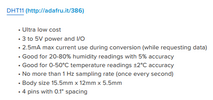
Make sure your sampling rate adheres to : https://cdn-learn.adafruit.com/downloads/pdf/dht.pdf
Follow all the recommendations in the datasheet. Like pullups as discussed.


1733314488417.png


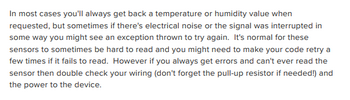
Also if DHT11 directly in air flow path of fan consider locating it in an
area that has more thermal inertia, eg. target object, if whole room then
in some area of room out of direct air flow.


1733314801372.png


You might want to average a few samples before making decision in code to
turn on/off the fan. Hysteresis has the disadvantage that object temps have
wider variation of control. Still needed however, just be aware of this consequence.

The datasheet has no specs for output sensitivity to supply pin noise, so make
sure your supply well bypassed. Use a scope on infinite persistence, AC, say 100 mV
per box vertical setting, and look at pk-pk noise as a guide to your bypassing efforts.

Lastly make sure your code library for sensor up to date.


Regards, Dana.
 
Last edited:

JamesSmith

Nov 15, 2024
6
Joined
Nov 15, 2024
Messages
6
hysteresis is explained e.g. by Wikipedia (and many other sources).
Here's the gist of it: Turn the fan on at 30.5 °, turn it off at 29.5 °. This is hysteresis of 1 °C.


Many examples are freely available on the internet. Look up "Arduino relay".
Yes, you are right and I've read some tutorials on it, but I just need to discuss it with people. I feel comfortable in this way, as I am doing with you.
 

JamesSmith

Nov 15, 2024
6
Joined
Nov 15, 2024
Messages
6
Make sure your sampling rate adheres to : https://cdn-learn.adafruit.com/downloads/pdf/dht.pdf
Follow all the recommendations in the datasheet. Like pullups as discussed.


View attachment 65299


Also if DHT11 directly in air flow path of fan consider locating it in an
area that has more thermal inertia, eg. target object, if whole room then
in some area of room out of direct air flow.


View attachment 65300


You might want to average a few samples before making decision in code to
turn on/off the fan. Hysteresis has the disadvantage that object temps have
wider variation of control. Still needed however, just be aware of this consequence.

The datasheet has no specs for output sensitivity to supply pin noise, so make
sure your supply well bypassed. Use a scope on infinite persistence, AC, say 100 mV
per box vertical setting, and look at pk-pk noise as a guide to your bypassing efforts.

Lastly make sure your code library for sensor up to date.


Regards, Dana.
Hey, thanks for the detail.
Make sure your sampling rate adheres to : https://cdn-learn.adafruit.com/downloads/pdf/dht.pdf
Follow all the recommendations in the datasheet. Like pullups as discussed.


View attachment 65299


Also if DHT11 directly in air flow path of fan consider locating it in an
area that has more thermal inertia, eg. target object, if whole room then
in some area of room out of direct air flow.


View attachment 65300


You might want to average a few samples before making decision in code to
turn on/off the fan. Hysteresis has the disadvantage that object temps have
wider variation of control. Still needed however, just be aware of this consequence.

The datasheet has no specs for output sensitivity to supply pin noise, so make
sure your supply well bypassed. Use a scope on infinite persistence, AC, say 100 mV
per box vertical setting, and look at pk-pk noise as a guide to your bypassing efforts.

Lastly make sure your code library for sensor up to date.


Regards, Dana.
I'll surely read the content you shared. But, for a detailed understanding, I already have understood the DHT11 sensor through this post https://www.theengineeringprojects.com/2019/03/introduction-to-dht11.html . I don't think the issue is the sensor bit as you mentioned; the place of the fan may be the issue, and the hysteresis concept is not that clear in my mind. I read it from different sources and want to discuss it with people as we do with the teachers.
last night, I made some changes in my project, and I felt the fan is now working better, but IDK if the issue is in the sensor reading or in the circuit itself. Have you worked before on such a project? Should I share my code here with the people?
 

Harald Kapp

Moderator
Moderator
Nov 17, 2011
14,271
Joined
Nov 17, 2011
Messages
14,271
the hysteresis concept is not that clear in my mind.
It's very simple:
When you have a single treshold, obove which you e.. turn on a fan and below you turn teh fan off, then the fan will turn on and off repeatedly, showing the effect you observed. Here's why:
When the temperature rises and crosses the threshold, the fan will turn on.
Immediately the fan's action will start to cool down the air.
as the temperature falls below the threshold, the fan will turn ff.
Temperature will rise agian and the fan will turn again.
This is the oscillation you see.

Now consider 2 thresholds. threshold 1 for turning the fan on set at e.g. 1 °C above threshold 2 for turning the fan off. Here's what happens now:
When the temperature rises and crosses the threshold 1, the fan will turn on.
It will take some time until the air has cooled down below threshold 2 (because, in this example) it sits 1 °C below threshold 1.
Once threshold 2 is reached the fan will turn off.
It will now again take some time until the air has heated up enough (1 °C in this example) to cross threshold 2.
Once treshold 2 is reached, the fan will turn on again.
An so on.
This is also an oscillation, as the fan will turn on and off alternatingly, but at a much lower rate and with idle (off) pauses between the active (on) states.
This is the point where @danadak 's tip comes into play:
Also if DHT11 directly in air flow path of fan consider locating it in an
area that has more thermal inertia, eg. target object, if whole room then
in some area of room out of direct air flow.
Here the thermal inertia will provide the hysteresis as it will take some time to heat up and cool down the target if it is not directly in the way of the airflow. This will also lead to longer pauses of the fan.

The scheme is widely used in bang-bang controls. Read the Wikipedia articel to understand it in more detail.
 

JamesSmith

Nov 15, 2024
6
Joined
Nov 15, 2024
Messages
6
It's very simple:
When you have a single treshold, obove which you e.. turn on a fan and below you turn teh fan off, then the fan will turn on and off repeatedly, showing the effect you observed. Here's why:
When the temperature rises and crosses the threshold, the fan will turn on.
Immediately the fan's action will start to cool down the air.
as the temperature falls below the threshold, the fan will turn ff.
Temperature will rise agian and the fan will turn again.
This is the oscillation you see.

Now consider 2 thresholds. threshold 1 for turning the fan on set at e.g. 1 °C above threshold 2 for turning the fan off. Here's what happens now:
When the temperature rises and crosses the threshold 1, the fan will turn on.
It will take some time until the air has cooled down below threshold 2 (because, in this example) it sits 1 °C below threshold 1.
Once threshold 2 is reached the fan will turn off.
It will now again take some time until the air has heated up enough (1 °C in this example) to cross threshold 2.
Once treshold 2 is reached, the fan will turn on again.
An so on.
This is also an oscillation, as the fan will turn on and off alternatingly, but at a much lower rate and with idle (off) pauses between the active (on) states.
This is the point where @danadak 's tip comes into play:

Here the thermal inertia will provide the hysteresis as it will take some time to heat up and cool down the target if it is not directly in the way of the airflow. This will also lead to longer pauses of the fan.

The scheme is widely used in bang-bang controls. Read the Wikipedia articel to understand it in more detail.
oh thank you so much. Now I got the point :D
 

Stemkida

Dec 11, 2024
1
Joined
Dec 11, 2024
Messages
1
@JamesSmith , please share your Code for this project and also share circuit diagram, you can switch on/off LED based on temperature conditions and simultaneously control fan using your code. For DC fan, please use separate set of 2 battery 3.7V each with on/off switch. Since 5V voltage is required by Arduino, obviously fan would get less than required voltage and hence uneven speed. I can help you if you share mentioned details.
 

danadak

Feb 19, 2021
1,063
Joined
Feb 19, 2021
Messages
1,063
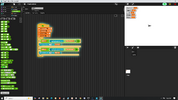
A simple way of doing fan program :

1733942036089.png


Snap4Arduino, converts your block configuration into Arduino code.


Regards, Dana.
 

danadak

Feb 19, 2021
1,063
Joined
Feb 19, 2021
Messages
1,063
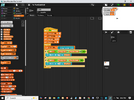
Correction to program, pin high to tun on fan, low off, I had inverted
in if statements.

1733960722521.png
 
Last edited:
Top