
There are a lot of online IoT platform out there, google is one of the first few platforms that provide free and easy-to-use IoT services to maker and developer, here is an example using Realtek' RTL8195 development board for Google IoT service,
Google Cloud IOT
Preparation
This example illustrates how to use Cloud IoT Core on AMEBA. It doesn't need extra Library and use WiFiSSLClient and PubSubClient to connect. Before compiling to Ameba, we need to register and set up Google Cloud IoT Platform. Please refer to Standard SDK examples:
https://www.amebaiot.com/google-cloud-iot/
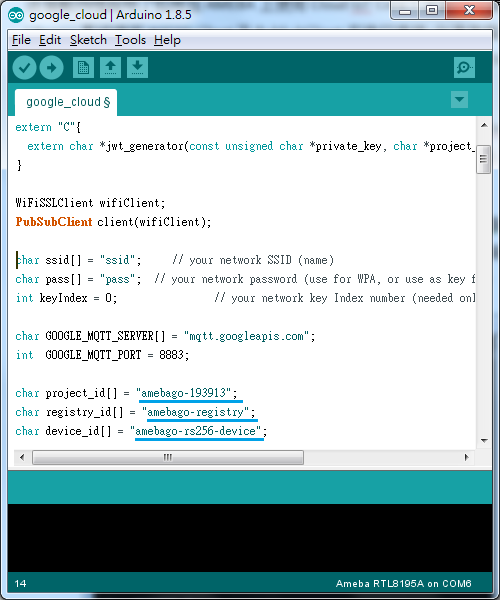
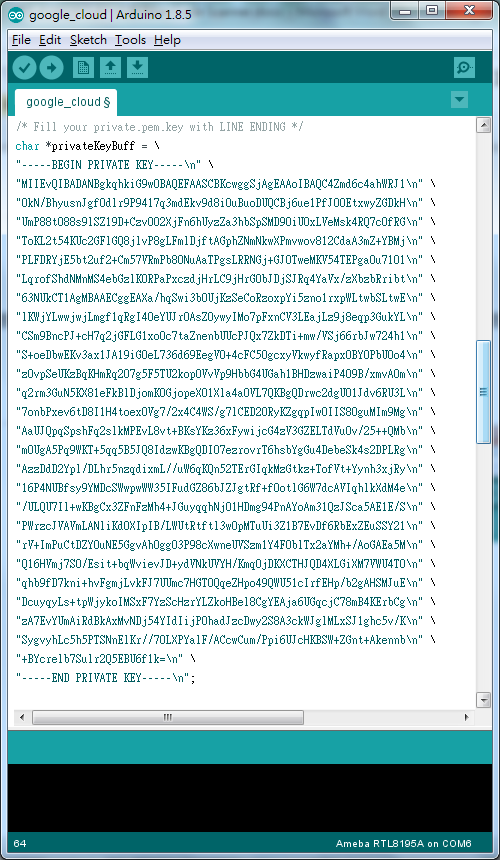
Open the example “File” -> “Examples” -> “AmebaMQTTClient” -> “google_cloud”, we can get project_id, registry_id, device_id and private.pem.key if Google Cloud IoT Platform has been set up. In the example, fill in amebago-193913 for project_id, amebago-registry for registry_id and amebago-rs256-device for device_id as follows. Remember to fill in private.pem.key for privateKeyBuff. Compile and download to Ameba after updating these parameters.
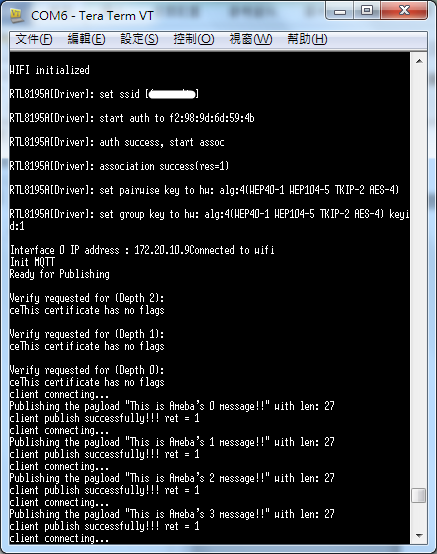
Then open the terminal, start to connect to Google Cloud and it shows ” This is Ameba's x message!!” when the connection is successful as follows. The "x" is the increment value for each loop.
Verify:
Key in with Google Cloud SDK Shell:
$ gcloud beta pubsub subscriptions pull --auto-ack \
projects/amebago-193913/subscriptions/amebago-subscription
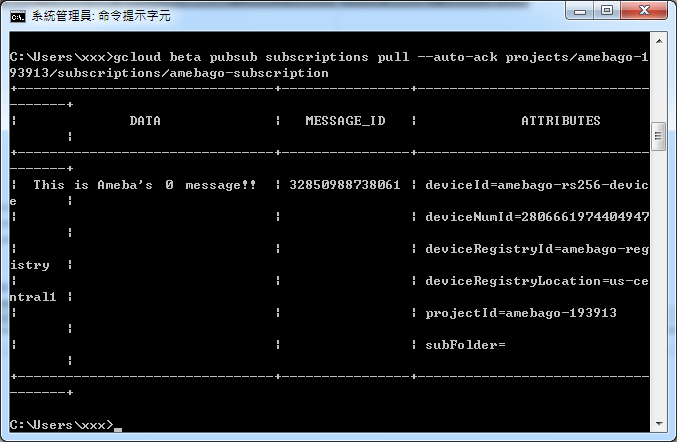
The following are the messages sent by Ameba.
Code Reference
In setup(), we set up Certificate, which means setting RootCA and Private Key
wifiClient.setRootCA((unsigned char*)rootCABuff);
wifiClient.setClientCertificate(NULL, (unsigned char*)privateKeyBuff);
In loop(), each loop checks the Internet status and re-connect to it when the environment has a problem.
if (WiFi.status() != WL_CONNECTED) {
while (WiFi.begin(ssid, pass) != WL_CONNECTED)
{
delay(1000);
}
Serial.println("Connected to wifi");
}
It requires mqtt_id , clientPass and pub_topic to publish:
produce mqtt_id:
mqtt_id = (char *)malloc(strlen("projects/") + strlen(project_id) + strlen("/locations/us-central1/registries/") + strlen(registry_id) + strlen("/devices/") + strlen(device_id) + 1);
sprintf(mqtt_id, "projects/%s/locations/us-central1/registries/%s/devices/%s", project_id, registry_id, device_id);
produce clientPass(via JWT Format):
clientPass = jwt_generator((unsigned char*)privateKeyBuff, project_id, 3600*1);
produce pub_topic:
pub_topic = (char *)malloc(strlen("/devices/") + strlen(device_id) + strlen("/events") + 1);
sprintf(pub_topic, "/devices/%s/events", device_id);
MQTT Server setting:
client.setServer(GOOGLE_MQTT_SERVER, GOOGLE_MQTT_PORT);
client.setPublishQos(MQTTQOS1);
client.waitForAck(true);
Start to connect to google cloud
if (client.connect(mqtt_id, clientUser, clientPass) )
{
..........
for(int i = 0; i < count; i++){
..........
sprintf(payload, "This is Ameba's %d message!!", i);
ret = client.publish(pub_topic, payload);
..........
}
..........
client.disconnect();
}
free(mqtt_id);
free(pub_topic);
Publish the payload with client.publish method. Remember to disconnect, free mqtt_id and pub_topic buffer。
Google Cloud IOT
Preparation
- Ameba x 1
This example illustrates how to use Cloud IoT Core on AMEBA. It doesn't need extra Library and use WiFiSSLClient and PubSubClient to connect. Before compiling to Ameba, we need to register and set up Google Cloud IoT Platform. Please refer to Standard SDK examples:
https://www.amebaiot.com/google-cloud-iot/
Open the example “File” -> “Examples” -> “AmebaMQTTClient” -> “google_cloud”, we can get project_id, registry_id, device_id and private.pem.key if Google Cloud IoT Platform has been set up. In the example, fill in amebago-193913 for project_id, amebago-registry for registry_id and amebago-rs256-device for device_id as follows. Remember to fill in private.pem.key for privateKeyBuff. Compile and download to Ameba after updating these parameters.
Then open the terminal, start to connect to Google Cloud and it shows ” This is Ameba's x message!!” when the connection is successful as follows. The "x" is the increment value for each loop.
Verify:
Key in with Google Cloud SDK Shell:
$ gcloud beta pubsub subscriptions pull --auto-ack \
projects/amebago-193913/subscriptions/amebago-subscription
The following are the messages sent by Ameba.
Code Reference
In setup(), we set up Certificate, which means setting RootCA and Private Key
wifiClient.setRootCA((unsigned char*)rootCABuff);
wifiClient.setClientCertificate(NULL, (unsigned char*)privateKeyBuff);
In loop(), each loop checks the Internet status and re-connect to it when the environment has a problem.
if (WiFi.status() != WL_CONNECTED) {
while (WiFi.begin(ssid, pass) != WL_CONNECTED)
{
delay(1000);
}
Serial.println("Connected to wifi");
}
It requires mqtt_id , clientPass and pub_topic to publish:
produce mqtt_id:
mqtt_id = (char *)malloc(strlen("projects/") + strlen(project_id) + strlen("/locations/us-central1/registries/") + strlen(registry_id) + strlen("/devices/") + strlen(device_id) + 1);
sprintf(mqtt_id, "projects/%s/locations/us-central1/registries/%s/devices/%s", project_id, registry_id, device_id);
produce clientPass(via JWT Format):
clientPass = jwt_generator((unsigned char*)privateKeyBuff, project_id, 3600*1);
produce pub_topic:
pub_topic = (char *)malloc(strlen("/devices/") + strlen(device_id) + strlen("/events") + 1);
sprintf(pub_topic, "/devices/%s/events", device_id);
MQTT Server setting:
client.setServer(GOOGLE_MQTT_SERVER, GOOGLE_MQTT_PORT);
client.setPublishQos(MQTTQOS1);
client.waitForAck(true);
Start to connect to google cloud
if (client.connect(mqtt_id, clientUser, clientPass) )
{
..........
for(int i = 0; i < count; i++){
..........
sprintf(payload, "This is Ameba's %d message!!", i);
ret = client.publish(pub_topic, payload);
..........
}
..........
client.disconnect();
}
free(mqtt_id);
free(pub_topic);
Publish the payload with client.publish method. Remember to disconnect, free mqtt_id and pub_topic buffer。


