Designing a Time Delayed Relay

KrisBlueNZ

Sadly passed away in 2015
Nov 28, 2011
8,393
Joined
Nov 28, 2011
Messages
8,393
Yes that one looks good. You need to derate the thermal resistance because you don't have free airflow but I think that will be fine.
 

chopnhack

Apr 28, 2014
1,576
Joined
Apr 28, 2014
Messages
1,576
Yes that one looks good. You need to derate the thermal resistance because you don't have free airflow but I think that will be fine.
That is a great point, I was thinking about derating in general because the ambient temperature is typically around 85deg F in the environment where I will be using this device. I had read that you may have to derate because of higher ambient temps. Being only a few degrees higher, I wasn't sure if it was a factor.
The "buffer" is the fact that the heatsink can take care of up to 2W, so there can be a 0.6W fudge factor if I am reading you right ;)

Should I create a plane of copper to tie to the heatsink to increase the efficiency? If so, is the back tab electrically connected to any of the legs of the transistor? I seem to remember that sometimes they are.

Thanks!
 

KrisBlueNZ

Sadly passed away in 2015
Nov 28, 2011
8,393
Joined
Nov 28, 2011
Messages
8,393
Yes there's a 0.6W "buffer". Yes, you should have copper on both sides with thermal vias, to improve heat dissipation. The tab is connected to the middle pin, i.e. the collector. In all TO-220 packages that I've ever seen, if the tab is metal and not specifically isolated from the component, it is connected to the middle lead.
 

chopnhack

Apr 28, 2014
1,576
Joined
Apr 28, 2014
Messages
1,576
Yes there's a 0.6W "buffer". Yes, you should have copper on both sides with thermal vias, to improve heat dissipation. The tab is connected to the middle pin, i.e. the collector. In all TO-220 packages that I've ever seen, if the tab is metal and not specifically isolated from the component, it is connected to the middle lead.

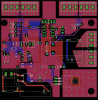
For what its worth, 1.1"x0.98" on both sides with smallest clearance between 48+ and ground plane at 0.04" and between relay and heatsink plane about 90 thou.
Do you think a TO-220 mounting kit is necessary?

upload_2014-9-28_0-33-14.png
 

KrisBlueNZ

Sadly passed away in 2015
Nov 28, 2011
8,393
Joined
Nov 28, 2011
Messages
8,393
I think that, plus that heatsink, will be fine. No, you don't need a mounting kit because you don't need electrical isolation between the device and the heatsink.
 

chopnhack

Apr 28, 2014
1,576
Joined
Apr 28, 2014
Messages
1,576

KrisBlueNZ

Sadly passed away in 2015
Nov 28, 2011
8,393
Joined
Nov 28, 2011
Messages
8,393
Sorry, that's a mistake on my schematic. It's a multi-layer ceramic capacitor (MLCC) and they are non-polarised.

With THT components, personally I just bend the leads slightly. With SMT you can use a dab of glue but I find it easier to tack one corner pin, adjust alignment if necessary, tack the opposite corner pin, adjust alignment if necessary, and solder all the other pins. I don't think tape would help.

Edit: For SMT capacitors, firm downwards pressure with tweezers etc should be enough to stop it sliding around during soldering. You can tin the first pad, place the component, and while pressing the component with tweezers in one hand, flow the solder using the iron in your other hand. Once the solder has cooled, solder the other end. Then tidy up the first end. Do everything quickly and allow it to cool completely between operations, so the heat doesn't flow through the component and melt the solder at the other end! Do several components in sequence so you aren't heating up the same component before it has had time to cool completely.
 

chopnhack

Apr 28, 2014
1,576
Joined
Apr 28, 2014
Messages
1,576
Sorry, that's a mistake on my schematic. It's a multi-layer ceramic capacitor (MLCC) and they are non-polarised.

With THT components, personally I just bend the leads slightly. With SMT you can use a dab of glue but I find it easier to tack one corner pin, adjust alignment if necessary, tack the opposite corner pin, adjust alignment if necessary, and solder all the other pins. I don't think tape would help.

Edit: For SMT capacitors, firm downwards pressure with tweezers etc should be enough to stop it sliding around during soldering. You can tin the first pad, place the component, and while pressing the component with tweezers in one hand, flow the solder using the iron in your other hand. Once the solder has cooled, solder the other end. Then tidy up the first end. Do everything quickly and allow it to cool completely between operations, so the heat doesn't flow through the component and melt the solder at the other end! Do several components in sequence so you aren't heating up the same component before it has had time to cool completely.
No problem, just wanted to be sure I wasn't missing something :)
Awesome, thanks for the info! I do have some solder paste that I intended to use for the smt components. I figured it would help to temporarily "glue" them in place while I soldered them. I am not sure, but I think or at least it seems to flow quicker than reel solder.
 

KrisBlueNZ

Sadly passed away in 2015
Nov 28, 2011
8,393
Joined
Nov 28, 2011
Messages
8,393
I do have some solder paste that I intended to use for the smt components. I figured it would help to temporarily "glue" them in place while I soldered them.
Not really. I recommend doing the corners first, whether you use reel solder or solder paste.
 

chopnhack

Apr 28, 2014
1,576
Joined
Apr 28, 2014
Messages
1,576
Not really. I recommend doing the corners first, whether you use reel solder or solder paste.
Good to know, thanks again. Will you be able to give the BOM a look over when I am done? I am trying to be as meticulous as possible, but two sets of eyes are better than one.
 

chopnhack

Apr 28, 2014
1,576
Joined
Apr 28, 2014
Messages
1,576
BOM complete.
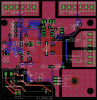
I made a few more changes to the board to accommodate the on/off switch - I don't want the circuit energized all the time, only when equipment is being used. I used a jumper to make a break in the incoming 120VAC to a rocker switch, see J2 and associated traces on the bottom left corner. The rocker will be mounted on the top side of the box.

I noticed that R10 value of 1.5k seems a bit too large yielding 1/3 mA (I=V/R 5V/1.5k Ω) to J1 which feeds the LED for circuit on/off status. Should I swap that out for perhaps a 470Ω resistor giving something closer to 10mA?

Thanks for all your help, amazingly we are close to completing phase 1! LOL :)
Edit: I do not have the standoffs sourced yet - they want nearly 1/2$ for 1 standoff from Digi-Key!!!


upload_2014-10-1_1-41-22.png
 
Last edited:

chopnhack

Apr 28, 2014
1,576
Joined
Apr 28, 2014
Messages
1,576
I thought we had chosen a high-efficiency LED (http://www.digikey.com/product-detail/en/LTL2R3KGD-EM/160-1852-ND/2675131) for the power indicator, to operate at 2 mA. That's the amount I allowed in the current budget. In that case, VF is typically 1.8V so R10 would be 1K6.

Looks good!

Oops, my mistake!! It wasn't a 1/3mA it was 3mA. Yes, I found the discussion back in posts ~95-99. Excellent, I will update the BOM on that. Do you think I should submit the board for manufacture or are there any other things I should check?
 

KrisBlueNZ

Sadly passed away in 2015
Nov 28, 2011
8,393
Joined
Nov 28, 2011
Messages
8,393
You might want to add chamferred corners instead of right-angles in tracks, but that's just cosmetic. You could add a pin 1 marking for the ICP connector, though you've used a polarised connector there so arguably that's not needed.

You could re-check the dimensions and pin positions and hole sizes for components like the relay, the 1 µF capacitor, electrolytics, connectors...

Did it pass a netcheck? Did it pass a DRC including a clearance check? Have you inspected each layer individually?
 

chopnhack

Apr 28, 2014
1,576
Joined
Apr 28, 2014
Messages
1,576
You might want to add chamferred corners instead of right-angles in tracks, but that's just cosmetic. You could add a pin 1 marking for the ICP connector, though you've used a polarised connector there so arguably that's not needed.

I thought that it did improve longevity of the traces, something about current not "hitting" a right angle and scouring away at the trace. I will do it, I think the software has a miter function.
You could re-check the dimensions and pin positions and hole sizes for components like the relay, the 1 µF capacitor, electrolytics, connectors...
I did that as I constructed the BOM. As I entered each piece I checked the given size and pin out locations against my PCB.
Did it pass a netcheck? Did it pass a DRC including a clearance check? Have you inspected each layer individually?
check and check, the only issue that came up was "drill distance", but when I submitted it to the board house, they didn't have an issue quoting it. Should I pursue the issue?
 

KrisBlueNZ

Sadly passed away in 2015
Nov 28, 2011
8,393
Joined
Nov 28, 2011
Messages
8,393
AFAIK square corners don't make any difference except at high frequencies, so that would only be relevant to the TPS54062. It's just a cosmetic thing. Square corners look like lazy work to me :)

Why do you say drill distance was an issue? Does it seem a lot longer than you expected?
 

chopnhack

Apr 28, 2014
1,576
Joined
Apr 28, 2014
Messages
1,576
Lazy? Maybe, however, I am typically very persistent ;-)

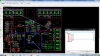
The software is stating drill distance, I haven't a clue as to what its referring to...

upload_2014-10-1_17-23-58.png
 
Top