Help Identify PJ742K chip

Jeen

May 19, 2021
12
Joined
May 19, 2021
Messages
12
Got this laptop that doesn't work and was going to try to identify and repair the issue. I'm a novice to this sort of thing.
laptop model Asus fx503V
zero response when plugging in power supply. no lights, no response when hitting power button.

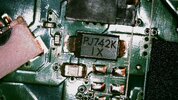
I opened up the frame and looked for any burnt areas, but everything looked clean. I tried performing continuity tests starting with the largest chips first and came across the PJ742K. Continuity test failed on this particular chip. I don't know what it is or, don't laugh, if a continuity test would even work here.

The chip is in close proximity to where the power comes into the machine. The black block just above it is the power cable.
I tried googling it, but because I don't know what kind of chip this is, I don't know where to start in terms of codes. closest I got was a zener diode.
 

Attachments

  • WIN_20250620_10_39_34_Pro.jpg
    WIN_20250620_10_39_34_Pro.jpg
    360.7 KB · Views: 4

JP-Stereo

Feb 13, 2025
15
Joined
Feb 13, 2025
Messages
15
This is not a "CHIP".
This is a capacitor, inductor or a resistance...
Just check if it have a reading of around 740kohm with a multimeter.
If so it's a good resistor.
 

Jeen

May 19, 2021
12
Joined
May 19, 2021
Messages
12
Thank you everyone for the suggestions. I'll try to get in there in the next couple of days and try out your suggestions and post my results.

I also notice that two of you linked to taobao.com. I'll poke around there a little more with the given information and see what comes up.
 

Jeen

May 19, 2021
12
Joined
May 19, 2021
Messages
12
Went ahead and performed the tests. resistance on that circuit was sitting about 111.5k, I am thinking it is a resistor and it's probably still working.

I also noticed my universal power supply is short about 2amps for the laptop's power requirements. It's also probably short 60watts from the 120watts requirement. The give away there was a problem is that the light on the power supply turns off when I plug it in. It could be a short, but I can't be sure until I have a "oem" replacement part to test with.

In any case, the requested circuit has been identified enough that it can be tested. I will proceed with closing this thread. Thanks for the help, everyone.
 

Harald Kapp

Moderator
Moderator
Nov 17, 2011
14,271
Joined
Nov 17, 2011
Messages
14,271
I am thinking it is a resistor
With 99.9999999 % certainty it is not. The marking is completely atypical for a resistor. It's more like a diode.

The website I linked shows no details, not even with the help of google translate. But it definitely shows the component as a diode.
To check the component you will have to remove it from the circuit and use the diode test function of your multimeter to verify the basic operation (go/nogo) of the diode.
Note: testing components in circuit requires special equipment to isolate the measurement from the influences of other components. You can't do that with a multimeter alone. That's why I suggest to remove the diode from the circuit for measurement.

The give away there was a problem is that the light on the power supply turns off when I plug it in.
Very likely the overcurrent protection is being activated, shutting down the power supply.
Always make sure to exclude external potential sources of error - as a mismatch in the power supply - before diving into the analysis of a circuit.
 

Jeen

May 19, 2021
12
Joined
May 19, 2021
Messages
12
Okay. I goofed up. I just had an underpowered power supply. The new one just came in and it powers up fine. I didn't check the power requirements as Harald Kapp had mentioned. Thanks for all the help everyone.
 

davenn

Moderator
Sep 5, 2009
14,470
Joined
Sep 5, 2009
Messages
14,470
This is not a "CHIP".
This is a capacitor, inductor or a resistance...
Just check if it have a reading of around 740kohm with a multimeter.
If so it's a good resistor.

no it isnt
 

davenn

Moderator
Sep 5, 2009
14,470
Joined
Sep 5, 2009
Messages
14,470
Got this laptop that doesn't work and was going to try to identify and repair the issue. I'm a novice to this sort of thing.
laptop model Asus fx503V
zero response when plugging in power supply. no lights, no response when hitting power button.

I opened up the frame and looked for any burnt areas, but everything looked clean. I tried performing continuity tests starting with the largest chips first and came across the PJ742K. Continuity test failed on this particular chip. I don't know what it is or, don't laugh, if a continuity test would even work here.

The chip is in close proximity to where the power comes into the machine. The black block just above it is the power cable.
I tried googling it, but because I don't know what kind of chip this is, I don't know where to start in terms of codes. closest I got was a zener diode.

It 99% probability of being a diode
 
Top