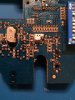
Which Electronic Component is this?

H2814D

Nov 4, 2017
258
Joined
Nov 4, 2017
Messages
258
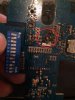
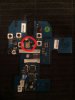
Hi all. I am trying to identify an electronic component on a PCB contained in a remote control transmitter used for a remote controlled helicopter. I have attached a picture of the front and back of the board. The component I am trying to identify is circled in red on one pic. The picture of the other side of the board is also circled in red, so you can see that the other side may have some type of heat sync or radio wave blocking metal foil (?).

It is 2.3 mm x 4.14 mm in rectangular size and has what appears to be three soldered legs on one side and the other side appears to be soldered/grounded to the foil. It also has these numbers/letters stamped on the top of the component: K5 741. A search does not come up with anything under those numbers.

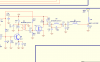
My searches have led me to believe it is possibly a transistor or a transformer. I have also attached the schematic diagram. The part I think it is is labeled as "Q4". I cannot find the designated electronics symbol for Q4, so that is why I am confused as to what it is. The parts list for this component has this information on it: Footprint: MOS-N1, Part Type: RD01, Designator: Q4.

The reason I need to know the part is because I have another of the same transmitter with that particular component burnt, along with the resistor positioned on the board directly off of the 12v dc power supply. I can identify the resistor.

If you can identify the component, is there a way to determine a replacement?

Thanks in advance for your reply.
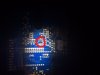
 

Attachments

  • PCB Component.jpg
    PCB Component.jpg
    25.2 KB · Views: 190
  • PCB Front.jpg
    PCB Front.jpg
    48.8 KB · Views: 191
  • SCHEMATICS-635854.pdf
    62.2 KB · Views: 111

davenn

Moderator
Sep 5, 2009
14,470
Joined
Sep 5, 2009
Messages
14,470
you photo of the board is difficult to see ... it's pretty small

The part I think it is is labeled as "Q4".

Q on a pcb = transistor

I have also attached the schematic diagram. The part I think it is labelled as "Q4". I cannot find the designated electronics symbol for Q4, so that is why I am confused as to what it is.

I assume you didn't go over the whole schematic ;)

Q4 in the schematic is the transmitter output transistor .... in this case a FET


upload_2017-11-4_16-37-43.png
 

Reset

Oct 25, 2017
6
Joined
Oct 25, 2017
Messages
6
Hi all. I am trying to identify an electronic component on a PCB contained in a remote control transmitter used for a remote controlled helicopter. I have attached a picture of the front and back of the board. The component I am trying to identify is circled in red on one pic. The picture of the other side of the board is also circled in red, so you can see that the other side may have some type of heat sync or radio wave blocking metal foil (?).

It is 2.3 mm x 4.14 mm in rectangular size and has what appears to be three soldered legs on one side and the other side appears to be soldered/grounded to the foil. It also has these numbers/letters stamped on the top of the component: K5 741. A search does not come up with anything under those numbers.

My searches have led me to believe it is possibly a transistor or a transformer. I have also attached the schematic diagram. The part I think it is is labeled as "Q4". I cannot find the designated electronics symbol for Q4, so that is why I am confused as to what it is. The parts list for this component has this information on it: Footprint: MOS-N1, Part Type: RD01, Designator: Q4.

The reason I need to know the part is because I have another of the same transmitter with that particular component burnt, along with the resistor positioned on the board directly off of the 12v dc power supply. I can identify the resistor.

If you can identify the component, is there a way to determine a replacement?

Thanks in advance for your reply.
RD01MUS Power MOSFET
http://www.mitsubishielectric.com/s...rfdiscrete/siliconrfdiscrete_lv4/rd01mus1.pdf
 

H2814D

Nov 4, 2017
258
Joined
Nov 4, 2017
Messages
258
you photo of the board is difficult to see ... it's pretty small


Q on a pcb = transistor


I assume you didn't go over the whole schematic ;)

Q4 in the schematic is the transmitter output transistor .... in this case a FET


View attachment 37234
Thanks for the reply davenn. Actually, I did go over the schematic, many times. I tried to figure out what Q4 was before finally breaking down and coming to the forum. I am certainly not versed in electronic component identification, but I seem to get lucky sometimes in tearing these things apart.

I suppose my post wasn't clear as to what I meant when I said I couldn't find the designated component symbol for Q4. What I meant was I couldn't find what that symbol (designated as Q4) means by comparing it to the glossary of electronic component symbols. I knew where it was on the schematic, just not what specific component it was. The Q4 symbol on my schematic looks like the side of a chair on its back where you can only see the two right legs and the transistor symbol has legs that angle away. :) That was why I was confused as to what it actually was. I was looking through the symbol glossary for a symbol that looked like a chair. And thanks for this: "Q on a pcb = transistor" because I didn't even know that until you said so.

So it looks like reset may have provided me with the component I am looking for. My next task will be trying to get one of those.

So thanks, davenn, for the education and the response.
HD.
 

davenn

Moderator
Sep 5, 2009
14,470
Joined
Sep 5, 2009
Messages
14,470
The Q4 symbol on my schematic looks like the side of a chair on its back where you can only see the two right legs and the transistor symbol has legs that angle away.

A FET is a type of transistor as on your schematic

Angled legs are for a BJT transistor

Hi reset. Thank you for replying. Is the part you supplied the information on the specific part I need to get?

yes

Or are there other like components and I will need to find the correct replacement for my application?

there may be replacement equivalents that at do the same job, but it is the preferable one to get


Dave
 

H2814D

Nov 4, 2017
258
Joined
Nov 4, 2017
Messages
258
Again, thanks. I did , however, determine that RD01MUS2 is the correct replacement, based on the K5 marking on the original component. Apparently, the RD01MUS1 has a K2 marking. I found the parts and have ordered them. Once I get them and have finished the replacement, I will report back.

HD.
 

H2814D

Nov 4, 2017
258
Joined
Nov 4, 2017
Messages
258
Ok folks. I was able to source the component (RD01MUS2, an RF Transistor) on Ebay. Ten of them for $10, shipped from China. So I had to wait for them to get here. Anyway, they arrived.

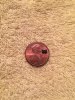
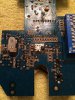
Today I was able to start working on the project, which involved removing the fried component and a resistor that had apparently fried at the same time. The PCB where the transistor was was burnt pretty bad and the original traces were gone. I had the schematic (you can see it up above), so I knew what went where from the new transistor. The problem was that the component was pretty small and was surface mount, so I had to solder wires to the component to get them to the other components. Not too bad, but I may have overheated on the first try, but since I had nine more of them I just decided to not risk wasted time by chancing it.

Anyway, the replacement soldering went well and the new component was attached to the PCB. Once I put the thing (a radio control transmitter for RC aircraft) back together, it worked. Made my day for sure.

So I just wanted to come back here and say thanks to those of you who had provided the original guidance and information I needed to try this. By the way, this is not my line of work (you can probably tell by the photos), but more of a challenge and a hobby. I seriously got lucky I think.
 

Attachments

  • Photo of Burnt Transistor 1.jpg
    Photo of Burnt Transistor 1.jpg
    65.1 KB · Views: 109
  • Photo of Burnt Resistor 2.jpg
    Photo of Burnt Resistor 2.jpg
    26.7 KB · Views: 97
  • New Component Size Reference.JPG
    New Component Size Reference.JPG
    69.9 KB · Views: 97
  • PCB with Component Removed.JPG
    PCB with Component Removed.JPG
    79.4 KB · Views: 93
  • New Transistor Installed.JPG
    New Transistor Installed.JPG
    70.4 KB · Views: 97

kellys_eye

Jun 25, 2010
6,512
Joined
Jun 25, 2010
Messages
6,512
....and thank you for getting back to us with the results of your work. Not many people take the time to do this and it's very much appreciated.
 

H2814D

Nov 4, 2017
258
Joined
Nov 4, 2017
Messages
258
You bet, kellys_eye. I've seen many forum posts that just stop without resolution or solution and I always wonder what happened, I didn't want to be 'that guy'.
 
Top