JBL Bar 2.1 Mk2 making screeching sound when audio is played.

superuser726

Mar 8, 2026
9
Joined
Mar 8, 2026
Messages
9
I have a 2yr old JBL Bar 2.1 Mk2. It stopped working about 2–3 months ago and I've opened it up now to try to see what could be the problem.

When playing any audio from any source, it creates a very loud screech sound from the speakers. I have attached a video of the same.


It is only present when audio is being played. It gets louder if volume is increased, but if nothing is being played and volume is at 100, no screeching sound is there.

System sounds like the Bluetooth connected tune also make the same screeching noise.

Today I opened it up. There's a switch-mode power supply and it connects to the main audio board with one pair of wires. This runs at 23V.

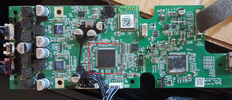
Then at the audio board, there are four big ICs only:

  1. ES8680FSB (DAC?)
  2. EP92A2S4 (HDMI ARC)
  3. 2x Realtek ALC1322 with heatsinks on both (Class-D amp and codec?)

I thought there would be some dedicated IC for the Class-D amp but there's nothing obvious on either side of the board and only those two chips have a heatsink on them.

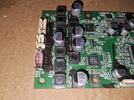
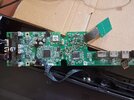
I've attached a pic of the audio board. There's some white goo on the ALC1322 chips from the heatsink.

1772992286920-jpeg.69934


The notable SMD parts:

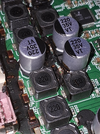
  1. 8 inductors near output pins (220 µH)
  2. Around this, 5 electrolytic capacitors (220 µF 35V)
  3. Little to the right, 1 inductor marked 100 µH
  4. Near this, 2 × 220 µF 16V and one 100 µF 35V capacitors
  5. To the edge of the board there's a 220 µF 16V capacitor

There's two four-pin outputs which are:
L,R Tweeter +ve, -ve and L,R Speaker +ve, -ve.
So total 8 speaker pins.

What all I've measured:

  1. Voltage at the 5 capacitors is 23V
  2. On the capacitors next to the 100 µH inductor, it has 5V
  3. Resistance of speaker output + and - is 98kΩ
  4. Resistance of speaker output + and speaker output - both to ground is 48kΩ
  5. No ICs get very hot when I run it
  6. DC voltage across speaker output is 0.002V

Another very notable thing I noticed was that when I ran the audio board without connecting the speakers, there was the same screeching sound but much fainter coming from the audio board itself.

Touching or holding the inductors would only barely reduce the volume of the noise.

Connecting the speakers would amplify this same noise about 10× as it would be coming from both the board and the speakers.

Please guide me on what to do next, as in what might be the problem and what I will need to do to fix it.
 

Attachments

  • 1772992286920.jpeg
    1772992286920.jpeg
    342 KB · Views: 35

Harald Kapp

Moderator
Moderator
Nov 17, 2011
14,273
Joined
Nov 17, 2011
Messages
14,273
Visually check the electrolytic capacitors for leackage or bulging.

Next check the electrolytic capacitors electrically. If you have access to an oscilloscope, check for AC ripple. Electrolytic capacitors lose capacitance with age and don't filter the DC voltage well enough.
Lacking an oscilloscope, use a multimeter in AC range. Ripple should not exceed a few millivolts.
If you find a suspect capacitor, de-solder it and check it, preferably with a capacitance/ESR meter. Or simply replace it prophylactically.
 

superuser726

Mar 8, 2026
9
Joined
Mar 8, 2026
Messages
9
Visually check the electrolytic capacitors for leackage or bulging.

Next check the electrolytic capacitors electrically. If you have access to an oscilloscope, check for AC ripple. Electrolytic capacitors lose capacitance with age and don't filter the DC voltage well enough.
Lacking an oscilloscope, use a multimeter in AC range. Ripple should not exceed a few millivolts.
If you find a suspect capacitor, de-solder it and check it, preferably with a capacitance/ESR meter. Or simply replace it prophylactically.
Hi,
Is this corrosion from leakage? It was under the black glue that was on the board.


1773146549054.png


1773146577450.png


Also, I have tried measuring the AC voltage across the capacitors, but is this value possible or am I doing something wrong?


I am getting this across most of the capacitors.
 

Harald Kapp

Moderator
Moderator
Nov 17, 2011
14,273
Joined
Nov 17, 2011
Messages
14,273
Is this corrosion from leakage?
Probably not but a residue of or discoloration caused by the glue.

I have tried measuring the AC voltage across the capacitors, but is this value possible or am I doing something wrong?
50 V (AC) across an electrolytic capacitor points to something wrong with your measurements. However, I can't see any obvious fault in the video.
 

superuser726

Mar 8, 2026
9
Joined
Mar 8, 2026
Messages
9
Probably not but a residue of or discoloration caused by the glue.


50 V (AC) across an electrolytic capacitor points to something wrong with your measurements. However, I can't see any obvious fault in the video.

What do you think I should do now? I've found a place where I can buy these capacitors, should I replace those?

Or does this seem more like a fault wit some IC which will be hard to source?
 

Harald Kapp

Moderator
Moderator
Nov 17, 2011
14,273
Joined
Nov 17, 2011
Messages
14,273
Assuming the measurement is o.k. and you really have 50 V (AC) across the capacitors, replacing these will not help. Then there is likely a fault in the power supply which wil be hard to locate without a schematic of the board. Also 50 V (AC) across these capacitors will most likely have destroyed some of the chips.
Is the board supplied by an AC source or a DC source? If your source is AC, find the rectifier on the PCB and check it (de-solder, the measure the diodes). If the board is supplied by a DC source, check the output of the source for voltage level and AC components on top of the DC.
 

superuser726

Mar 8, 2026
9
Joined
Mar 8, 2026
Messages
9
I do have the schematic of the board.
The PSU is a separate board which receives mains and then outputs 23V DC.

I have not seen any issues till now on that board, it looks fine.

I asked another guy who has some experience with JBL boards, he said only the audio processing chip (ES8680FSB Crescendo 3P) needed to be replaced.
I have attached the schematic and the IC he said needed to be replaced

1773219722142.png
 

Attachments

  • circuit diagram.pdf
    1.1 MB · Views: 1

superuser726

Mar 8, 2026
9
Joined
Mar 8, 2026
Messages
9
Assuming the measurement is o.k. and you really have 50 V (AC) across the capacitors, replacing these will not help. Then there is likely a fault in the power supply which wil be hard to locate without a schematic of the board. Also 50 V (AC) across these capacitors will most likely have destroyed some of the chips.
Is the board supplied by an AC source or a DC source? If your source is AC, find the rectifier on the PCB and check it (de-solder, the measure the diodes). If the board is supplied by a DC source, check the output of the source for voltage level and AC components on top of the DC.
 

Attachments

  • circuit diagram.pdf
    1.1 MB · Views: 5

Harald Kapp

Moderator
Moderator
Nov 17, 2011
14,273
Joined
Nov 17, 2011
Messages
14,273
he said only the audio processing chip (ES8680FSB Crescendo 3P) needed to be replaced.
I'm by no means an expert with that sound bar or the circuit, and will not question the xpertise of someone with more experoence with that design. But a "screeching sound" in my opinion wouldn't come from the audio processor itself.
It is imho more likely to come from one or more of the inductors, especially as you mention the sound being present (although not so loud) when the speakers are not connected. So a fault in the signal chain that outputs the schreeching sound via the speakers can be excluded.

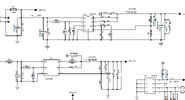
A known phenomenon, however, is inductors making audible noise when overstressed. The schematic shows quite a few switch mode step-down regulators, for example these on page 14:
1773220737174.png
Check the output voltages on all these regulators versus the specified value on the schematic. Also check if any of the step-down regulator associated components becomes extraordinarily warm/hot.
 

superuser726

Mar 8, 2026
9
Joined
Mar 8, 2026
Messages
9
I'm by no means an expert with that sound bar or the circuit, and will not question the xpertise of someone with more experoence with that design. But a "screeching sound" in my opinion wouldn't come from the audio processor itself.
It is imho more likely to come from one or more of the inductors, especially as you mention the sound being present (although not so loud) when the speakers are not connected. So a fault in the signal chain that outputs the schreeching sound via the speakers can be excluded.

A known phenomenon, however, is inductors making audible noise when overstressed. The schematic shows quite a few switch mode step-down regulators, for example these on page 14:
View attachment 69954
Check the output voltages on all these regulators versus the specified value on the schematic. Also check if any of the step-down regulator associated components becomes extraordinarily warm/hot.
The model in the schematic and the board I have is the same but the numbering seems to be all off, I visually identified and figured out the step-down regulators.

Also the class d amps are also different in that board.
I wasn't able to find a line with 1.35V
No regulator or similar components are getting hot while playing audio

3.3V is around 3.28-3.33 volts
5V ones are around 5.1V
HDMI 1.8V one is 1.8V exactly

I guess all the regulators seem to be fine, I don't understand what is causing this noise now.
 

Martaine2005

May 12, 2015
5,277
Joined
May 12, 2015
Messages
5,277
As suggested above, filtering appears to be the main reason.
You really need to check the ESR of those capacitors before you go down a rabbit hole.
As also mentioned, the fact that the audio/noise increases with volume, suggests that the audio IC’s, preamp and amp are working.
 

superuser726

Mar 8, 2026
9
Joined
Mar 8, 2026
Messages
9
As suggested above, filtering appears to be the main reason.
You really need to check the ESR of those capacitors before you go down a rabbit hole.
As also mentioned, the fact that the audio/noise increases with volume, suggests that the audio IC’s, preamp and amp are working.

From what I have calculated, the replacement capacitors (even taking into account MOQs) cost much less than getting a decent ESR meter. I'm moderately good at soldering and have all the equipment needed for SMD soldering, should I just get the replacement capacitors?
I was thinking this had to be an issue with the audio IC or something, but many people on this site and other sites have now said it's not likely to be that... gives me hope.
 

Martaine2005

May 12, 2015
5,277
Joined
May 12, 2015
Messages
5,277
Yes, change the caps. But get them from a reputable supplier. Cheap deals on eBay or similar, you never know what you’ll get.
 

superuser726

Mar 8, 2026
9
Joined
Mar 8, 2026
Messages
9
Yes, change the caps. But get them from a reputable supplier. Cheap deals on eBay or similar, you never know what you’ll get.
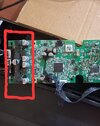
So I replaced the capacitors that I have circled here with new capacitors.

8650.jpg


Unfortunately it has done nothing to the sound issue.


It still sounds the same. Also I am still able to measure 50V AC across these capacitors.

Pls help
 
Last edited:

WHONOES

May 20, 2017
1,242
Joined
May 20, 2017
Messages
1,242
Some Switch Mode Power Supplies tend to go into "Intermittent mode" when lightly loaded. This tends to make the transformer squeak. A fault in the SMPS feedback loop may cause a similar fault. Either way, a substantial ac ripple will likely be present on the SMPS output. If it is the latter issue, the supply regulation will probably be all over the place.
So, if you can isolate the SMPS from the rest of the circuitry, you could do some basic checks though you may need to put a resistive load on the output(s) in case it is sensitive to being lightly loaded.
It would also be beneficial to have an oscilloscope to aid your fault finding. Amazon sell some tablet devices that do not cost a lot of money. It would need a bandwidth of at least 1MHz.
With the aid of your scope you could indeed see if the supply is oscillating and maybe even trace it to its source.
 
Top