Display Images on E-Paper RTL8722

Michael Zhang

Mar 5, 2020
21
Joined
Mar 5, 2020
Messages
21
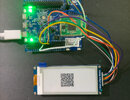
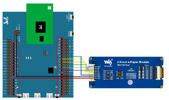
In this example, use the Ameba RTL8722 module connects to a Waveshare 2.9inch e-Paper module to display a few QR codes. The display uses the flexible substrate as a base plate, with an interface and a reference system design. 

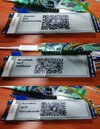
Firstly, you need to prepare a picture/photo in the format of 296×128 pixels. It is easy to find a photo resizing tool online and download the generated image in JPG format. Then link all hardware and upload code in to the hardware. Upon successfully upload the sample code and press the reset button, you need to wait for around 1~2 seconds for the e-Paper module to fresh its screen.  Then the screen will start to display an image for 5 seconds first, then 3 different QR codes will be displayed every 5 seconds (showing in the screenshot below, y may scan the QR codes and find out more information if you wish to). Lastly, a gif in which forms of 3 frames will be displayed for a few seconds.
3.png

5.jpg


Michael Zhang

Mar 5, 2020
21
Joined
Mar 5, 2020
Messages
21
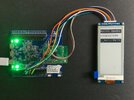
The second demo is controlling the pixel directly. In this example, we use the Ameba RTL8722 module connects to a Waveshare 2.9inch e-Paper module to display a few QR codes. The display uses the flexible substrate as the base plate, with interface and a reference system design.

The QR code is generated from URL and has restructured into hex data. The data is sent to the screen to directly control the pixel and display.

https://www.amebaiot.com/en/amebad-arduino-epaper-qrocde/

5.png


Michael Zhang

Mar 5, 2020
21
Joined
Mar 5, 2020
Messages
21
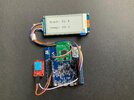
The third demo is display the texts. In this example, we use the Ameba RTL8722 module connects to a Waveshare 2.9inch e-Paper module to display a few texts. The display uses the flexible substrate as the base plate, with interface and a reference system design.

The text is generated from customized libraries and has restructured into hex data. The data is sent to the screen to directly control the pixel and display.

https://www.amebaiot.com/en/amebad-arduino-epaper-text/

5.jpg


Michael Zhang

Mar 5, 2020
21
Joined
Mar 5, 2020
Messages
21
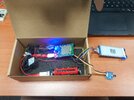
The last demo is display the real time data with powersave mode. In this example, we use the Ameba RTL8722 module connects to a Waveshare 2.9inch e-Paper module to display a few texts data from the DHT sensor. The display uses the flexible substrate as the base plate, with interface and a reference system design. The DHT sensor reads data and displays on Eink screen when system is awake. After 5 seconds system auto enter DeepSleep Mode for power save. System will wake up by wakeup source.

https://www.amebaiot.com/en/amebad-arduino-deepsleepmode-elink/

MicrosoftTeams-image.png


Michael Zhang

Mar 5, 2020
21
Joined
Mar 5, 2020
Messages
21
There is a new Eink related project starting. Guys, anybody could give me some suggestions about how to use RFID by cell phone?


davidklayer

Jul 18, 2022
1
Joined
Jul 18, 2022
Messages
1
The third demo is display the texts. In this example, we use the Ameba RTL8722 module connects to a Waveshare 2.9inch e-Paper module to display a few texts. The display uses the flexible substrate as the base plate, with interface and a reference system design.

The text is generated from customized libraries and has restructured into hex data. The data is sent to the screen to directly control the pixel art and display.

https://www.amebaiot.com/en/amebad-arduino-epaper-text/

View attachment 43971
This is so beautiful

 
Top