Guitar Aplifier

Hero999

Oct 28, 2007
2,433
Joined
Oct 28, 2007
Messages
2,433
Ok, I messured voltages somehow...:

VBE of Q4 (voltage accross R10) was 0.6V
VBE of Q3 was 0.6V
VBE of Q5 was 0.3V
VBE of Q6 was 0.2V
Looks good up until Q5 and Q6.

Author said, that I must check also voltage across Collector of Q5 and negative ground and across Emitter of Q5 and negative ground. Both voltages should be half of voltage supply. However, voltage across Collector and negative ground was 34V, and across Emitter and negative ground was 15V. Can that explain my problem? What should I do?
That sounds right to me.

Did you manage to stop it oscillating?

If not then it's pointless trying to measure DC voltages because the AC could interfere with your meter causing it to generate inaccurate readings.

Look at the schematic, rather than just assuming what you've been told is true.

The voltage between Q5's collector and 0V should be equal to the DC supply voltage.

The voltage between Q5's emitter and 0V should be approximately equal to half the supply voltage.

I simulated it with a DC voltage of 30V and the voltage on Q5's emitter is 13.6V which is within 10% of the estimated value.

I don't know what is wrong with your circuit, your VBE measurements of Q5 and Q6 suggest that they should both be off, yet the high quiescent current indicates they're both conducting too much and the emitter voltage of Q5 also suggests they're both conducting.
 

fikic

Apr 9, 2009
87
Joined
Apr 9, 2009
Messages
87
Did you manage to stop it oscillating?
I swiched circuit on and loudspeaker screamed, then I quick turned it of and on again and it shuted up so I could make messurements. Should I still account your advice, to replace Q4? I don't understand your explanation for VBE of Q5 and Q6. Why is that voltage so low? Can you explain in newbe language please?
 

fikic

Apr 9, 2009
87
Joined
Apr 9, 2009
Messages
87
What if DC supply voltage is too high? The secundary of my transformer is 24V, but when I messure voltage in fuse socket (without fuse connected), I read 31V. This is 7V higher. Is this becouse of the filter capacitor, or is supply voltage too high?


Hero999

Oct 28, 2007
2,433
Joined
Oct 28, 2007
Messages
2,433
It's pretty normal for a transformer to output a much higher voltage when lightly loaded and the mains is probably also on the high side. The circuit should be designed to account for this but this doesn't seem to be the case as the filter capacitor is specified for 35V, it should be 50V.

The DC voltage across the filter capacitor should be about 42V..

I'll rerun the simulation with the DC voltage set to 42V and see what happens.

EDIT:
I've simulated it and it seems to work, R9 needed readjusting but it works.

Of course this doesn't mean it'll work in real life but I don't see why not.

 
Last edited by a moderator:

fikic

Apr 9, 2009
87
Joined
Apr 9, 2009
Messages
87
Any new suggestions? It seems that somewhere in circuit one component conduct too much current. Somewhere is mistake. But where? Why is current so high in fuse socket?


Hero999

Oct 28, 2007
2,433
Joined
Oct 28, 2007
Messages
2,433
Simulate it in LTSpice.

That will give you the approximate voltages and currents you'll expect in different parts of the circuit.

I'll post the files if you like.


fikic

Apr 9, 2009
87
Joined
Apr 9, 2009
Messages
87
I tryed circuit without speaker. Instead of a speaker, I connected 12V, 21W lamp. It was unable to read current drawing, becouse one moment was 13mA and in the other was 30mA..it was changing every half second or faster. Lamp was little flashing. What could explain that?


Hero999

Oct 28, 2007
2,433
Joined
Oct 28, 2007
Messages
2,433
It's oscillating.

An incandescent lamp is a non-linear load, when the filament is cold, its resistance will be very low, when the filament is hot, its resistance will be much higher.

The amplifier is only designed to power a 4Ω to 8Ω speaker, connecting a lower impedance load, such as an incandescent lamp with a cold filament, could damage Q5 and Q6.

If you want to test it without the speaker, use a 3.9Ω to 8.2Ω resistor as a dummy load, like I told you before.


fikic

Apr 9, 2009
87
Joined
Apr 9, 2009
Messages
87
But why is oscilating? It is also oscilating with speaker. How can I stop that?


audioguru2

Apr 6, 2004
12,026
Joined
Apr 6, 2004
Messages
12,026
A transistor performs like an oscillator if its pins are connected backwards and there is a capacitor on it.
Check the datasheet for the photo of the pins on every transistor in your circuit.


fikic

Apr 9, 2009
87
Joined
Apr 9, 2009
Messages
87
I checked them all. They are all correct soldered. Only option left, I think is poor solder joint somewhere in the PCB. I am now making new PCB with differend software to make more mechanical compact pads. I will report.


Hero999

Oct 28, 2007
2,433
Joined
Oct 28, 2007
Messages
2,433

Attachments

  • 10W_Guitar_Amp.asc.txt
    6.4 KB · Views: 3
  • potentiometer.sub.txt
    184 bytes · Views: 2
  • potentiometer_EU.asy..txt
    633 bytes · Views: 2

Hero999

Oct 28, 2007
2,433
Joined
Oct 28, 2007
Messages
2,433
You'll need to upgrade LTSpice's default transistor library.

Back up the existing LTSpice/lib/cmp/standard.bjt

Remove the .txt extension from the attachment and save it in the LTSpice/lib/cmp directory..

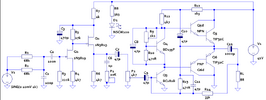
I've also included a picture of my LTSpice implementation of the circuit, not that Q5 and Q6 are drawn as two transistors because I couldn't find a Darlington model.

standard.bjt.txt

10W_Guitar_Amp.png


Attachments

  • standard.bjt.txt
    109.5 KB · Views: 2

fikic

Apr 9, 2009
87
Joined
Apr 9, 2009
Messages
87
How can I see voltage betwen ground and some element. C13 for example...There should be higher voltage then 24V. And how can I turn trimmer? I don't  know this program much.

 
Last edited by a moderator:

Hero999

Oct 28, 2007
2,433
Joined
Oct 28, 2007
Messages
2,433
You've probably noticed that there is no C13 or transformer in the schematic. This is because, to make the simulation run faster, I've replaced them both with V1 which is set to 42V as it is the voltage you said is across C13.

I assume you're talking about the DC voltage?

There are two ways to get the voltage at a certain point.

1) Use the transient analysis, should be the default, and set the V2 to 0V and select run from the simulate menu. Now click on the node and a straight line will appear on the graph, if you click on the legend on the graph a cursor will appear, allowing you to read the exact voltage.

2) Use the 'calculate DC operating point' tool. Select 'Edit Simulation Command' from the simulation menu, click on the 'DC op pnt' tab, click 'ok', place the cursor anywhere on the schematic and click, you'll see a label '.op' appear, this is the simulation command. Select 'run' from the simulate menu, a list of voltages at all the nodes will appear, the trouble is that the nodes will have obscure names such as V(n006) unless you've names them using the label net tool.

To turn a pot, right click on the symbol and edit the 'wiper=' setting, the number should be from 0 to 1 and represents the position of the wiper, for example 0.5 is half way along. LTSpice is not an interactive package so you'll need re-run the simulation every time you've made an adjustment.

LTSpice is a very powerful simulation package, but it does have a steep learning curve if you don't have much experience with electronics or other simulation software.


fikic

Apr 9, 2009
87
Joined
Apr 9, 2009
Messages
87
These voltages are just betwen mouse pointer and 0V. But how can I messure VBE of some transistor for example?


Hero999

Oct 28, 2007
2,433
Joined
Oct 28, 2007
Messages
2,433
The voltages are all referenced to 0V.

To measure the voltage between two points, simply subtract the voltage at one point from another.

It's probably easier to use a calculator but LTSpice can do it for you.

For example with this circuit:

  • Set the simulation command to transient analysis and run the simulation command.
  • Click Q5d's base to get the base voltage.
  • With the schematic window selected wave the mouse cursor over Q5's emitter, the cursor will change to a red probe, note the net name displayed in the bottom left hand side of the screen 'Click to plot V(N009)'
  • Right click on the graph legend 'V(n005)', a dialogue box will appear.
  • In the text box, append '- V(n009)' (with out the ') to the text, it should look like 'V(n005)-V(n009)' Don't worry about whether it's upper or lower case, SPICE is case insensitive.
  • Click OK.
  • The line on the graph will be equal to the voltage between the base and emitter, again you can click on the graph legend to get the voltage at any point in time.

In this example, with the input set to zero Q5(VBE) = 1.24709V, note that because Q5 is really made from Q5 and Q5d, the base emitter voltage has been measured across them both.
 

fikic

Apr 9, 2009
87
Joined
Apr 9, 2009
Messages
87
I made new differend and better PCB, but circuit is still oscilating...only change, I made from original schematic was n-fet transistors Q1 and Q2. I used BF244A
It is kind of a inposible to make new PCB and connect transistors wrong again to make circuit oscillate...I checked them again and I can't find error. What else can cause oscillating?


fikic

Apr 9, 2009
87
Joined
Apr 9, 2009
Messages
87
I forgot to say, that it's only oscillating, when I power on circuit and have volume potentiometer set to minimum resistance..If I turn it to something bigger than 0Ohms it's cool to turn it back to 0Ohm when I power the circuit on. I am now reading current drawing from fuse of 25mA (I turned R9 to half of full resistance)....But sound is not ok..it is waving. What voltages should I messure and must be the same as in the LTSpice? I am posting some pictures from my messuring procedure. Second picture is speaker I am using now for testing. It's 4Ohms 15W speaker from old TV:

View attachment 40664

View attachment 40665

 
Top