A couple of cautions when you are working first time with micro boards.
1) When using a scope make sure ground clip on probe cant accidentally brush up
against other part or board leads or board traces. Make sure when connecting to a ground
on board it stays put. I have hosed more boards than I care to mention because of
flopping around probe ground lead clips.
2) If you are attaching to pins signals that may, for whatever reason, and have voltages
> board micro power supply, use a R between pin and signal, say 4.7K. On any pin in CMOS
are internal parasitic diodes that if you raise pin one diode drop (+.7V) above its Vdd
( +5V or +3.3V supply to processor on board) or less than ground (more negative
than -.7V) large current can flow and hose the micro. Once you are sure in design your V's
to pins constrained to > 0V and < micro power pin then you can eliminate the R.
Note if pin driving a led for example, that will reduce its available current from the pin.
Also keep in mind most boards have a V regulator on them that feeds micro. But key
V's are the actual micro supplied V, pins can only range roughly between 0V and the
micro Vdd (the regulated V used for micro).
3) Install Arduino IDE on your system, as well as block programmer software if you are
going to use it.
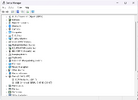
4) You have to set COM part board is using for your software. Go into windows device
manager, expand the COM port, plug in board, and watch for the board to pop up a new entry in ports
list. That will show its assigned COM port.
Now for the frustrating part, some boards do not have correct firmware installed on board.
There are tons of resources from other users on how to solve this problem. Patience is
key. Don't give up. Use forums for help, Arduino has a great forum, and of course this
forum can help.
5) To program the 8 pin parts you can use the Arduino board. You wire up the board to the
8 pin part. You have to install programming firmware on it, there are quite a few videos on web to
step you thru this. Once you prog board micro with it, and prog the 8 pin part, you reinstall normal
firmware in it via Arduino IDE, again many videos on doing this.
6) Micros have limits on how much each pin can supply current, and total for all pins. Thats in their
datasheet.
Ref material : https://duckduckgo.com/?q=arduino+interface+pdf&ia=web
Have fun its great stuff with patience and persistence, like any discovery process.
1) When using a scope make sure ground clip on probe cant accidentally brush up
against other part or board leads or board traces. Make sure when connecting to a ground
on board it stays put. I have hosed more boards than I care to mention because of
flopping around probe ground lead clips.
2) If you are attaching to pins signals that may, for whatever reason, and have voltages
> board micro power supply, use a R between pin and signal, say 4.7K. On any pin in CMOS
are internal parasitic diodes that if you raise pin one diode drop (+.7V) above its Vdd
( +5V or +3.3V supply to processor on board) or less than ground (more negative
than -.7V) large current can flow and hose the micro. Once you are sure in design your V's
to pins constrained to > 0V and < micro power pin then you can eliminate the R.
Note if pin driving a led for example, that will reduce its available current from the pin.
Also keep in mind most boards have a V regulator on them that feeds micro. But key
V's are the actual micro supplied V, pins can only range roughly between 0V and the
micro Vdd (the regulated V used for micro).
3) Install Arduino IDE on your system, as well as block programmer software if you are
going to use it.
4) You have to set COM part board is using for your software. Go into windows device
manager, expand the COM port, plug in board, and watch for the board to pop up a new entry in ports
list. That will show its assigned COM port.
Now for the frustrating part, some boards do not have correct firmware installed on board.
There are tons of resources from other users on how to solve this problem. Patience is
key. Don't give up. Use forums for help, Arduino has a great forum, and of course this
forum can help.
5) To program the 8 pin parts you can use the Arduino board. You wire up the board to the
8 pin part. You have to install programming firmware on it, there are quite a few videos on web to
step you thru this. Once you prog board micro with it, and prog the 8 pin part, you reinstall normal
firmware in it via Arduino IDE, again many videos on doing this.
6) Micros have limits on how much each pin can supply current, and total for all pins. Thats in their
datasheet.
Ref material : https://duckduckgo.com/?q=arduino+interface+pdf&ia=web
Have fun its great stuff with patience and persistence, like any discovery process.
Last edited:


