switch for my room

jones

Mar 31, 2012
11
Joined
Mar 31, 2012
Messages
11
Hello Electronics Point,

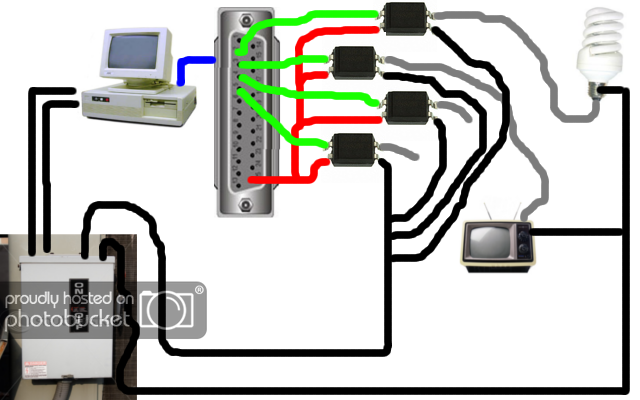
I'm just new here and I have a question. Is it possible for me to have a 220 volts switch using a 3 volts signal? What I'm trying to accomplish is, to switch my room lights on/off using the parallel port DB25 of my computer.

Sorry, I'm into Information Technology but really interested in electronics since grade 4 elementary school. =)

Any help is very much appreciated! Thanks guys in advance.

// Start Edit

By the way, my solution is by using a mechanical motor (but I think, it is not feasible enough). When there's 3 volts flowing, switch on. When there's zero volts, turn off. Mmm... Any ideas?

// End Edit
 
Last edited:

(*steve*)

¡sǝpodᴉʇuɐ ǝɥʇ ɹɐǝɥd
Moderator
Jan 21, 2010
25,510
Joined
Jan 21, 2010
Messages
25,510
It is indeed possible.

Typically you would use an optocoupler to trigger a triac.

It's not quite that simple, and it's not something you should try unless you have experience working with mains voltages.
 

jones

Mar 31, 2012
11
Joined
Mar 31, 2012
Messages
11
It is indeed possible.

Typically you would use an optocoupler to trigger a triac.

It's not quite that simple, and it's not something you should try unless you have experience working with mains voltages.

Thanks! At least I got an idea. Next stop, wikipedia. Maybe the key word I'm looking for years is optocoupler. =)

Again, thanks. (Trying to switch lights thru android device. )
 

(*steve*)

¡sǝpodᴉʇuɐ ǝɥʇ ɹɐǝɥd
Moderator
Jan 21, 2010
25,510
Joined
Jan 21, 2010
Messages
25,510
It is somewhat safer to use the low voltage output to cause a relay to close, and use the relay to switch power.

However, the relay will require more power than you likely have available on that signal output, so you will require a separate power supply. The optocoupler will only require that your signal output can supply (say) 10mA.
 

jones

Mar 31, 2012
11
Joined
Mar 31, 2012
Messages
11
It is somewhat safer to use the low voltage output to cause a relay to close, and use the relay to switch power.

However, the relay will require more power than you likely have available on that signal output, so you will require a separate power supply. The optocoupler will only require that your signal output can supply (say) 10mA.

Uhuh... I hope I got it right. I'll use optocoupler to switch my lights on/off.
Instead of using this one
Broan-NuTone-P65W-rw-154821-221315.jpg
I'll be using this one
4-dip_optocoupler_tmb.jpg
...

By the way, my concept is this...
diagram-1.png


Don't worry, I'll try consulting the engineering department just in case I'm [opps...] off. =)

If I have time, maybe I could connect it to an android (like a remote control).

// Start Edit

Last night I arrived to an article at wikipedia [http://en.wikipedia.org/wiki/Opto-isolator] which describes what Opto-isolator is. Then ended up consulting the google and arrived here [http://www.electronics-tutorials.ws/blog/optocoupler.html]... And this image struck me
opto4.gif

it says photo-transistor, can this handle 220volts? (Sorry, I'm a newbie)

// End Edit
 
Last edited:

Harald Kapp

Moderator
Moderator
Nov 17, 2011
14,271
Joined
Nov 17, 2011
Messages
14,271
The photo triac could be the right component for the job. See for example here: http://www.semicon.toshiba.co.jp/docs/catalog/en/BCE0034_catalog.pdf

Besides being able to handle 220 V, you have to take into account the current you want to switch.

Or you could simply buy a USB controlled extension cord (liek this one: http://www.amazon.co.uk/Ecotek-Standby-Saver-6-Way-Socket/dp/B0017PTD3M/ref=pd_sim_sbs_diy_1)

The so called "USB control" doesn't require any software. It just detects if the 5V from
the USB bus are present and turns on the sockets. Maybe it works with 3V, too.


Harald
 

(*steve*)

¡sǝpodᴉʇuɐ ǝɥʇ ɹɐǝɥd
Moderator
Jan 21, 2010
25,510
Joined
Jan 21, 2010
Messages
25,510
I said it wasn't that simple, right? :)

At the very least you'd ned a series resistance before the optocoupler (you may need another source of power as well in some cases.

AND the optocoupler can't switch a lot of current, so you'd need to use it to switch a meatier device (like a triac).

Oh, another option is a SSR (solid state relay).

(And Harald's suggestion is also good)

There may be other things you need to worry about depending on the load. Also, you're playing with voltages that can kill you so I doubt your college engineering department is going to say "sure, experiment in your dorm room!" :)
 

jones

Mar 31, 2012
11
Joined
Mar 31, 2012
Messages
11
...See for example here: http://www.semicon.toshiba.co.jp/docs/catalog/en/BCE0034_catalog.pdf

...simply buy a USB controlled extension cord (liek this one: http://www.amazon.co.uk/Ecotek-Standby-Saver-6-Way-Socket/dp/B0017PTD3M/ref=pd_sim_sbs_diy_1)

The so called "USB control" doesn't require any software. It just detects if the 5V from
the USB bus are present and turns on the sockets. Maybe it works with 3V, too.
Harald
Thanks. But I'm more interested in switching the lights thru a remote device (like android...) I think parallel port db25 can handle it. It has 16 output (well, typically 8 but depending on the configuration). Anyway, thanks for the first link.

I said it wasn't that simple, right? :)
...Oh, another option is a SSR (solid state relay).
(And Harald's suggestion is also good)
..."sure, experiment in your dorm room!" :)
SSR is interesting, too! I hope I could buy them over the web. =)

Sorry, I'm newbie in this field. Don't worry about the dorm, I'm consulting my engineering folks.
 

Harald Kapp

Moderator
Moderator
Nov 17, 2011
14,271
Joined
Nov 17, 2011
Messages
14,271
What I didn't express too clearly (sorry) was that you don't need to hook up the USB controlled extension cord to an actual USB interface. All you need is to use the USB supply pins and drive them through the interface of your choice. Effectively you use the data port of your preferred remote device to control the the USB power wires going to the extension cord. You don't use the USB data lines in that case.

Alternatively you could buy a remote controlled extension cord which will spare you all the hassle.

Harald
 

cjdelphi

Oct 26, 2011
1,166
Joined
Oct 26, 2011
Messages
1,166
Hmmm is there a reason for using the parrarel port rather than usb?
 

jones

Mar 31, 2012
11
Joined
Mar 31, 2012
Messages
11
My reason is, I'm more familiar with it. I have written a simple program thru it. =)
 

cjdelphi

Oct 26, 2011
1,166
Joined
Oct 26, 2011
Messages
1,166
Alright then except usb comes with power making your job easy :p
 

timothy48342

Nov 28, 2011
218
Joined
Nov 28, 2011
Messages
218
Alright then except usb comes with power making your job easy :p

Does it??

Harold Kapp mentioned (and linked ) a USB controled power strip, but you can't use your computer programmatically to control those. You have to plug them into the comp to turn on the appiance, and unplug them to turn it off. (or turn your computer on and off to control it)

It could be hacked though. If you build a device to switch just 5V, you can control the USB power strip and let it do the rest, without having to worry about solid state relays and all that. (within the limits of it's design.)

Designing a USB device and learning the protocol and writing drivers for would be a bit more involved. The OP has written the code to control the output of the 25 pin serial plug. (or is it parallel? Whichever.)

(If anyone has a primer on designing USB devices. I'd interested in reading about that.)

--tim
 

Harald Kapp

Moderator
Moderator
Nov 17, 2011
14,271
Joined
Nov 17, 2011
Messages
14,271
You will not need a lot of hacking. Connect GND from the printer port to GND of a USB cable. Connect the controlling signal from the printer port to VUSB (+ of the USB cable). Do not connect D+ and D- (data lines) of the USB cable.
Now when you program your controlling signal of the printer port to LOW, the voltage on the USB cable will be ~0V. Thus the extension cord will switch off.
When you program the controlling signal to High, the extension cord sees ~3V...5V on the USB and will turn on.
The only thing I wasn't able to figure out from the description of the extension cord is how much current is drawn from the USB cable to activate the switching mechanism. You will want to find that out before you invest in the extension cord.

Note: for someone not experienced in handling high voltages and currents (that doesn't necessarily imply any of the contributors to this thread :D ) this may be one of the safest way to go about this. Handling voltages as high as 115 V or 230 V is very dangerous and can be lethal. If you don't know what you do, better leave your hands off.


Harald
 

timothy48342

Nov 28, 2011
218
Joined
Nov 28, 2011
Messages
218
Harald, do you think that the low voltage state of the output pin on the printer port will be able to fully ground the V5+ of the USB? Also could it affect power available to other USB devices?

I'm not disagreeing, just asking. I could be misunderstanding altogether, of course.

-t
 

Harald Kapp

Moderator
Moderator
Nov 17, 2011
14,271
Joined
Nov 17, 2011
Messages
14,271
No, please reread my post. Nowhere did I state that the USB cable should be connected to a USB port. In fact, you may definitely not connect this one cable to any USB port of the PC. You need it only to adapt the logic signal from the printer port to the USB port of the extension cord.
The simple way to avoid any wrong connection would be to cut off the PC-side of the USB cable which makes it easy wiring this end up to the printer port. You now have no longer the USB connector to plug into the PC,

Remember, this all wokrs under the (reasonable) assumption that the extension cord only looks for USB power. Otherwise you'd need controlling software on the computer. But the description doesn't say so. It only says that all devices plugged into the extension cord will be switched on as soon as the Computer is switched on which can be easily detected by looking at the USB power suppl:
PC off -> no USB supply
PC on -> USB power supply available
All I propose is to mimic this behaviour by (ab-)using the parallel port pins.

Harald
 

elecman

Apr 3, 2012
2
Joined
Apr 3, 2012
Messages
2
You should publish something in instructables about this I would love to be able to switch the lights with my computer.
 

jackorocko

Apr 4, 2010
1,284
Joined
Apr 4, 2010
Messages
1,284
You should publish something in instructables about this I would love to be able to switch the lights with my computer.


Harald has spelled it out very clearly, how much more instruction do you need? The hard part now is the software to interface with the parallel port. If the OP feels like it, he may wish to contribute that file for others to see.
 

(*steve*)

¡sǝpodᴉʇuɐ ǝɥʇ ɹɐǝɥd
Moderator
Jan 21, 2010
25,510
Joined
Jan 21, 2010
Messages
25,510
Just to butt in.

If I were doing this and I was tempted to use a parallel port, I would get a USB to parallel port adapter.

Safer for your computer, easier to replace, and has a known source of 5V.

None of this is to suggest that a parallel port is the right or wrong option...
 
Top