Designing a Time Delayed Relay

KrisBlueNZ

Sadly passed away in 2015
Nov 28, 2011
8,393
Joined
Nov 28, 2011
Messages
8,393
That's good. I don't normally put a circuit description in my source code - just a summary of the signals on the device pins and for each possible state, what they mean (for inputs) and what effect they have (for outputs), but if you aren't going to document it somewhere else, I guess that's a good place.
The DC will have a delay, to run for ~10 seconds after the triggering tool has ended operation to clear out the ductwork.
Suggest not using DC for "dust collector" here; suggest "... will continue to run for ~10 seconds after the ..."
The +5V output continues and feeds 4 more areas: the PIC microcontroller (PIC12F675), Allegro Hall Effect ACS712 chips, Q1 2n3904 power amplifier and the coil K1.
... , and the coil of relay K1 (which controls the dust collector) which is driven by Q1.
* When current is sensed in either Allegro chip, (this would be from an outlet in series with the chip via connectors CN2 or CN3, one for 120v and
* one for 240v) pin 7 will send out an analog signal (amplitude varies with current). This signal enters the PIC at pins 3 and 5 - one for each sensor chip.
With no current flowing in the monitored appliances, the Allegro chip outputs will sit at about half the supply voltage. When AC flows in an appliance, the Allegro chip reproduces the current waveform at its output, centered around half supply, with a ratio of (fill in the blank here - I'm not sure which Allegro chips you chose).
* C4 and C6 are filter & C5 and C7 are bypass caps for the Allegro chips. I believe R2 pulls down the master clear (MCLR) Pin 4 so it's not left floating
-MCLR (pin 4) is pulled up, not down, and yes, that's just to stop it from floating when the programmer isn't connected.
* (R2 allows for 0.15mA of current to pass).
Not relevant; I'd remove that
R3 limits current, but allows mains frequency to to reach pin 2 of the PIC (CKLIN), while C9 filters the signal.
This signal is used by firmware to measure the hold-on time for the dust collector.
* Pins 1 & 8 are V+ and V- or ground with C8 filtering between. Pin 7 is the output, which will trigger the coil
relay
via R4 and Q1. D1 prevents backfeeding the circuit when the magnetic field collapses.
D1 absorbs inductive kickback from the relay coil when Q1 is turned off and the current path is interrupted. It is needed to protect Q1 from excessive collector-emitter voltage.
R5 and C10 help to dissipate power as the field collapses. K1 will the relay separating power from our switched device.
The supply to the dust collector is interrupted and fed through the contacts of relay K1.
 

chopnhack

Apr 28, 2014
1,576
Joined
Apr 28, 2014
Messages
1,576
Thanks Kris, I needed to get the ball rolling and I started with what I knew ;)
 

chopnhack

Apr 28, 2014
1,576
Joined
Apr 28, 2014
Messages
1,576
In further writing of the specs, I tried to figure out clock usage of the PIC. It should be rather simple, but I haven't found any examples on the web that explicitly explain it.... If I use mains frequency as my oscillator - in this case it would be on pin 2, OSC1, would another pin now have to be used for the clock or is that simply handled internally?
 

KrisBlueNZ

Sadly passed away in 2015
Nov 28, 2011
8,393
Joined
Nov 28, 2011
Messages
8,393
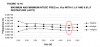
You can't use the mains frequency as the clock source; it's far too slow. Just use the internal 4 MHz (nominal) oscillator. Your code will need to watch the mains frequency input and use it for timekeeping if you want your run-on time to be accurate, but the internal oscillator is pretty accurate. Here's one relevant graph from the PIC12F629/675 data sheet for 25 °C:

PIC12F675 internal oscillator vs. VDD at 25 deg.png
It looks like the three-standard-deviation error in each direction is about 1.25%. That should be fine for this application, but you always have the option of monitoring the mains frequency input in firmware if you want more accurate timing in future.
 

chopnhack

Apr 28, 2014
1,576
Joined
Apr 28, 2014
Messages
1,576
You can't use the mains frequency as the clock source; it's far too slow. Just use the internal 4 MHz (nominal) oscillator. Your code will need to watch the mains frequency input and use it for timekeeping if you want your run-on time to be accurate, but the internal oscillator is pretty accurate. Here's one relevant graph from the PIC12F629/675 data sheet for 25 °C:

View attachment 18012
It looks like the three-standard-deviation error in each direction is about 1.25%. That should be fine for this application, but you always have the option of monitoring the mains frequency input in firmware if you want more accurate timing in future.
Oh? I was under the impression from earlier in the thread that the mains was being used for timekeeping, I just didn't understand how. So the on board crystal will be used for timekeeping and the mains cycle for the program to compare and correct against? Aren't the oscillations of the crystal accurate enough to maintain time? I can understand the need for mains cycle because of startup, but are you saying that the program will need to watch it periodically as well?

What should I mark down for pin 2's use on my chart? I see External Clock CLKIN or TMR1 clock T1CKI - but in the comments, they both claim to need a Schmitt trigger input buffer. I don't recall a transistor setup off those pins. When I saw OSC1 (crystal/resonator), I thought the mains would feed into that port to replace the crystal's oscillations. I am little confused on this, can you tell :p
 

KrisBlueNZ

Sadly passed away in 2015
Nov 28, 2011
8,393
Joined
Nov 28, 2011
Messages
8,393
There's no on-board crystal; there's only the PIC's internal oscillator, which runs at about 4 MHz with an error of a few percent worst case at room temperature. The mains signal can be used for timekeeping if you want, but a few percent error is probably okay for this application, so you won't need to use it.

No, the mains frequency can't replace the crystal clock. It's much too slow. Actually, you probably could use it, if the device was able to use that pin as a master clock input, but your program would execute about 60 instructions per second. That would be workable considering how little it need to do, but I didn't consider that option.

Describe that pin as mains frequency input for accurate timekeeping if required.
 

chopnhack

Apr 28, 2014
1,576
Joined
Apr 28, 2014
Messages
1,576
Ok, so the onboard oscillator is some type of algorithm run by the software that determines time? No, I don't want to complicate matters!! Hahaha, I just thought I remember somewhere in this post that mains frequency was being used for time keeping. Its probably my misunderstanding of what we are doing. I will document it as you wrote, but if we are not using mains freq. for something, why did we take the extra measure to bring it in on the schematic and feed it to pin 2?
 

KrisBlueNZ

Sadly passed away in 2015
Nov 28, 2011
8,393
Joined
Nov 28, 2011
Messages
8,393
The on-board oscillator is just an oscillator that's designed to be fairly accurate and stable. I don't know how it's implemented. It's fully internal to the PIC.

I thought it would be a good idea to have an accurate time source. Somehow I thought that your turn-off delay was going to be 1~2 minutes and I thought you might need it to be accurate. Since I discovered it's just a ten second hold-on for a dust blower, which could run for a few extra seconds without causing a problem, it doesn't seem that important. But it's available if you want it for some reason. You just need to add some code to use it.
 

chopnhack

Apr 28, 2014
1,576
Joined
Apr 28, 2014
Messages
1,576
The on-board oscillator is just an oscillator that's designed to be fairly accurate and stable. I don't know how it's implemented. It's fully internal to the PIC.
Black magic :D

I thought it would be a good idea to have an accurate time source. Somehow I thought that your turn-off delay was going to be 1~2 minutes and I thought you might need it to be accurate. Since I discovered it's just a ten second hold-on for a dust blower, which could run for a few extra seconds without causing a problem, it doesn't seem that important. But it's available if you want it for some reason. You just need to add some code to use it.

Cool, some confusion dispelled :). It's hard writing a spec when you don't know what your talking about!! :D:eek::D:D
 
Last edited:

chopnhack

Apr 28, 2014
1,576
Joined
Apr 28, 2014
Messages
1,576
Kris, how do you post your code snippet complete with its own dialog box, like in your fan run on project? I had to reformat for space in my previous post and it still didn't come out correctly.
Thanks!
 
Last edited:

KrisBlueNZ

Sadly passed away in 2015
Nov 28, 2011
8,393
Joined
Nov 28, 2011
Messages
8,393
Use the [CODE] and [/CODE] tags around it. Unfortunately the XenForo text editor won't let you paste more than two spaces in a row, even into a CODE block; it reduces them to two. Very irritating. So you have to go through and tidy up the lines to make the columns line up.
 

chopnhack

Apr 28, 2014
1,576
Joined
Apr 28, 2014
Messages
1,576
Cool, thanks! I got a little more done today.
Code:
/*
*   Dust Collector Delay Circuit
*  Chopnhack
*   2015
*
*   Purpose: This circuit has been designed to automatically turn on a dust collector when another tool is running. The criteria for turning on the dust collector
*       will be at least 5 amps at 120v or 4 amps at 240v AC. This should allow the dust collector to run when large dust producing tools are being used without
*       triggering on smaller tools. This should save time in the shop and allow for cleaner air and floor as the DC will turn on at the time its needed.
*       The collector will have a delay, to run for ~10 seconds after the triggering tool has ended operation to clear out the ductwork.
* 
*   Hardware: Refer to schematic or board. Power will come into the circuit via a rocker switch mounted through the 4" steel electrical box wall (not shown in
*        schematic). The circuit is protected by an inline, 160mA slow blow fuse and comes on-board at connector CN1. From there, AC power travels through
*        a transformer, providing isolation from mains as well as a secondary fuse (transformer is self limiting). The stepped down power gets rectified via
*        BR1, full wave bridge rectifier. This is then filtered via C1 and C2 electrolytic caps before entering U1, a 7805 LDO voltage regulator and exiting,
*        filtered by C3 at +5V DC. R1 provides a constant current for a power-on LED indicator via jumper J1.
* 
*        The +5V output continues and feeds 4 more areas: the PIC microcontroller (PIC12F675), Allegro Hall Effect ACS712 chips, Q1 2n3904 power amplifier and
*        the coil of relay K1 (which controls the dust collector) which is driven by Q1.
* 
*        When current is sensed in either Allegro chip, (this would be from an outlet in series with the chip via connectors CN2 or CN3, one for 120v and
*        one for 240v) pin 7's normally stable voltage of +2.5 VDC will change (amplitude varies with current at a ratio of 1 V/10A).
*        This voltage is read by the PIC at pins 3 and 5 - one for each sensor chip. C4 and C6 are filter & C5 and C7 are bypass caps for the Allegro chips.
*        R2 pulls up the master clear (MCLR) Pin 4 so it's not left floating. R3 limits current, but allows mains frequency to to reach pin 2 of the PIC (CKLIN),
*        which is used for timing, while C9 filters the signal.
*        Pins 1 & 8 are V+ and V- (ground) with C8 filtering between. Pin 7 is the output, which will trigger the relay via R4 and Q1. D1 prevents excessive
*        collector emitter voltage from the inductive feedback that occurs from the relay. R5 and C10 help to dissipate power as the field collapses.
*        The supply to the dust collector is interrupted and fed through the contacts of relay K1.
*
*   PIC12F675:   The PIC will be programmed by the onboard ICSP connection using a Microchip PICKit3 programmer. The PIC will use the internal oscillator   
*                       and/or incoming mains 60Hz signal for timing.
*
* Pin-Out
*
* #  Abilities                                  Use             Connected to
*******************************************************************************************************************************************************************
* 1  VDD                                      VDD           Circuit +5V rail
* 2  GP5/T1CKI/OSC1/CLKIN                     OSC1          Mains frequency through R3
* 3  GP4/AN3/-T1G/OSC2/CLKOUT                 AN3.IN        Voltage input from Allegro U2 pin 7 - 110v unit, < 3v (5A cutoff) (2.5v baseline, 0.5v for 5A above baseline)
* 4  GP3/-MCLR/VPP                            VPP             ICSP connector (33k pull up to VCC)
* 5  GP2/T0CKI/INT/COUT                       AN2.IN         Voltage input from Allegro U3 pin 7 - 220v unit, < 2.8v (4A cutoff)
* 6  GP1/CIN-/ICSPCLK                         ICSPCLK      ICSP Serial Programming Clock
* 7  GP0/CIN+/ICSPDAT                         GP0/ICSPDAT  Output to turn on relay/ICSP Serial Programming I/O
* 8  VSS                                      VSS              Circuit 0V
*
*Program Description
*
*Power on
*Initialization Routine - clearing of registers, regulation of time
*Loop a subroutine to check for voltage at either AN2 or AN3 and do while true RUN if false see STOP
*STOP when above goes false, count 10 seconds then stop.
*RUN - Output to pin 7, pull up Q1 and operate relay. This stays high until STOP takes over.
*/
 
Last edited:

chopnhack

Apr 28, 2014
1,576
Joined
Apr 28, 2014
Messages
1,576
Delving into MPLAB X a little bit today, I was able to burn a program onto a pic as a test. MPLAB's interface leaves something to be desired... I had to find a cryptic setting to allow me to load the program onto the chip since the circuit was not powered. One would think that most developers would be working on programming chips that are not powered i.e. not in a working circuit! I think that since there is no safe default, this should be something that pops up with an easy to change interface instead of something buried three levels deep....

My first foray in programming under the IDE has been in ASM and it makes more sense since I have been reading The PIC Microcontroller by John Morton. So far I can recommend the book! He breaks each section down into byte size :p nibbles for us challenged mortals. I like the reinforcing he does with his examples section after each key point is made.

Hopefully by the end of tonight, I can get this LED to light up!

EDIT:

Success!!

Code:
       clrf       05h        ;clearing first GPIO
       movlw      b'0000'    ;setting all 4 GPIO's to output
       tris       05h        ;on Port A
on     bsf        05h,0      ;makes 1st GPIO high, turns on LED
       goto       on
 
Last edited:

chopnhack

Apr 28, 2014
1,576
Joined
Apr 28, 2014
Messages
1,576
Its been awhile and I would like to thank not only Kris for helping me and inspiring me to learn more about electronics, but also to thank Hevans for continuing to help me pursue this and other projects. Thank you both!! :D
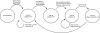
As Hop mentioned, it might be a good idea to create a state diagram to define the desired behavior of the software that I am trying to write:

upload_2016-7-9_23-20-21.png

From here I will continue to work on this in C unless I run out of memory space. I will post some code when I get further along or stuck or both :D
 

CDRIVE

Hauling 10' pipe on a Trek Shift3
May 8, 2012
4,960
Joined
May 8, 2012
Messages
4,960
Hey Chop are you saying you're still turning on the dust collector manually? I thought I was unique when it came to never quite finishing a project. Now I see I have plenty of company! :)

Chris
 

chopnhack

Apr 28, 2014
1,576
Joined
Apr 28, 2014
Messages
1,576
LoL - Chris, I am still doing it caveman style - when I'm out there at all lately!! I think aside from debugging any upcoming issues, we are nearly done here, but I'm still at it ;)
 

CDRIVE

Hauling 10' pipe on a Trek Shift3
May 8, 2012
4,960
Joined
May 8, 2012
Messages
4,960
Chop, I know that Pic+C# or ASM coders consider Picaxe like a bicycle with training wheels but it would have been simple code, up and running a long, long time ago. Leaving you far more time to make chips and dust. ;)

Chris
 

chopnhack

Apr 28, 2014
1,576
Joined
Apr 28, 2014
Messages
1,576
I think the code will be simple enough once I put some thought into it - maybe a case statement or a nested if then else will be sufficient.

I love the idea behind the picaxe - making it more accessible and I believe Constantine is working with them now (HellasTechn), but I don't care for a propietary OS if you will sitting on top of the chip. To me its essentially the same as learning the code and then making libraries and functions. That is what I found with JAL - I couldn't work with other chips because no one had written calls for them. So I gave up on JAL having learned that pic freedom starts with understanding the chip, the code and rolling your own ;)

Don't misunderstand, I didn't become a programming guru - I still have trouble keeping track of variables as they pass in a function :p:D
 

CDRIVE

Hauling 10' pipe on a Trek Shift3
May 8, 2012
4,960
Joined
May 8, 2012
Messages
4,960
The Picaxe 08M2 is only $1.94. The fact that Picaxe uses a proprietary boot loader embedded in the chip is what makes them so painless to use. All the Picaxe chips are standard PIC's which can be stripped of the boot loader and reprogrammed conventionally as a blank PIC. As far as their stock function libraries are concerned, many don't have to be used. I've played with quite a few of them to analyze between my own functions and theirs. Theirs, always resolve to less lines of code though. That said, even the most basic Picaxe command is actually a sub or function that the boot loader converts to HEX.

For most uC tasks I find they're more than up to the task. Admittedly they would not be the best choice to run a CNC machine that requires extremely fast read and write speeds. That said the Picaxe system has been getting faster as the years have passed by.

Unless the developer is going to produce an item in great quantity they have very little down side. I like to think of the system as an excellent development to pain ratio! :D

Chris
 

chopnhack

Apr 28, 2014
1,576
Joined
Apr 28, 2014
Messages
1,576
I like to think of the system as an excellent development to pain ratio! :D
Indeed! I do like the simple to interface aspect, but I also enjoy the pain ;)
You have certainly made me think about the system once more - I have other projects that I would like to have on a much shorter development cycle!! Maybe the next go around will be with a picaxe.
 
Last edited:
Top