Convert your projects in 3D mode

FH16

Sep 8, 2004
26
Joined
Sep 8, 2004
Messages
26
Matthias Weiber has write a ulp for Eagle to convert PCB's in 3D images or animation.
The ulp create a POV Ray file that can be used in program to create images and animation for your project.
You can download the ulp from Matthias Weiber website http://www.matwei.de/doku.php?id=en:home and POVRay from from the official site www.povray.org for free.

Samples from Eagle 3D
fetch.php

fetch.php

fetch.php

fetch.php

fetch.php


gogo2520

Aug 14, 2005
495
Joined
Aug 14, 2005
Messages
495
Not bad
  I dl it and got it running in less then 2 hours.
    This is what i got out. It dosn't do push buttons yet.
                          have gogo

View attachment 38511


GreekPIC

Aug 1, 2004
251
Joined
Aug 1, 2004
Messages
251
Is there something similar that outputs 3D solids? I'm using Autodesk Inventor and I-DEAS which can import IDF files. Those are 3D representations of the boards (not photorealistic as this, just the basic shapes). You can then use them to model the housing, heatsinks, wire harnesses etc without guestimating.

However Eagle doesn't output IDF. Target does but I'm not so eager to learn a second PCB layout program (I haven't really learned the first yet). So, if there's a way to output *.iges, *.sat, *.step or something like this from Eagle, it would be great.

Nikolas


gogo2520

Aug 14, 2005
495
Joined
Aug 14, 2005
Messages
495
Nice Job GreekPic
  What package did you use for the push buttons. I couldn't get mine to work.
I think I loaded the librarys in the wrong directory.
                                Thanks gogo

 
K

Kasamiko

Jan 1, 1970
0
OK..heres what I done so far..

Form this:

Timer1.jpg


To this..WOW!!!

Timer.jpg


I did it!!

rhonn  ;) ;)


GreekPIC

Aug 1, 2004
251
Joined
Aug 1, 2004
Messages
251
gogo2520 said:
Nice Job GreekPic
  What package did you use for the push buttons. I couldn't get mine to work.
I think I loaded the librarys in the wrong directory.
                                Thanks gogo
??? Me? ???

You probably mean FH16...
 
Last edited by a moderator:
K

Kasamiko

Jan 1, 1970
0
@gogo2520
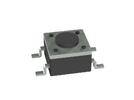
I think it's the SWITCH_PUSH_BUTTON_LSH43

Yet another one..

eprommer.jpg


rhonn  ;) ;)

SWITCH_PUSH_BUTTON_LSH43.png

 
Last edited:

gogo2520

Aug 14, 2005
495
Joined
Aug 14, 2005
Messages
495
Cool thanks.
        Did you dl the librarys and if you did where did you install them.
  Also the dc input jack I can't even find that in egale so I dl'd of the site.
                                      gogo

 
Last edited by a moderator:
K

Kasamiko

Jan 1, 1970
0
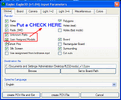
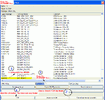
Here's the trick I used..I don't know if this is the proper way of doing it  :p

Before creating the POV File check this:

Snap1.gif

Snap2.gif

 
K

Kasamiko

Jan 1, 1970
0
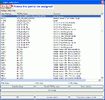
Search for the MODEL in your POV-Ray Gallery..you can extract it anywhere..

Snap4.gif

Snap5.gif

 
K

Kasamiko

Jan 1, 1970
0
@gogo2520

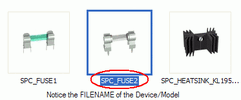
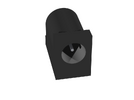
Maybe this is what you mean?

FILENAME: DCPOWERCONNECTOR

DCPOWERCONNECTOR.png


gogo2520

Aug 14, 2005
495
Joined
Aug 14, 2005
Messages
495
Hello logan
        there is afew hints on there web site, I figured it out in about two hours. How you doing with eagel?
      I found the rest of the parts with your help kasamike and GreekPic thanks
                                                have fun gogo


FH16

Sep 8, 2004
26
Joined
Sep 8, 2004
Messages
26
gogo2520 said:
Nice Job GreekPic
  What package did you use for the push buttons. I couldn't get mine to work.
I think I loaded the librarys in the wrong directory.
                                Thanks gogo
I'm Using
Library: switch-omron
Device: 10-XX
Pacage: B3F-10XX
 

niceblade

Feb 17, 2006
3
Joined
Feb 17, 2006
Messages
3
Hello. I use this ULP for some time now, althought I couldn't yet figure out how to create the animations of the board. Does anyone knows how to do this? best regards...


Untitled_user

Jan 3, 2006
26
Joined
Jan 3, 2006
Messages
26
Hello!  :D

After I saw this topic, I immidiately downloaded and tried this software and I have to say it's absolutely awesome. Realy impressed me.

Bravo! Thank you guys for reference!  8)


FH16

Sep 8, 2004
26
Joined
Sep 8, 2004
Messages
26
niceblade said:
Hello. I use this ULP for some time now, althought I couldn't yet figure out how to create the animations of the board. Does anyone knows how to do this? best regards...
After the creation of POV Ray file from Eagle, open it and find and replase the following:

--- Find ---

Code:
//Animation
#declare global_anim = off;
--- Replace ---

Code:
//Animation
#declare global_anim = on;
--- Find ---

Code:
#if(global_anim=on)
camera
{
	location global_anim_spline_cam_flight(clock)
	#if(global_anim_npoints_cam_view>2)
		look_at global_anim_spline_cam_view(clock)
	#else
		look_at global_anim_spline_cam_flight(clock+0.01)-<0,-0.01,0>
	#end
	angle 45
}
light_source
{
	global_anim_spline_cam_flight(clock)
	color rgb <1,1,1>
	spotlight point_at 
	#if(global_anim_npoints_cam_view>2)
		global_anim_spline_cam_view(clock)
	#else
		global_anim_spline_cam_flight(clock+0.01)-<0,-0.01,0>
	#end
	radius 35 falloff  40
}
#else
camera
{
	location <cam_x,cam_y,cam_z>
	look_at <cam_look_x,cam_look_y,cam_look_z>
	angle cam_a
	//translates the camera that <0,0,0> is over the Eagle <0,0>
	//translate<-48.730000,0,-21.585000>
}
#end
--- Replace ---

Code:
#if(global_anim=on)
camera {
  angle    45
  location <100.0 , 100.0 ,10.0>
  right    x*image_width/image_height
  look_at  <0 , 0, 0>
  rotate   <0,-360*(clock+0.10),0>
}
light_source
{
	<0,0,0>
	color rgb <1,1,1>
}

}
#else
camera
{
	location <cam_x,cam_y,cam_z>
	look_at <cam_look_x,cam_look_y,cam_look_z>
	angle cam_a
	//translates the camera that <0,0,0> is over the Eagle <0,0>
	//translate<-48.730000,0,-21.585000>
}
#end
Then Create .ini file and add the following:

--- Add ---

Code:
Initial_Frame = 1
Final_Frame = 500
Initial_Clock = 0
Final_Clock = 0.9
Cyclic_Animation=on

[80x80 Low Resolution]
Width=80
Height=80
Antialias=off
Antialias_Threshold=0

[100x100 Low Resolution]
Width=100
Height=100
Antialias=off
Antialias_Threshold=0

[640x640 Low Resolution]
Width=640
Height=640                
Antialias=Off
Antialias_Threshold=0
        
[800x600 Low Resolution] 
Width=640
Height=640                
Antialias=Off
Antialias_Threshold=0

[1024x768 Low Resolution]
Width=1024
Height=768                
Antialias=Off
Antialias_Threshold=0 

[640x640 High Resolution]
Width=640
Height=640                
Antialias=On
Antialias_Threshold=0.5

[800x600 High Resolution]
Width=800
Height=600                
Antialias=On
Antialias_Threshold=0.5

[1024x768 High Resolution]
Width=1024
Height=768                
Antialias=On
Antialias_Threshold=0.5

[640x640 Very high resolution]
Width=640
Height=640                
Antialias=On
Antialias_Threshold=1.0

[800x600 Very high resolution]
Width=800
Height=600                
Antialias=On
Antialias_Threshold=1.0

[1024x768 Very high resolution]
Width=1024
Height=768                
Antialias=On
Antialias_Threshold=1.0
Save file and exit
(Final_Frame = 500 is the numbers of frames)
Press from Pov Ray the INI button and select your ini, press button "Set but don't render"
Select the resolution you want and press "RUN".
Thats all :)


logan_dslasher

Jul 23, 2004
392
Joined
Jul 23, 2004
Messages
392
gogo2520 said:
Hello logan
How you doing with eagel?
Eagle? hmm.. let me see.. frustrating? ehehe.. i can't seem to find a good way to strat learning it.. any suggestions how? what are the basics that is should learn? what exercises can i perform to familiarize myself with eagle?

hmm.. does it need computer upgrades to operate?  i have a very low-performance computer.. P3, no video card, no sound card, 13G hard disk.. its still  very young..

i really want to learn eagle.. please help.. thanks..


Top