help with IR2110 chips

Maglatron

Jul 12, 2023
2,025
Joined
Jul 12, 2023
Messages
2,025
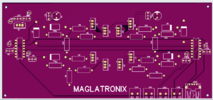
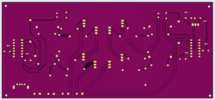
:) is there an order that I turn on the different parts i.e. inverter input, 12voltDC, Arduino power which in turn turn on the signals? some front and back pics of what it's going to look like1728846638212.png1728846820073.png
 

Maglatron

Jul 12, 2023
2,025
Joined
Jul 12, 2023
Messages
2,025
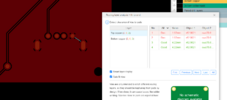
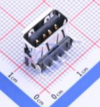
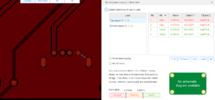
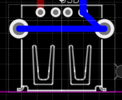
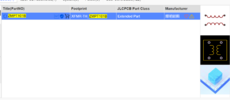
struggling with this for the usb connector it says and error for the tht to smd, my connector is through hole type1728854613779.png
 

Maglatron

Jul 12, 2023
2,025
Joined
Jul 12, 2023
Messages
2,025
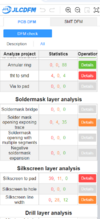
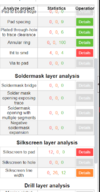
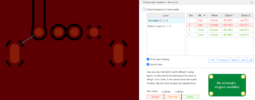
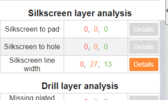
although th DRC check checks out on easyeda, the DFM check on the website PLCPCB there are two red flags and I don't understand them, one says error on the USB bus tht to smd so I suppose that that means through hole and surface mount not sure how to fix??
the other error is silkscreen layer and got no idea about that what it means
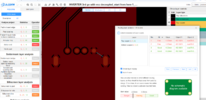
1728901899509.png
1728902243490.pngthis image clarifies all of the points that are not done properly the rest in the list are good!!
 

Maglatron

Jul 12, 2023
2,025
Joined
Jul 12, 2023
Messages
2,025
any body know how to fix these couple of problems please? thanks
 

Maglatron

Jul 12, 2023
2,025
Joined
Jul 12, 2023
Messages
2,025
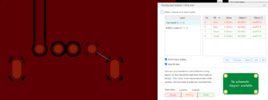
nope its not having it I need to get past this hurdle help please guys!! i'm using the correct through hole part I can't do it!! sooo frustrating :(1728908129524.png
 
Last edited:

Maglatron

Jul 12, 2023
2,025
Joined
Jul 12, 2023
Messages
2,025
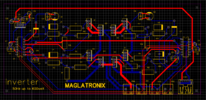
here is the files, in the pcb editor the front and back ground planes have been removed so you can see the tracks! the silkscreen crosses loads of the tracks I don't think that I can do it any other way1728913493729.png
 

Attachments

  • SCH_INVERTER-3rd-go-with-vcc-decoupled_2024-10-14 - Copy.json.txt
    91 KB · Views: 0
  • PCB_best-so-far3_2024-10-14 .json.txt
    437 KB · Views: 0
Last edited:

Maglatron

Jul 12, 2023
2,025
Joined
Jul 12, 2023
Messages
2,025
Not in a huge hurry, want it done by Thursday though! I have two major issues the "tht to smd" and "silkscreen to pad! I do not know how to fix either! I've exhausted all of my ideas getting quite annoyed with it!! as you can see in the 3D sim in easyeda the USB socket installed correctly!! And so I have determined that all of the red errors that I get in the PCBDFM software are related to the USB socket!!!!
1728924825336.png1728923267724.png1728923318375.png
 
Last edited:

Maglatron

Jul 12, 2023
2,025
Joined
Jul 12, 2023
Messages
2,025
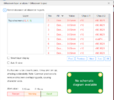
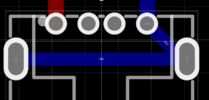
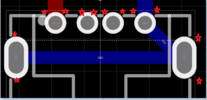
the problem of the silkscreen to pad highlights these area maked in little red stars! still trying to work out the tht to smd!!
1728926034623.png1728926135467.png
the tht to smd error is here!1728926380144.png1728926421261.png
 

Maglatron

Jul 12, 2023
2,025
Joined
Jul 12, 2023
Messages
2,025
I know with the right info I can crack this! thanks guys, does everybody have this kind of trouble getting USB sockets to work?
 
Last edited:

Maglatron

Jul 12, 2023
2,025
Joined
Jul 12, 2023
Messages
2,025
RIGHT so I neeeed to find a working USB A female that does not have problems or how do I MODIFY an existing part footprint because I'm sure that if I draw around the lugs of the USB socket then that would work! like this one and join up the grey parts now only one red and one orange It's telling me that the silkscreen lines are too close to the solder pads notice the little blue marker on the third pad up on the right!
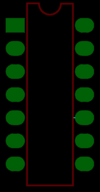
what can I do about this can I just leave it as is or do I have to go about making the chip symbol smaller to satisfy?
1728930111548.png1728929702518.png1728929466637.png
 
Last edited:

Maglatron

Jul 12, 2023
2,025
Joined
Jul 12, 2023
Messages
2,025
now if I forget the silkscreen errors I think I am good to go!!1728934118456.pngdid a second DMF check and the red ones went away I can cope with orange I think its gonna be fine!!
 
Last edited:

Maglatron

Jul 12, 2023
2,025
Joined
Jul 12, 2023
Messages
2,025
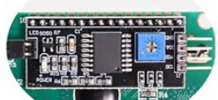
I cannot seem to find the lcd 20x4 i3c in easyeda it is starting to bug me I want one of these in the easyeda program 1729171205000.png
 

Maglatron

Jul 12, 2023
2,025
Joined
Jul 12, 2023
Messages
2,025
anyone know how to hook up this voltage sensor?? please help1729183835930.png
 
Last edited:

Maglatron

Jul 12, 2023
2,025
Joined
Jul 12, 2023
Messages
2,025
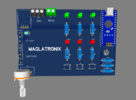
here is my three in one the first set of LED's on the right red indicates that the signal generation is off and two presses of the button activates the toggling signal at 50Hz with 2us dead time, another double press within a second deactivates the signalling the middle set of LED's indicate weather that part of the circuit is off and on again with two presses for off and on and this part of the circuit controls a screen that reads out voltage current power and frequency the thrird part of the circuit, the third set of LED's on the left indicate if the esc is on, and the speed is controlled by the potentiometer the square at he top left is a current sensor ACS712 the squares are where tactile switches go! there is also an RBG LED that scrolls through the colours and goes round in circles
1729243278847.png
 
Last edited:
Top