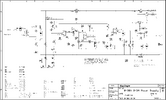
0-30V Stabilized Power Supply

Status
Not open for further replies.

redwire

Nov 10, 2007
244
Joined
Nov 10, 2007
Messages
244
liquibyte,  did you have the Q1 clamp transistor installed?  Did you have D10 and R15 installed?

Have you tested at 12V with the current setting at about half way?

On a couple of my tests I have also noticed what appears to be a one point spike both postive and negative early in the the decaying voltage signal.

 
L

liquibyte

Jan 1, 1970
0
redwire said:
liquibyte,  did you have the Q1 clamp transistor installed?  Did you have D10 and R15 installed?

Have you tested at 12V with the current setting at about half way?

On a couple of my tests I have also noticed what appears to be a one point spike both postive and negative early in the the decaying voltage signal.
Yes, I'm testing on the side that has Q1 installed but no, I don't have D10 and R15 in there yet.

I'm not getting the ripple at much lower than 30 volts and definitely not at 12V @ 1.2A with my load.  I get zero ripple unloaded (AC coupled) at any voltage for what it's worth.  The load I'm testing with is a big assed 10 ohm power resistor so I'm not getting the same results at the lower voltages.  I don't have an electronic load yet so that'll have to wait.  I built my load out of a stove burner and it tests the PS at the full 30 volts and 3 amps nicely though.

Being that this is an analog scope what's happening is going by almost too fast to see with the naked eye and I'm not sure a movie of it will capture anything but I'll try rigging up a better camera tonight and doing a movie of it.  I'd like to know how all the screenshots I see of analog scopes online are so clear when showing transients because mine shows it very, very fast, almost to fast to see and I have to switch on at just the right time to see it at a really slow time/div.
 

redwire

Nov 10, 2007
244
Joined
Nov 10, 2007
Messages
244
Being that this is an analog scope what's happening is going by almost too fast to see with the naked eye and I'm not sure a movie of it will capture anything but I'll try rigging up a better camera tonight and doing a movie of it.  I'd like to know how all the screenshots I see of analog scopes online are so clear when showing transients because mine shows it very, very fast, almost to fast to see and I have to switch on at just the right time to see it at a really slow time/div.
I don't know how you could see a transient spike without a trigger and screen capture.  It happens so fast.  I often have to change the trigger voltage,  type of edge trigger, and capture rate because the first shot doesn't always  catch it.    If the event happens early, the scope will capture the initial spike but not the actual drop/increase in voltage at the output because it used all of the available memory, so I will do a second shot at a much slower rate.  I am still learning the features on the caputure end.
 
L

liquibyte

Jan 1, 1970
0
I wish I could afford something digital but I have to admit that even with what I managed to get my hands on, things are looking better as far as being able to see what's going on.  As for the trigger, I do have that but I'm not entirely sure if I'm working things right.  I've seen scopes in use for most of my life but have never used one so I'm still learning as well.  I'm starting to wonder if a soft start may be the only real solution here.  The spike happens before the input on the circuit altogether and isn't being controlled by it and I'm not sure it can be, at least how it's designed now.  As far as the rest of the performance goes, things look fairly good from my standpoint.

Want to try out my version?  I still have four unpopulated boards and I will probably have the new version I came up with made regardless if we solve the transients because I'm thinking soft start circuit.  We never heard much back from the two I've send boards to as far as their builds or testing goes.  I've changed the pinouts for the input and output connections in the new design to be grouped by device and to use Molex KK .156 friction lock connectors for ease of getting the boards in and out.  I learned my lesson there but have to admit the performance of the boards is really quite good even if they are a pain to get in and out.


redwire

Nov 10, 2007
244
Joined
Nov 10, 2007
Messages
244
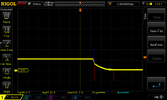
I installed the diode between the emitter and base of the output transistor. It seems to have helped but I still seem to be getting a spike right (first picture)  before the voltage drops when I pull the plug on the transformer.  The second picture is an expanded view of the first picture.  I wonder if it is from the transformer when the field collapses.

View attachment 42254

View attachment 42255

 
L

liquibyte

Jan 1, 1970
0
redwire said:
I installed the diode between the emitter and base of the output transistor. It seems to have helped but I still seem to be getting a spike right (first picture)  before the voltage drops when I pull the plug on the transformer.  The second picture is an expanded view of the first picture.  I wonder if it is from the transformer when the field collapses.
Is that with Q1, R13 and R14 as well as D10?  I don't understand the waveform in the first picture.  Is the trace inverted?
 

redwire

Nov 10, 2007
244
Joined
Nov 10, 2007
Messages
244
Yes it is with Q1, R13, R14 and D10.  The picture is when I unplug the transformer and the voltage is decreasing.

 
L

liquibyte

Jan 1, 1970
0
redwire said:
Yes it is with Q1, R13, R14 and D10.  The picture is when I unplug the transformer and the voltage is decreasing.
The picture makes sense in relation to the second one now.  It seems to be falling off a lot better than it was without Q1 though, no more huge spike there.  What's it looking like at power on?  That's where I'm seeing the big issue.
 

redwire

Nov 10, 2007
244
Joined
Nov 10, 2007
Messages
244
From memory I think it looks like the inverse of the first one.  Spike right before it ramps up.

 
L

liquibyte

Jan 1, 1970
0
So, if my thinking is right on this, the blue region represents Q1 activating and pulling the power to ground and the red region is where Q1 shuts off and the caps drain on their own.

Have you tried the TIP141 idea yet?  I'm curious as to what effect that might have, it looks like a good idea but I'm wondering about what kind of heating would be going on if there were 3 amps at 30 volts going through it.  Either way, it would be easy to add off board on an external heatsink if required.  My parts order is on hold for now as we just can't afford the expense at the moment so I can't even try my idea unless I can find a relay in some old discarded equipment.  Minus the relay for my idea and a TIP141 or equivalent (which I may have somewhere), I have everything else I need though.

NewFile3.png

 
L

liquibyte

Jan 1, 1970
0
I just found this appnote from TI.  Figures 4 and 5 show promising results but I'm not sure if this would work at higher currents, they only talk about and around 300mA.  Figures 2 and 3 and the associated text state that careful consideration of the capacitor values must be taken into account for proper circuit operation.


redwire

Nov 10, 2007
244
Joined
Nov 10, 2007
Messages
244
Have you tried the TIP141 idea yet?  I'm curious as to what effect that might have, it looks like a good idea but I'm wondering about what kind of heating would be going on if there were 3 amps at 30 volts going through it.  Either way, it would be easy to add off board on an external heatsink if required.  My parts order is on hold for now as we just can't afford the expense at the moment so I can't even try my idea unless I can find a relay in some old discarded equipment.  Minus the relay for my idea and a TIP141 or equivalent (which I may have somewhere), I have everything else I need though.
No, I have been focused on the shut down issues.  I'm confident a soft start can take care of the inititial startup spike.  I just sent you a TIP 141 today.  It will likely be next week before you get it.  It is estimated that at full output (3 amps), the TIP will be using about 3.6 watts.  So if it is mounted to some metal or a small heatsink it should be ok.  A MOSFET may be a better solution but for testing purposes  the TIP should work.
 
L

liquibyte

Jan 1, 1970
0
redwire said:
No, I have been focused on the shut down issues.  I'm confident a soft start can take care of the inititial startup spike.
I only see a drop in voltage at power off with just the Q1 circuit soldered in.  I'm not seeing any spikes unless it's happening too fast for my scope and my eyes.  I'll do more testing at various settings loaded and unloaded and see if I can capture it.

I just sent you a TIP 141 today.  It will likely be next week before you get it.  It is estimated that at full output (3 amps), the TIP will be using about 3.6 watts.  So if it is mounted to some metal or a small heatsink it should be ok.  A MOSFET may be a better solution but for testing purposes  the TIP should work.
I certainly appreciate it.  I'll wedge it in as soon as it gets here and let you know what I see and try and get some screen grabs from a movie.  I'm going to rig up a mount today so I can film with a phone and hope it's good enough to capture what's going on.  I think I should probably watch the o-scope training class they had over at eevblog too, I could just be missing a setting or two that I need.
 
L

Luisitou

Jan 1, 1970
0
Hi to everyone!
I'm building this proyect but with little mods from the page that I have seen, the design is the same: http://electronics-lab.com/projects/power/028/index.html.  What changes would you recommend?
I'm using a transformer 120V to 24 V 3A
Because I have seen in this topic a lot of mods but my teacher wants exactly the same design with minimal changes
Best regards


audioguru2

Apr 6, 2004
12,026
Joined
Apr 6, 2004
Messages
12,026
The original project has errors and problems:
1) Many of its parts are overloaded so it is not reliable. The transformer, driver transistor and single output transistor overheat. Your 24V/3A transformer is rated at 72VA maximum but the full wave bridge rectifier operates from the peak which is 24V x 1.414= 34V and with an output of 3A then the transformer power is 34V x 3A= 102VA. You can calculate the heating in the driver and output transistors yourself.
2) Without a load the peak voltage from the transformer is about 36V which is reduced to about +34.8V by the bridge rectifier.  The opamps use an additional negative -5.6V supply so their total supply is 34.8V + 5.6V= 40.4V but their absolute maximum rating is only 36V.
3) There is no way the project can supply 30VDC at 3A because the circuit losses reduce the output to about 25V at 3A. If you increase the transformer voltage then the opamps will be destroyed even quicker and more heat will destroy the driver and output transistors quicker.

Therefore we fixed the circuit and improved the parts.

Maybe you should research the original parts and calculate how much they are overloaded. Also show your teacher the losses that prevent 30V at 3A.

The original circuit would be reliable if it uses a 20V/4.3A transformer. But its maximum output at 3A would be only about 18VDC or 20VDC.

 
L

Luisitou

Jan 1, 1970
0
Wow... so quickly. Thanks for answering.
I'm seeing that the original project isn't reliable, so I have to make some changes, I don't care if my teacher gets angry with me :)
Actually I'm looking for mods that some people have made, and I found that in general some changes are: 2 x 2N3055 in parallel with resistors, some transistors have changed, added a zener 10V, and other minor changes. 
So I hope it works fine.
What do you think?
Sorry for delay but I had lost internet connection.

sch-parts.png


redwire

Nov 10, 2007
244
Joined
Nov 10, 2007
Messages
244
Luisitou,  liquibyte has posted a parts list with part numbers to assist you in ordering.  Unless you are using parts from your lab.

 
L

Luisitou

Jan 1, 1970
0
Yes, I have seen the latest liquibyte's posts, and it seems his project works fine.... So thanks for the help... Now to work.
Thanks again.  :)

 
L

liquibyte

Jan 1, 1970
0
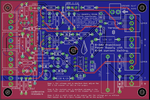
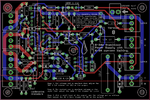
I've been doing a little more work on the board.  I added in the TIP141 soft start circuit redwire came up with and I added R15 and D10 back in.  I figure that if I had these made and R15 and D10 isn't needed or causes unexpected results a jumper can be soldered in instead.  Since I measured overhead to spare I figure it couldn't hurt to try them out.

Since I've done the work and people keep asking about it, I'm going to put the Eagle files up.  I haven't made this yet and I haven't tested the the power supply with the added components yet so if you want to make this it's at your own risk.  If you do make it, let me know how it works.  I plan on doing testing of the added stuff later on next week and if everything works out I'll probably have these made.

Quick edit: redwire reminded me that spacing on fills and traces should probably be bigger for home etching.  If you got this before I edited the post, try downloading again for the updated spacing.  I changed the spacing from 6mil to 10mil.

Another edit: I wasn't happy with a few things so I tweaked some stuff.  I'm happy now.
brd.png

brd-filled.png

0-30V-rev-8.zip


Attachments

  • 0-30V-rev-8.zip
    119.7 KB · Views: 254
Last edited:
L

liquibyte

Jan 1, 1970
0
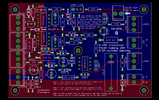
I took the liberty of making gerbers using Elecrow's cam file if anyone wants to have these made super cheap.  You can get 10 boards made for around $20 including shipping.  I'm confident in the design of the board and redwire is sure the soft start should take care of the problem with the startup transient.  I'll be doing testing on this sometime this week and report the results with pics.  If you do have this made, report back on how it works for you.  If you want to test without the soft start, just jumper the TIP141 header from the collector to the emitter and leave out the 12K resistor.  If you want to test without D10 and R15, leave out D10 and use a jumper in place of R15.  The Q1 circuit seems to now be required so leave that in.

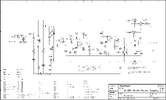
In addition to the edit in my previous post, I redid the gerbers and I made a new schematic with the added parts.

gerber.png

gerber.zip

schematic.png


Attachments

  • gerber.zip
    116.5 KB · Views: 268
Last edited:
Status
Not open for further replies.
Top