0-30V Stabilized Power Supply

Status
Not open for further replies.

audioguru2

Apr 6, 2004
12,026
Joined
Apr 6, 2004
Messages
12,026
liquibyte said:
I'm attaching the schematic I did in Eagle that I worked from to show the parts numbering that I redid.
1) Your parts re-numbering causes a nightmare to troubleshoot it.
2) Some of your text overlaps other text.
3) Many of the external connections are confusing.
4) The schematic is too small or is too large.
Then maybe I will not look at your problems anymore.
 
L

liquibyte

Jan 1, 1970
0
My parts numbering is according to what I've read is the industry standard for readability.  Some of the text overlaps because I wanted to stop rearranging things and start building.

The external connections are paired up on the 2N3055's because they are connected at the back of the case.  For instance, the .33 ohm resistors on the emitters are connected at the back and joined after the resistor and run to the board using one wire.  The base connections and the collector connections are done the same way but just joined from one transistor to the other.

I don't understand your fourth comment.  Suit yourself if you want to help or not as I'm sure the reason for the failure of the design is my fault and not yours but being rude about it doesn't excuse the fact that the original schematic sucked and needed re-doing and I did it around my needs of having a large case and two supplies.  I attached my work to show you all what I had done, not to piss anyone off.  I had planned on re-doing the schematic once again with proper numbering and none of the external connections and attach the eagle files in order to help out the next guy in line that wanted to build this.


audioguru2

Apr 6, 2004
12,026
Joined
Apr 6, 2004
Messages
12,026
My fourth comment is about the clarity of your schematic. The large one is much too large for my pc screen and clearly shows only a small part of it. The small one is a perfect size but its fuzzy faint lines and text are difficult to see. My schematic is also shown here.

View attachment 42031

 
L

liquibyte

Jan 1, 1970
0
audioguru said:
My fourth comment is about the clarity of your schematic. The large one is much too large for my pc screen and clearly shows only a small part of it. The small one is a perfect size but its fuzzy faint lines and text are difficult to see. My schematic is also shown here.
In the interest of being useful and helping others, instead of trying to troubleshoot my power supplies, I spent the last several hours updating the schematic and arranging it in Eagle.

In the zip file are the schematic and a parts list and I'm attaching a png file that's made from the schematic and edited to be black everything on a white background.

There is no board file because you can't mount the 2N3055's, the pots or the bridge rectifier on the board.  In that vein, folks will have to replace those parts in Eagle with their respective terminal blocks, pads, or other associated parts that will be routed off board and then route the board themselves.

The zeners aren't what you will want either because they aren't the right packages because the defaults in Eagle suck in that regard.  The TLE2141 is a modified part that I made myself out of the TLC080P which has basically the same pinout.30V.png

30V.zip


Attachments

  • 30V.zip
    56.5 KB · Views: 43
Z

Zinci

Jan 1, 1970
0
Hi all, First post.  8)

I have read this (and the original thread with lost attachments) for few days now, and I can say that this is most entertaining thread that I've encountered on this Forum. The other one is as good as this one. Very nice.

All we need is another diagram, electrically same as the original "good one", with completely different part numbers. Why would that be helpful, it escapes me. Maybe so I can make another folder with the same diagram?

So far this is what I understand we have for this project:

1. Original diagram. We all know that is "bad for you" :)
2. "Modified" diagram, which does not have PCB endorsed by the "big boys", with missing part numbers on diagram but present on part list. Parts on the part list nowhere to be found on the diagram (I believe that has been fixed now). Well, at least a mismatch, as they would say in my "electronics course"  ::) down the road.
3. Redwire's 5A "version". Well, a little reading and we know there is little difference between the 3A and 5A(emphasis on difference). Repeated here for about 4 times at least.  He posted the Eagle double sided .brd (no .sch file that I could see.)
4. Picmaster's new (PCB) "design" and new part numbers. Electrically same really, but still different, for added bonus confusion it depicts different output transistors. It is quite nice of him to give the PDF file of the board and diagram. I for one thank him as the board is one sided and not that big, so defenetely helpful, but needs tweaking (again) as of course, no Eagle files, just PDF  :(.
According to « Reply #797 on: February 03, 2011, 08:31:47 PM » there is a fault on that drawing. I did not check, too much fun.

5. Red Baron posted the part list with the discrepancies, which helps a lot. If anybody wants to build this "fun" project with posted boards I suggest to get this discrepancies file which he politely called: Parts comparison 0 - 30V 3 or 5A Power Supply.pdf (somewhere page 100 or so... cannot remember).

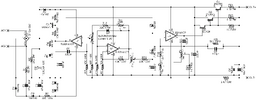
 
Last edited:
L

liquibyte

Jan 1, 1970
0
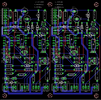
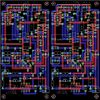
I've been working on a dual version of this and have decided to have the board made.  This is what I have so far, any critiques are welcome as I have never designed a board for production before.  The reason that it's laid out this way is because I am trying to fit two of these on one board that measures no more than 10 centimeters sqare.  I'm also including the schematic and board files if anyone wants to take a look or if they can be useful.

30Vbrd.png

30V.zip


Attachments

  • 30V.zip
    85.3 KB · Views: 36

redwire

Nov 10, 2007
244
Joined
Nov 10, 2007
Messages
244
Hi Zinci,  Welcome to the forum.  It's good to hear a new member's perspective of where we are.    I think there is one basic design that that been fairly consistant.  Audioguru reposts the sketch about every 2 pages because of the tremendous number of pages to weed through but that basic sketch is shown on the first post and the parts are listed on the 2nd post.    Sure there are two trimmers without part numbers but the values are listed.  If you look at the photo of my board (built off the sketch shown) you will see a date of 9/25/08.  Note that that design is still current despite 5 years of discussion.  Sure we might have tweaked one or two component values but it works fine.    You are correct I didn't post the .sch file because it was my first Eagle attempt and it was/is  a mess.  I never bothered to clean it up so I never posted it, but the board file could be used to make pcb's.  I built a 30V 3A version, a 50V 5Abut all have the same basic  design layout.  Just for the fun of it, I built a SMD version by taking my original Eagle .sch and changing compontents.    Many individuals post sketches during the design and build phase  but how do you know they work?

There might be minor component changes but many are preferences.  For example, the heat sinks for the 3055's run 9 times the cost of the transistor.  While the 3055's output transistors are readily available, economical and work fine, I prefer to use a beefier and more expensive MJ11016  given the cost of the transistor is incidential to keeping it cool, and I can delete the heat sink on the BD139.  I prefer to use a .027 ohm sense resistor instead of the 0.47.   

If you use the sketch on the the first post and parts on second you will have a proven design that has been built by many users.  I will bet if you build the board a couple of times you will likey change a few parts to suit your preference.  Good Luck.


redwire

Nov 10, 2007
244
Joined
Nov 10, 2007
Messages
244
Liquibyte,  I assume you are going to eventually have a  some sort of display.  You may want to determine if you need any connections from your board to the microcontroller for power. If you want to display the max setting of the current control, will you need  to measure the voltage of Pin 3 on U3?      Another decision, do you want to add "green power on" led for the board indicating both boards have powered up?  On my board I had one onboard led for current control and a set of jumpers for the LED on the case.  While testing I didn't have to bother with hooking up a led.  Are your power paths wide enough (I did not examine ). 

 
L

liquibyte

Jan 1, 1970
0
redwire said:
Liquibyte,  I assume you are going to eventually have a  some sort of display.  You may want to determine if you need any connections from your board to the microcontroller for power. If you want to display the max setting of the current control, will you need  to measure the voltage of Pin 3 on U3?      Another decision, do you want to add "green power on" led for the board indicating both boards have powered up?   On my board I had one onboard led for current control and a set of jumpers for the LED on the case.  While testing I didn't have to bother with hooking up a led.  Are your power paths wide enough (I did not examine ).   
The displays I'll be adding later will be powered from a separate power supply that I've already made concessions for in the case.  I've been getting feedback on the board design on another board and will probably be redoing the traces to shorten everything up and not be as meandering as they are now.  I was going to measure accross "R7" to display the current value but didn't know I could do that with U3.  Did you put in a header to do that, can you elaborate on that part a bit?  I'd definitely like to do it that way.
 

redwire

Nov 10, 2007
244
Joined
Nov 10, 2007
Messages
244
liquibyte,  R7is the sense resistor, meaning if you measure the voltage drop across the resistor you can determine how much current is being drawn using I = V/R.  If you use a microcontroller to drive your display you can utilize one of the ADC pins to measure the voltage drop in order to compute current.    Likewise Pin 3 of U3 controls the current limit of the device.  For example if you set Pin 3  to 1.0V  (by adjusting P2) then there will be no current cutoff until I = 1.0/0.47ohms = 2.1amps.  By also hooking up another ADC pin of you microcontroller to Pin 3 you can measure the voltage on Pin 3 and display what the current control is set to.  Without a display you don't know the current limit setting.   

By the way, R7 is typically a 5 to 10W resistor that takes up a large chuck of real estate.  I didn't see anything like that on your board so I assumed you were mounting it to the frame.  If not you may want to make adjustments.

 
L

liquibyte

Jan 1, 1970
0
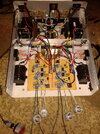
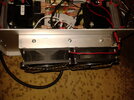
I'll attach a pic so you can see what I'm attempting.  It's rather large just so you know.  At the bottom, you can see green and black wires running off screen, those are the current sense resistors.  Chassis mount, gold aluminum etc...  Mine are 0.47R 16W though.

ps-in-box.jpg


redwire

Nov 10, 2007
244
Joined
Nov 10, 2007
Messages
244
Liquibyte,  That is a beast!

Looks well organized with no expense spared.    I have a couple of questions:
What size transformer is in the middle (to power the display I assume?)?  Is the rectifier for that mounted on the bottom?
What is the VA of the large transformers?
It looks like you have 2 output transistors per half mounted to the rear.  What kind of heat sink is on the back?
How many turns are your 4 Potentiometers and where did you get them.
You have 2 heat sinks near with transistors, attached near the bridge rectifiers are those the BD139's?
I see you have headers with the green and black wires so you will have no need to additional pinouts on the board for the microcontroller connections for R7.

 
L

liquibyte

Jan 1, 1970
0
redwire said:
Liquibyte,   That is a beast!

Looks well organized with no expense spared.    I have a couple of questions:
It is rather large but once I get done with it, I'm hoping it looks like I bought it.

What size transformer is in the middle (to power the display I assume?)?  Is the rectifier for that mounted on the bottom?
That one is a Radio Shack (#273-1512) 12.6-0-12.6 @ 2A.  It's going to be for the displays and cooling fans and associated circuitry.  The aluminum bar that the BD139 heat sinks are attached to is one of two that I'm mounting another circuit board on top of and in between with the stuff to control all that.

What is the VA of the large transformers?
Those transformers are Triad Magnetics VPS28-4600's @ 130VA.

It looks like you have 2 output transistors per half mounted to the rear.  What kind of heat sink is on the back?
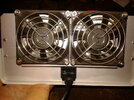
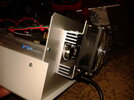
I got the heatsink on Ebay and is exactly like this one.  I've also got two 80mm fans mounted to it as well for active cooling once I get the temp sensors and associated circuitry worked out.

How many turns are your 4 Potentiometers and where did you get them.
Those are 10-turn pots from Digikey (987-1523-ND).

You have 2 heat sinks near with transistors, attached near the bridge rectifiers are those the BD139's?
Yeah, those are the BD139's.  they're actually mounted upside down on really beefy heatsinks I salvaged out of another power supply and cut in half to get two.

I see you have headers with the green and black wires so you will have no need to additional pinouts on the board for the microcontroller connections for R7.
That was the plan I had in mind.
 

redwire

Nov 10, 2007
244
Joined
Nov 10, 2007
Messages
244
Liquibyte ,    Do you have any pictures of the back side with the fans.  I never thought about searching Ebay for heat sinks.   

Did you ever resolve the issue with the low voltage output?

 
L

liquibyte

Jan 1, 1970
0
I haven't worked out the low voltage stuff yet but may just have boards made and then redo the whole thing from scratch.  Most of the components on the board are cheap enough.

Here's a few pics of the back and how I mounted the fans.  It's kind of hackish but worked out fairly well.

20140315_170718.jpg

20140315_170750.jpg

20140315_170809.jpg

 
L

liquibyte

Jan 1, 1970
0
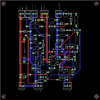
This is what I've come up with for a dual board that can be cut down the middle so that the boards can be separatec into two single supplies.  Sorry for the largish nature of the image but i wanted people to be able to see the text.  I didn't use the part numbers, just the values because I think that would be the most useful.  The board is 10cm square so it can be fabricated relatively inexpensively.  If I don't catch any glaring errors, this is what I'm going to have made to put in my box.

0-30v-current.png


redwire

Nov 10, 2007
244
Joined
Nov 10, 2007
Messages
244
Do you intend to have the board professionally made?  Some board houses require a minimum of 3 boards (OSH Park)and you pay by the area.  If you only need 2 boards,  than you may want to make single boards and have one spare. 

All of the traces are the same size.  My preference would be to use small traces for the millivolt powered parts which are 90% of the parts and use double the size shown for the power traces.  For example, you have conveniently located IN+ and 2N3055 Collector very close.  I would have doubled the size of that trace.    Between IN- and R7 I would have done the same and then from R7 to the output.  The only other item that has some power is the CE pins of the BD139 but your traces look adequate for that.

 
L

liquibyte

Jan 1, 1970
0
redwire said:
Do you intend to have the board professionally made?  Some board houses require a minimum of 3 boards (OSH Park)and you pay by the area.  If you only need 2 boards,  than you may want to make single boards and have one spare. 

All of the traces are the same size.  My preference would be to use small traces for the millivolt powered parts which are 90% of the parts and use double the size shown for the power traces.  For example, you have conveniently located IN+ and 2N3055 Collector very close.  I would have doubled the size of that trace.    Between IN- and R7 I would have done the same and then from R7 to the output.  The only other item that has some power is the CE pins of the BD139 but your traces look adequate for that.
Itead has a deal of 10 two layer 10cm square boards for $20, can't beat that.

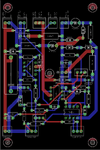
I've been thinking about the layout and figured I could get two boards into the case stacked on top of each other because it's so tall.  Taking things into consideration that folks have been suggesting, I redid the board again but with just one PS per board.  I've tried to keep the power traces wide and fairly far away from the other traces.  To facilitate easier routing, I also changed most of the terminal blocks to be two wire except for the positive in/collectors which is three wire.  The only thing I don't understand is whether or not I'd need power/ground planes and what sizes to actually use for the traces.  I think I'm getting close with this one though.0-30V-final.png


redwire

Nov 10, 2007
244
Joined
Nov 10, 2007
Messages
244
Liquibyte,  Are you using EAGLE?  I would suggest shrinking the outline because most fabricators charge by the outer dimension. 

Itead has a deal of 10 two layer 10cm square boards for $20, can't beat that.
  The price is likely for a minimum of 10 boards at $20 each.  $200 total.  Better verify.

 
L

liquibyte

Jan 1, 1970
0
redwire said:
Liquibyte,  Are you using EAGLE?  I would suggest shrinking the outline because most fabricators charge by the outer dimension.

The price is likely for a minimum of 10 boards at $20 each.   $200 total.  Better verify.
Yes, using Eagle.  I've been shrinking things a bit as I get the parts exactly where I want them and spaced out a bit more.  I wanted to have a hole in the center for a fifth standoff because I'll be stacking two boards and want really good rigidity.

According to everything I've read in reviews they are decent enough and that's the price for 10 boards even according to their site.0-30V-final.png

 
Last edited:
Status
Not open for further replies.
Top