0-30V Stabilized Power Supply

Status
Not open for further replies.
J

jeffrey13

Jan 1, 1970
0
hey liquibite i would sure like to get a look at that code for the microchip display. ive built this same board and mine is a duel also. and man has it been a ride. i fried it numerouse times but mainly from assembly. after two years off and on ive finally got her and works great but no display. ive worked with the microchip and have all i need to program but just didnt want to go thru the programing hassle. ive been out of it a while and it will take a little to get going again but i really want to get the display going for now.
 
L

liquibyte

Jan 1, 1970
0
jeffrey13 said:
hey liquibite i would sure like to get a look at that code for the microchip display. ive built this same board and mine is a duel also. and man has it been a ride. i fried it numerouse times but mainly from assembly. after two years off and on ive finally got her and works great but no display. ive worked with the microchip and have all i need to program but just didnt want to go thru the programing hassle. ive been out of it a while and it will take a little to get going again but i really want to get the display going for now.
I haven't even started on that part yet.  I was just going to use what amounts to an arduino and a couple of max3219's to output the values on 7 segment displays.  There's numerous examples around the web doing it this way and if you look on the arduino website, you'll find several examples of the code as well.  If you're willing to wait, I'll eventually get this thing done and post the code and schematics here as well.
 
L

liquibyte

Jan 1, 1970
0
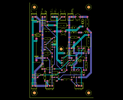
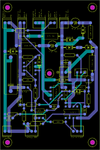
I ordered my boards today.  Doing these has been a learning experience.  Here's a view from GerbV and I'm attaching the board files Itead required to get the boards made plus the Eagle .brd and .sch files in the hopes that these might be useful to someone.  Total cost for 10 boards was $28.80 including shipping.  One of the cool things about Itead is that if you "open source" your board design, they'll send you two boards for free of two other open sourced designs that other people have done and released as such.  I don't think you can find out what until you receive them but either way it's a cool idea.  I did this just to see what I get.

The off board parts are the two 2N3055's, the BD139, the 12,000uF smoothing cap, the bridge rectifier, the 10W current sense resistor (in my case 16W so you'll have to change that on the silk screen layer), the two 10K pots and the LED.  Connectors are marked for all of these except where the bridge rectifier goes across the smoothing cap, in that case it's just marked In+ and In- respectively.  The center connector for the pots is the wiper and I haven't marked this on the board to indicate it but it should be obvious as it's the center.  The parts are pretty bog standard except for the 10uF cap at the output on the schematic (C7).  I changed that to be a film cap instead of an electrolytic and is rather large on the board due to this fact.  They aren't exactly cheap either.

Quick edit to remove the zip file because the board and schematic aren't correct due to the BC557 being reversed.  I'll put up the corrected version at the end of this thread tomorrow along with the gerbers.

30V-board.png

 
Last edited:

redwire

Nov 10, 2007
244
Joined
Nov 10, 2007
Messages
244
Liquibyte,  your board looks good.  The only thing that stands out it your  OUT+ and OUT - header is very close to the mounting hole.  I think there if enough room to miss the mounting bolt but if you are stacking board is may be more difficult to make connections once installed.  I probably would have either moved the terminal block between the first 2 headers on the upper right side of the board, or just soldered an additional wire  to the emitter on the 2N3055 (after the 0.33 ohm resistors) and solder an additional  wire to the  0.47 ohm Sense Resistor and those 2 wires would serve as the main power carrying wires for the PS front panel, whereas the OUT+- pins can be used for  testing/Misc but you wouldn't need to carry 3-5 amps through your board.  I guess stacking the boards back to back is a possibility.

If you end up doing a lot of assembly and disassembly/testing  I would suggest  using a push on type connector (such as molex KK  with a ramp) for the voltage and current adjustment potentiometers) These carry very little current .  Assembly, testing and disassembly is quick and  easy because  you don't need to figure out which wire goes where - the ramp only goes one way.  Also if you have stacked boards you can use a right angle connector and won't need a tool to remove. 

Again these are really incidental  comments .

 
L

liquibyte

Jan 1, 1970
0
My intention is to do all of the testing etc. out of the case first and make sure things are working right then install the bottom board then do the same for the top board.  As far as the mounting hole goes, the standoffs I'm using are 4-40 so the screw heads are tiny for the most part and the screws that tighten the terminal blocks are on the top so I'm not concerned about clearances there.

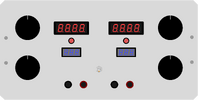
I've also done a mockup of the front panel with the measurements being fairly precise so this is basically what it's going to look like on the front.  I did order the big 1.25 inch knobs because it's common that people have stated they wished they had bought bigger knobs.  So, that's what I did.

panel.png

 
L

liquibyte

Jan 1, 1970
0
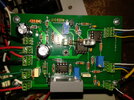
OK, my boards came in today.  I populated one of them and almost everything is working right.  The only issue I have is that the current limit LED stays on.  I think there was someone else here with the same issue but I haven't looked back through the thread yet to see if it solves the problem.

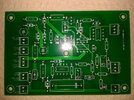
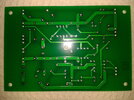
Redwire, just an FYI, I did receive 10 boards for the price they quoted and I think they came out nice enough.  I'm attaching a few pics for everyone to see.  The total for the board order was:

Subtotal $19.90
Shipping & Handling $8.98
Grand Total $28.88

All in all, I think that's not too bad a price for what you get but I have no idea what I'm going to do with the other eight.  I'll probably end up making a few of these just to have around I guess.

top.jpg

bottom.jpg

populated.jpg


audioguru2

Apr 6, 2004
12,026
Joined
Apr 6, 2004
Messages
12,026
liquibyte said:
The only issue I have is that the current limit LED stays on.
You did not say if the current regulation LED is on all the time or only if the current-setting pot is at zero and there is no load.

Opamp U3 is simply a comparator. Resistor R7 is simply a current to voltage converter of the load current.
When the voltage produced by the current-setting pot exceeds the voltage produced by the current sensing resistor R7 then the output is high and there is no current regulation and the LED does not light.

Resistor R17 sets the lowest voltage produced by the current-setting pot and was 33 ohms. If the LED lights when the pot is at zero and there is no load then increase R17 to 68 ohms.
 
L

liquibyte

Jan 1, 1970
0
LED is on all the time and R17 is 68 ohms already.  One of the problems I did have with R17 is that they sent me 1/2 watt resistors instead of 1/4 watt for some reason.  I figured that wouldn't matter much in the grand scheme of things.  I used your parts list with these but I did make sure that I got 10 turn trimmers this go around as I wanted finer control over things..

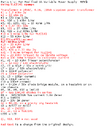
0-30V_new_opamps_mod_Parts_List_latest.png


redwire

Nov 10, 2007
244
Joined
Nov 10, 2007
Messages
244
liquibyte said:
OK, my boards came in today.  I populated one of them and almost everything is working right.  The only issue I have is that the current limit LED stays on.  I think there was someone else here with the same issue but I haven't looked back through the thread yet to see if it solves the problem.

Redwire, just an FYI, I did receive 10 boards for the price they quoted and I think they came out nice enough.  I'm attaching a few pics for everyone to see.  The total for the board order was:


All in all, I think that's not too bad a price for what you get but I have no idea what I'm going to do with the other eight.  I'll probably end up making a few of these just to have around I guess.
Yes, the price seems out of line with other board manufactures.  Your boards looks good enough and it is hard to make them yourself for that price!      I actually made an order from them for a simple rectifier board, similar to what you would use for your Radio Shack transformer.  I'm waiting for them to arrive.

As for your LED always being on, check your transistor Q3 to make sure it is connected properly. You could have leads crossed.  Post the voltage reading of all of the pins on U3.  Check to make sure you didn't swap R19 and R20. 
 
L

liquibyte

Jan 1, 1970
0
You nailed it man.  I had Q3 collector and emitter reversed.  I don't know if the package comes that way in Eagle or if I mirrored it somehow.  Everything is now right with my world, thanks.  I wish I had caught that before I sent out for the boards.  I'll just have to remember to reverse the transistor when I build further versions.


redwire

Nov 10, 2007
244
Joined
Nov 10, 2007
Messages
244
liquibyte,  glad you got it going!    You have limited parts with Eagle, so it happens that you grab a device that has reversed leads from your actual part. 

 
L

liquibyte

Jan 1, 1970
0
Yeah, I double checked the part and it has reversed legs, why I don't know.  I mirrored it and corrected the board file and gerbers to reflect the correct part I used.  I deleted the zip file from my previous post so I don't cause confusion and I'm attaching the corrected version here for anyone that wants to use the files.  Included are the schematic and board files plus the gerbers that I used at Itead to get the boards made.  The recommended weight should be 2oz copper for 3A given the trace width, however, that adds $25 to the cost of the boards with them.  I used 1oz and am going to run 22awg jumper wire along the bottom between the components and the outputs to handle the current.  Probably not the best solution but I imagine it will work alright.

Edited to include a parts list of Digikey part numbers.

0-30V.png

30V.zip


Attachments

  • 30V.zip
    335.8 KB · Views: 59
Last edited:

redwire

Nov 10, 2007
244
Joined
Nov 10, 2007
Messages
244
liquibyte said:
Yeah, I double checked the part and it has reversed legs, why I don't know.  I mirrored it and corrected the board file and gerbers to reflect the correct part I used.  I deleted the zip file from my previous post so I don't cause confusion and I'm attaching the corrected version here for anyone that wants to use the files.  Included are the schematic and board files plus the gerbers that I used at Itead to get the boards made.  The recommended weight should be 2oz copper for 3A given the trace width, however, that adds $25 to the cost of the boards with them.  I used 1oz and am going to run 22awg jumper wire along the bottom between the components and the outputs to handle the current.  Probably not the best solution but I imagine it will work alright.
I had concerns that the traces were on the thin side as noted earlier  but  I still think you can rearrange parts  and small traces, and widen the power traces to use  1oz copper.  The overall placement is pretty good as the power traces are nearly a straight line on the left side of the board. 
 
L

liquibyte

Jan 1, 1970
0
I might end up doing that later on but I think that everything should be ok with solid core wire on the bottom helping handle the current for now.

I did build the second unit and everything is working as expected so I'm happy with that.  Oddly enough for as big a case as I put these in, I'm starting to run out of room.  I managed to get two of these in side by side so the vertical space will be used for the two power supplies for the thermal circuitry, fans and the four displays.  I planned on using linear voltage regulators there to keep things as small and simple as possible and 328's and AS1100's to drive the meter stuff.  I'm working out how to do this on my own so it will probably take awhile.

I've yet to fully calibrate these and was going to ask if there were a specific procedure that you use on yours when you do it.  I know that you set the voltage pot to zero and then adjust RV1 to get an output of zero but past that I'm not sure.  One thing I have noticed is that I can't get to an absolute 0V but bottom out at about 28mV.  I have a feeling that it probably needs to be fine tuned in other places as well to get that true 0V.  Any advice?


redwire

Nov 10, 2007
244
Joined
Nov 10, 2007
Messages
244
liquibyte said:
I've yet to fully calibrate these and was going to ask if there were a specific procedure that you use on yours when you do it.  I know that you set the voltage pot to zero and then adjust RV1 to get an output of zero but past that I'm not sure.  One thing I have noticed is that I can't get to an absolute 0V but bottom out at about 28mV.  I have a feeling that it probably needs to be fine tuned in other places as well to get that true 0V.  Any advice?
The two things to adjust are:
1.  Voltage limit.  The 20K trimmer connected to U2 is to limit output to 30V.  You will likely find that the 20K trimmer straight from the factory was set at approximately 10K and is right about where you need it.    Set P1 to the maximum output, then adjust the the 20K on board trimmer to get  30V on the output.

2.  Current limit.  Without a load on the PS, adjust P2 so that you have the maximum voltage on pin 3 of U3.    Now adjust the 100K trimmer on the board to  to limit the max current that the board will output.  Because you are using a 0.47 Ohm Resistor , Using V=IR,  If you want a 3A limit,  the maximum voltage on pin 3  of U3 would be 3A x 0.47 Ohms = 1.41 V.  So adjust the 100K trimmer so that the maximum voltage on pin 3 of U3  is  1.41 volts.  You can fine tune from there.

Neither of the above adjustment will bring the voltage to exactly zero.  You will probably find that if you have small  load on your PS you can bring the Voltage down 0.    If you still want zero with no load, touch a 5k or 10k resistor across the output points on your header blocks and see if that brings the voltage to zero.  If that does the trick you can permantently connect it to your output header block along with your output wires.
 
L

liquibyte

Jan 1, 1970
0
Yep, that did the trick, thanks.  Now I just have to do the circuits for the displays and find out what the libraries offer in terms of resolution.  I think I'll be good at 10mV reading current but I'd like to get 1mV out of the voltage side if it's possible.  If arduino doesn't offer what I need, I may just get into the bare metal and see what I can come up with using C or assembler.


redwire

Nov 10, 2007
244
Joined
Nov 10, 2007
Messages
244
liquibyte said:
Yep, that did the trick, thanks.  Now I just have to do the circuits for the displays and find out what the libraries offer in terms of resolution.  I think I'll be good at 10mV reading current but I'd like to get 1mV out of the voltage side if it's possible.  If arduino doesn't offer what I need, I may just get into the bare metal and see what I can come up with using C or assembler.
It is not the programing language that will be the controlling factor but the microcontroller and set up.  Many AVR chips (used on many Arduino's)  have 10-bit resolution (2 raised to the power 10) resulting in 1024 different reading.  If you use the chip's internal reference voltage of 2.56V you will get 0.0025mv resolution.  Now this means you need to have a voltage divider from your PS output to the microcontroller that limits the sensing voltage to 2.5 V. Some AVR chips do allow  you to use  a 1.1V reference getting you close to your 1mv range but things may get jittery when trying to measure at that level.  I bet you will find your display jumping in increments greater than 1mv.    I think you will find 2mv accuracy is good enough. You will likely need to do some tweaking in software (averaging, offsetting, sampling rate, etc) to negate sampling error and tolerance in transistors used in the voltage divider.  You will probably want to add a trimmer to your voltage divider set up, so that you can fine tune without needing to reprogram.  If you don't have a lot of programming experience, I think Arduino is the way to go.  You can build your own pcb shield that fits on top of the Arduino. 

This is a breakout board that I used C to program from AVR Studio 6.  http://www.electronics-lab.com/forum/index.php?topic=19066.msg1015257#msg1015257 .  I believe you can include the Arduino Library and program using Arduino as well as straight C in AVR Studio 6.  My goal was to make the board so I can use on other projects so it has a lot of extra stuff.  I got sidetracked and never finished because of a fundamental power issue of trying to feed 41V from the power supply thru a bunch of zeners to get 5V to power the chip.  It works but the Zeners get burning hot.  I'm going to drop back and use a small transformer and bypass the zeners. 
 
L

liquibyte

Jan 1, 1970
0
I knew about the 10 bit resolution and was thinking about just using the chip for the output display logic and a separate reference and ADC for the readings.  I haven't gotten too far into it but I've read somwhere that op amps have been used for this but being newish will have to study more on the problems and solutions used by others in their quest for the same thing.  The current side of things would be easy since we're talking about sub 5V levels, so the only real trick would be on the voltage output I'm thinking.  I planned on using a trimmer for calibration and figured some of the real tricks would be on the software side of things once the basic circuitry is worked out.  It's an interesting challenge and I'm looking forward to it.  Fortunately I'm better with code than hardware and have been looking at programmers because I don't think I want to use a full arduino.  I'm still figuring things out so I'm going to take my time with this next bit and see if I can actually learn some new stuff.


redwire

Nov 10, 2007
244
Joined
Nov 10, 2007
Messages
244
Have you considered something like this: http://www.adafruit.com/products/296.  Using AVR Studio 6 (free)you only need a usb cable to program the chip. No separate programmer is necessary.  If you plan to do future project then you may want to  consider a  Dragon.  I have a STK500 it is a bit bulky but rugged and versatile.  The breakout board I linked is small, fast, powerful and has enough pins to handle most projects.
 
P

philtherepairman

Jan 1, 1970
0
I am new to the forum and have a question for you experts. (best on-going project that I've ever seen!!)

My constant current light is on when I have the pot turned all the way counter clock wise.

I traced the problem to my combo LED (amp and volt) meter which put a small load on the output.
http://www.ebay.com/itm/221367008747?ssPageName=STRK:MEWNX:IT&_trksid=p3984.m1439.l2649      is the LED for those interested.

So the sense circuit is putting a small voltage on U3 pin 2, enough to turn-on Q3. Verified by taking pin 2 to ground which turned off the LED.

Question: By changing R21 (10k) resistor, can I off-set the small load created by the LED panel??  OR, do you have any other ways to correct my problem?
(get rid of my import meter :)  )

 
Status
Not open for further replies.
Top