
How to Clean a Soldering Iron Tip Without Ruining It
Learn how to clean soldering iron tips for reliable soldering. A deep-dive guide on tools, oxidation removal, and maintenance to ensure perfect heat transfer.
In the world of electronics manufacturing, from the humblest DIY project to complex aerospace prototyping, the soldering iron tip (or bit) is the most critical interface. It is the final link in the thermal chain that transfers energy from the heating element to the solder joint. Yet, it is often the most neglected tool on the workbench.
Many engineers focus heavily on the quality of their soldering station—checking wattage, temperature stability, and heat-up time—while ignoring the condition of the tip itself. An oxidized, pitted, or dirty tip creates a thermal barrier. No matter how expensive your station is, if the tip cannot wet properly, the heat transfer will be inefficient, leading to poor joints and frustrated operators.
This guide will show you exactly how to clean a soldering iron tip properly—not just to make it look shiny, but to restore efficient heat transfer and prevent premature tip failure.
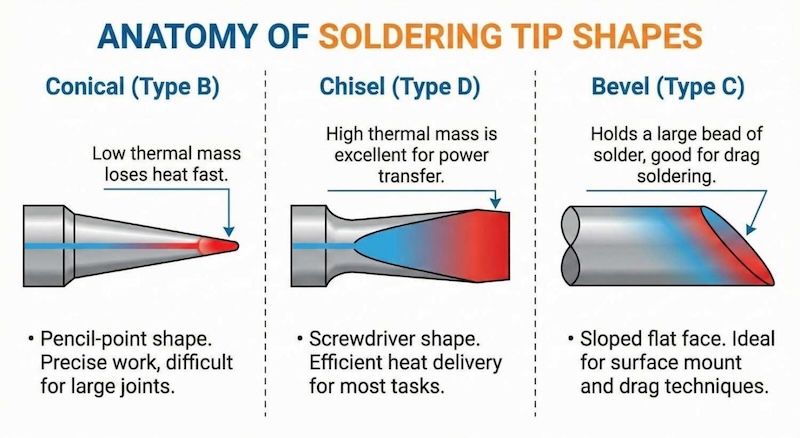
Figure 1. Comparison of soldering iron tip shapes: conical, chisel, and bevel types showing different thermal contact areas
If you’re looking for a quick answer, you can jump to the section “How to Clean a Soldering Iron Tip: Step-by-Step” below.
Common Soldering Iron Tip Problems
Identifying the state of your soldering iron tip is the first step in restoration. Here are the most common conditions you will encounter.
The Black Tip (Oxidation)
This is the most common issue. The tip looks matte black or dark grey. Solder is immediately fed onto the tip, balls up, and falls off, similar to water on a hydrophobic surface. This is called dewetting.
Cause: Idling at high temps or wiping the tip clean before storage.
The Pitted Tip (Corrosion)
This is a catastrophic failure. The tip’s surface has visible holes, craters, or a rough, eaten-away texture.
Cause: This happens when the iron plating is breached. Tin is a solvent for copper. Once the protective iron layer is scratched (by sandpaper) or eroded (by high-tin lead-free solder), the molten solder dissolves the copper core from the inside out. This tip cannot be saved and must be discarded.
The Burnt Flux Tip (Contaminated Tip Surface)
The tip has thick, crusty black deposits near the base or on the shaft, though the very tip might still work.
Cause: Overusing flux or pushing solder wire too high up the tip shaft.
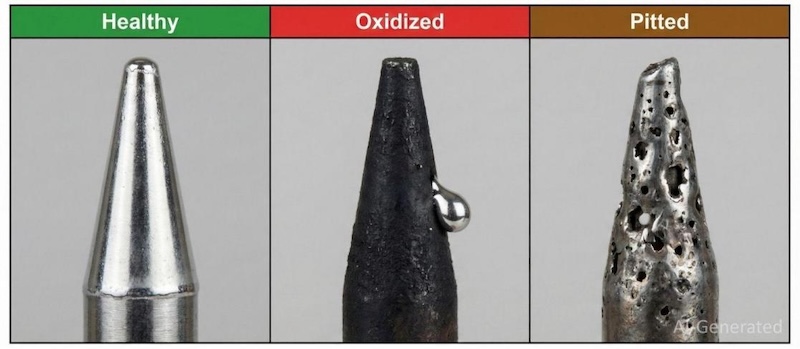
Figure 2. Showing a healthy tip, an oxidized de-wetted tip, and a pitted, corroded tip
Essential Tools Needed for Cleaning Soldering Iron Tips
You cannot maintain a precision tool with improvised equipment. Before you start soldering, ensure your workbench is equipped with the following.
Brass or Stainless Steel Wool
This is the modern gold standard for cleaning, especially for lead-free solders.
- Why it works: It is low-abrasive. The metal shavings are harder than the oxide/flux residue but softer than the iron plating of the tip.
- Thermal advantage: Unlike a wet sponge, dipping the tip in brass wool does not cause a rapid temperature drop (thermal shock). This keeps the process consistent.
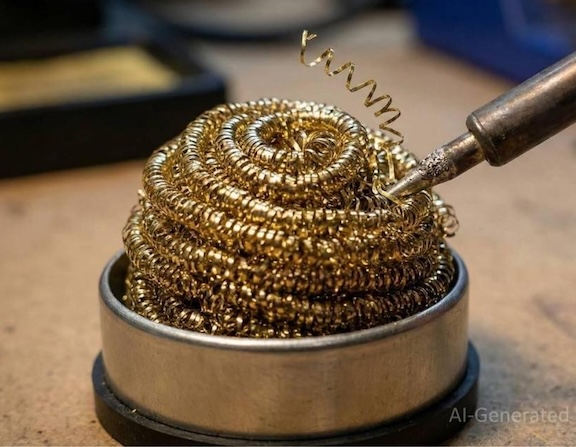
Figure 3. Brass wool soldering iron tip cleaner for removing oxidation without water
Sulfur-Free Cellulose Sponge
This traditional method is still useful for removing heavy flux buildup.
- Requirement: It must be sulfur-free (sulfur corrodes iron) and used with deionized water (minerals in tap water cause scale).
- Warning: The thermal shock of hitting a wet sponge can instantly drop the tip temperature by 50°C to 100°C.
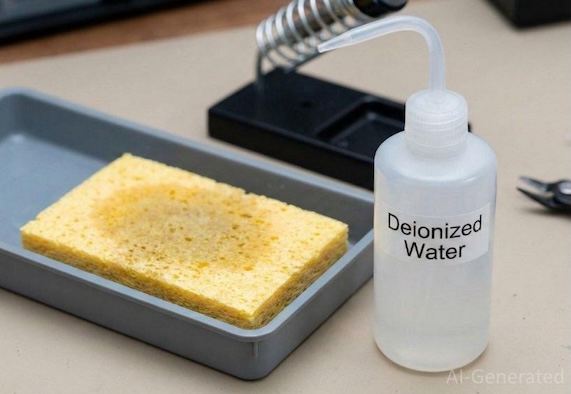
Figure 4. Sulfur-free cellulose cleaning sponge and a deionized water bottle for soldering maintenance
Tip Tinner (Activator)
A small metal tin containing a solid paste mixture of solder powder and mild acid (often ammonium phosphate). This is your “emergency reset button.” It chemically strips oxides when mechanical wiping fails.
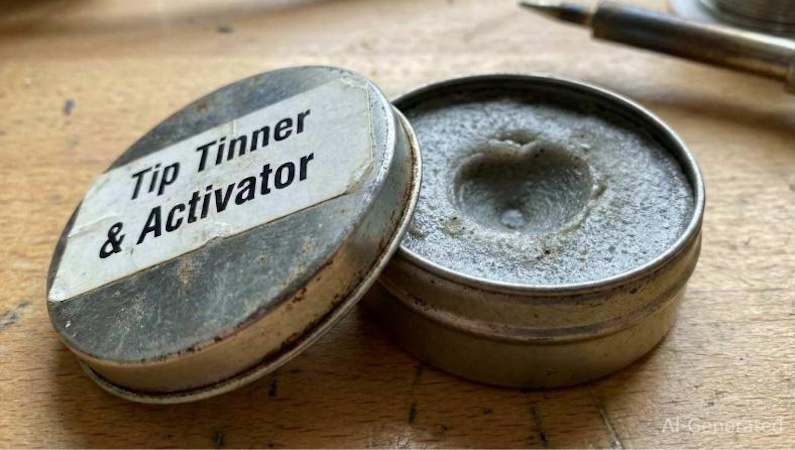
Figure 5. Chemical tip tinner and activator compound for restoring oxidized soldering tips
Polishing Bar
A specialized abrasive block used only for extreme cases. It cleans aggressively but removes a small amount of plating, so it should be used sparingly.
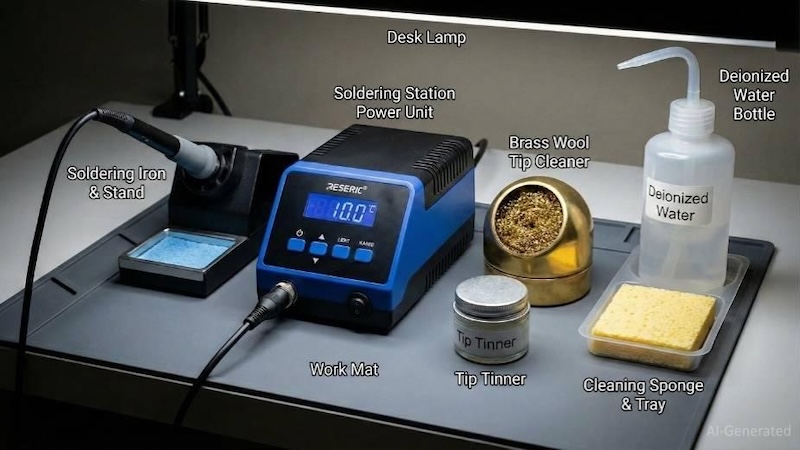
Figure 6. Essential soldering maintenance tools: brass wool, cellulose sponge, tip tinner, and deionized water
How to Clean a Soldering Iron Tip: Step-by-Step
Maintenance falls into two categories: the routine cycle you do every minute, and the deep cleaning you do when things go wrong.
Situation 1: Routine Soldering Iron Tip Cleaning (The “While-You-Work” Cycle)
In this situation, the goal is to remove spent flux and old solder to ensure a fresh connection. Perform this immediately before soldering a joint.
Step 1: Heat up. Allow the iron to reach operating temperature (ideally 350°C).
Step 2: Wipe. Gently plunge the tip into the brass wool 2-3 times. Rotate the iron slightly to clean all sides. Note that you should not stab the wool violently; you want to scrub, not puncture.
Step 3: Inspect. The tip should look bright and silver.
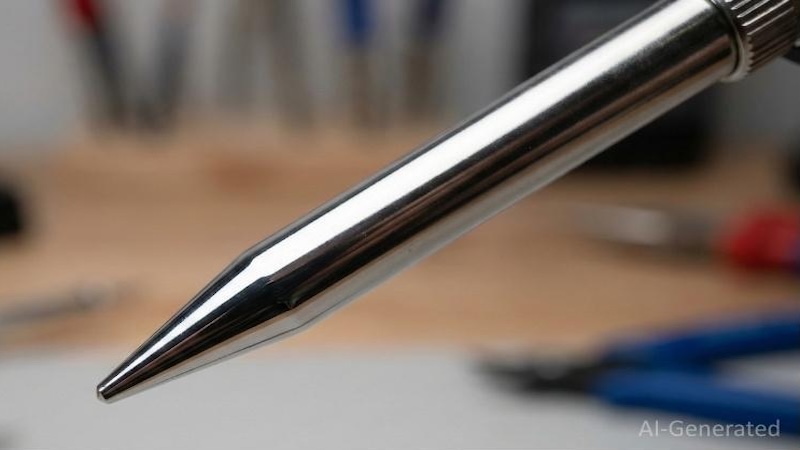
Figure 7. A clean, shiny soldering iron tip showing proper wettability and a mirror finish
Step 4: Solder. Move immediately to the PCB and make your joint. The flux in the wire will protect the tip during the operation.
Step 5: Re-coat. Before putting the iron back in the holder, feed a small amount of fresh solder onto the tip.
Situation 2: Deep Cleaning an Oxidized Soldering Iron Tip (Restoring a Black Tip)
In this second situation, we will chemically reduce the iron oxide layer that mechanical wiping cannot remove.
Step 1: Lower the temperature. Turn your station down to 250°C – 300°C. We use this temperature range specifically because tip restorers use chemical reactions to clean tips. At 400°C, the chemicals boil off before they can react. At 280°C, they stay active and scrub the surface.
Step 2: Dip in tip tinner. Insert the black, oxidized tip into the solid tip tinner/activator. You will hear a hiss and see smoke.
Step 3: Rotate and dwell. Gently rotate the tip in the melting paste for 3-5 seconds. The mild acid is breaking the oxygen bonds.
Step 4: Wipe and inspect. Remove the tip and wipe it firmly on brass wool. It should emerge shiny.
Step 5: Seal the surface. Immediately feed fresh rosin-core solder onto the tip. The exposed iron is highly reactive; if you don’t seal it with tin, it will oxidize again in seconds.
How to Extend Soldering Iron Tip Life: Maintenance Tips and Best Practices
Professional technicians in IPC-certified assembly houses follow strict protocols to make tips last for months or years. Here are some of their secrets.
Tip 1: The “Sacrificial Layer” Strategy
This is the single most important habit to develop. Never wipe your tip clean before putting it into the holder.
- The mistake: Many users wipe the tip until it looks shiny, then put it in the stand. That shiny iron is now naked and exposed to hot air. It will oxidize immediately.
- The pro way: Always flood the tip with a large blob of solder before turning off the station or putting it down.
- The science: This solder blob sacrifices itself. The outside of the blob forms a “skin” of oxide, but the molten tin inside keeps the iron plating hermetically sealed and oxygen-free.
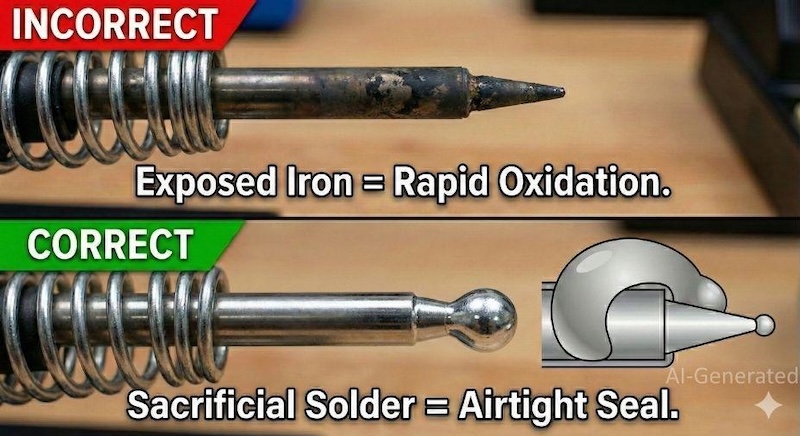
Figure 8. Comparison of soldering iron storage methods: incorrect dry storage leads to oxidation, whereas correct storage with a sacrificial solder blob prevents oxidation
Tip 2: Manage Your Temperature
Just because your station goes to 450°C doesn’t mean you should use it.
- Stay at 350°C: For standard lead-free soldering (SAC305), this is the optimal balance between performance and oxidation.
- Use auto-sleep: If your station has a “sleep” mode, enable it. It drops the temperature to 200°C when idle.
- Thermal mass over temperature: If you are struggling to solder a ground plane, don’t just turn up the heat—switch to a larger tip (chisel instead of conical). A larger tip holds more heat reserve, allowing you to solder massive joints at lower, safer temperatures.
Tip 3: Never Use Abrasives
Soldering tips are not solid copper. They are a complex composite made of the following:
- A copper core for heat transfer.
- Iron plating for protection.
- Chrome plating for solder restriction (on the shaft). If you use sandpaper, files, or a Dremel, you will sand right through the iron plating (which is often only 200-500 microns thick). Once the copper is exposed, the tip is dead.
Tip 4: Use the Right Flux and Clean Residue Promptly
Flux is a double-edged sword—it removes oxides from your PCB, but it also corrodes your tip.
- Avoid “Active” Flux: Highly active (RA) fluxes contain halides that eat through iron plating. Use RMA (Rosin Mildly Activated) or No-Clean flux for standard assembly.
- Beware the carbon trap: If flux residue is left on the tip for too long, it carbonizes into a hard black shell. If you see black residue building up on the shaft, clean it immediately with a damp sponge before it hardens.
When Manual Soldering Iron Tip Maintenance Is No Longer Enough
Even with the strictest maintenance protocols, manual soldering has inherent physical limitations. Prototyping a few boards by hand is feasible, but maintaining consistent tip temperature, pressure, and dwell time across thousands of joints is impossible for a human operator.
As your project scales from a breadboard proof-of-concept to a market-ready product, manual tip maintenance becomes a bottleneck.
- The human variable: A tired operator might hold the iron for 5 seconds instead of 3, overheating a component.
- Thermal recovery: Even the best iron lags when soldering massive ground planes, which can lead to potential cold joints.
- Component density: Modern 0201 passives and BGA (Ball Grid Array) components simply cannot be soldered reliably with a manual iron.
This is where the transition to JLCPCB’s Automated SMT Assembly becomes critical. Unlike a manual iron that fights oxidation in open air, industrial reflow ovens operate in controlled Nitrogen (N2) environments. By displacing oxygen, JLCPCB eliminates the very chemical reaction (oxidation) that you fight to clean off your tip every day.
Automated assembly offers:
- Precision reflow profiles: Every joint hits the exact liquidus temperature for the exact required time.
- AOI (Automated Optical Inspection): Cameras verify every fillet geometry, far faster than a human with a microscope.
- Scalability: The quality remains consistent, whether producing a single prototype board or engaging in low-volume production of up to 10,000 units.
Learn More About: JLCPCB Manufacturing & Assembly Capabilities
Conclusion
A soldering iron is a precision instrument, not a pry bar or a wood burner. By keeping your temperature reasonable, prioritizing brass wool over wet sponges, and using the “Sacrificial Layer” storage method religiously, you ensure consistent thermal performance.
While these manual skills are vital for prototyping, they introduce variables – human inconsistency, oxidation risks, and thermal recovery lags – that can jeopardize mass production. When your prototype is perfected and you are ready to scale, relying on manual soldering is a liability.
JLCPCB’s PCBA Services eliminate these variables. We utilize industrial Nitrogen (N2) Reflow Ovens. By displacing oxygen with nitrogen during the soldering process, we prevent oxidation entirely, ensuring that every single joint, from the first to the ten-thousandth, meets IPC Class 3 standards for wettability and reliability.
FAQs
Q1. Solder is climbing up the shaft of the iron (chrome bleed). How do I fix this?
This is called chrome bleed. The shaft of the tip is chrome-plated to prevent solder from sticking, keeping it concentrated at the working end. If you scratch this chrome (often by cleaning too aggressively with a wire brush), solder will creep up the shaft. This creates a large surface area that radiates heat away from the joint. This cannot be repaired; the tip must be replaced.
Q2. Why does my tip turn black immediately after cleaning?
Your temperature is likely too high (above 400°C), or you are using a very aggressive active flux that burns instantly.
- The fix: Lower your temperature to 350°C. Clean the tip, and then tin it immediately (within 1 second). Do not give the air time to attack the iron.
Q3. Can I use tap water on my sponge?
It is highly discouraged. Tap water contains dissolved minerals like calcium, magnesium, and chlorides. When the water boils off on the 350°C tip, these minerals are left behind as a hard scale. This scale acts as a thermal insulator, which can cause the iron plating to corrode over time. Always use distilled or deionized water.
Q4. How do I choose the right tip shape to prevent oxidation?
Larger tips (like chisel or bevel) generally last longer than fine conical tips.
- Reason: Fine tips have very low thermal mass and a high surface-area-to-volume ratio at the point. They tend to overheat locally and oxidize faster. Using a larger tip allows you to solder at lower temperature settings, which naturally slows oxidation.
Q5. Why is the solder balling up and rolling off?
This is the classic definition of de-wetting. It means the oxide layer is so thick that the solder cannot touch the iron plating. The surface tension of the solder pulls it into a ball because it cannot “wet” the surface. You need to perform the deep cleaning step mentioned in Section 6 using a chemical tip tinner.
This article was submitted by JLCPCB in collaboration with the author. All images were created using AI and provided by JLCPCB.