
Prevent Post-Launch Application Failures with Real-World Network Simulation
Ideal lab conditions rarely match a user's actual connectivity. Discover how testing for latency and packet loss before release ensures your software performs flawlessly anywhere.
For engineers, it can be a sinking feeling to see the problems that come to light during an application launch; however, this outcome can be avoided with the right approach. Simulating real-world networks can show you what your users are likely to encounter when they attempt to load your application for the first or the 30th time. Here are a few things to keep in mind as you plan your testing regimen.
Common Challenges in Actual Network Conditions
Your software may work great under ideal network conditions, but that isn’t quite what the average person has available to them. A successful launch requires you to look at it the way they will. When you break out of the controlled environment, you notice the issues that come up:
- Low connectivity
- Network congestion
- Latency
- Packet drops

Software may work under ideal, controlled network conditions, but fail in real environments. Image used courtesy of Adobe Stock
Performance Issues to Test Before Launch
During testing and development, it’s important to analyze and address potential performance issues. Here are a few that you should put on your radar.
Latency
Latency is a nightmare for many engineers because it is so subjective to the user’s environment. If a user is a little too far from their home router or the public Wi-Fi, speeds drop. If the network is overloaded with heavy traffic, everyone will suffer. Even having to connect through a range of routers and switches can slow things down. Users connecting through 3G speeds, which a significant portion of the world still uses, face all these problems and more.
Bandwidth Limitations
Even if the user’s network has a great setup, you have to factor in the condition of your network. Does your network have the bandwidth to handle the load created by your users? Network stress testing is a key element of application testing, because you don’t know what to expect until you put your network through the wringer. It’s also a sensible approach to help you withstand DDoS attacks and avoid outages.
Packet Loss
While the data struggles to make it to the user under typical network conditions, sometimes it doesn’t actually reach the destination. Packet loss leads to low-quality voice and video, along with other problems. If you want a seamless user experience, simulating packet drops can help you identify results and adjust to accommodate them.
How to Simulate Real-World Network Conditions
In most cases, you can create average network conditions without having to leave your workstation. Since the results you get depend largely on your approach, you may want to use multiple options.
Simulation
Creating a simulation can be one of the simpler approaches to real-world network testing. You can buy a third-party product or use code to create conditions like packet drops. Simulation is convenient because you can test for the kinds of conditions you expect without having to configure or place a literal device or even leave your office.
Emulation
Emulation often requires physical equipment. With emulation, like a WAN emulator, the device puts itself between the engineer’s network and the user trying to connect to them (or vice versa). The emulator creates common network conditions that allow the team to test for bandwidth, latency, packet loss, or throughput. This approach usually calls for a third-party solution.
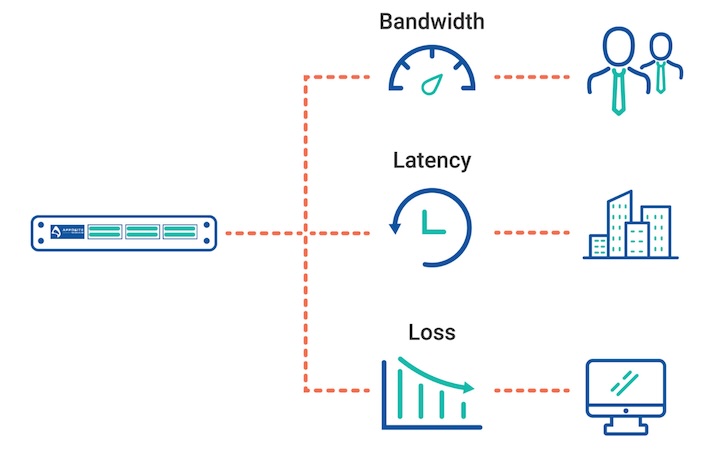
A network emulator allows for the evaluation of network impairments in real time. Image used courtesy of Apposite Technologies
Latency Testing
Latency testing involves measuring response to certain actions (like pings) and can be fairly easy to implement. Third-party applications exist to provide results on measurables like round-trip time or network response time, but you can develop your own code using Python or another language. Latency simulation allows you to create conditions with variable delays, so you can see how the user experience changes under this environment.
Testing in Average Network Conditions
If your application seems to be performing wonderfully no matter what testing approach you take, you may not want to trust those results. In some cases, there’s no replacement for heading out into the real-network conditions you’re testing for. Go to a place where the connectivity isn’t great, like a rural area or a clogged public Wi-Fi. Your results will depend heavily on your region’s resources, but at least you can start to validate or negate your earlier assessments.
Benefits of Proactive Simulation
There are plenty of reasons to get ahead of the crush of attention and find out what your users’ network conditions pose. You’ll be glad for each one.
Resolve Vulnerabilities
Even if your team is incredibly methodical and committed to testing, it’s likely you have a few vulnerabilities you didn’t realize. Application launch tends to result in an increase in network activity, which your own systems may or may not be equipped to handle. Learning that your system goes down under stress testing can give you advance time to develop solutions. That way, once you get to normal use, your users are less likely to encounter problems.
Improve Reliability
Reliability is a key aspect of a successful application launch. You want your users to be able to connect easily without facing latency or drops in quality. Simulating real-world network conditions allows you to understand what it is like for users to operate your application with questionable network quality. The result is that users can rely on your app with confidence, instead of worrying that it won’t work as soon as they leave their home Wi-Fi.
Enhance User Experience
Building an application for users is a time-tested approach to creating tools that users actually want to use. Testing for the user’s typical network conditions can help you identify the hitches that get in the way of a smooth user experience. You know what it’s like to deal with an app that refuses to load or does so unpredictably. Creating those conditions in testing can minimize these problems for your users, but it also requires you to get into your users’ heads and see things from their perspectives. That can give you a world of useful information.
Boost System Performance
These advantages are good for your users, your application launch, and your organization as a whole. Comprehensive testing is crucial to give you the necessary time to find problems and boost your system performance to accommodate them. While simulating network conditions for your users, you may highlight application response issues but also gaps in security and other problems. The information you receive can help you make your application and your own networks better in general.
Final Thoughts
When you test your application pre-launch, you should also simulate the real-world network conditions your users face when running it. There are various tools you can use, like emulation, simulation, or latency testing. By implementing rigorous testing, you can resolve vulnerabilities and ensure a better user experience.


