
Luckfox PicoKVM: Compact IP KVM Device with HDMI, USB, and Remote Control
A compact IP KVM solution featuring HDMI capture, USB emulation, BIOS/UEFI access, and Linux-based firmware for secure remote system management.
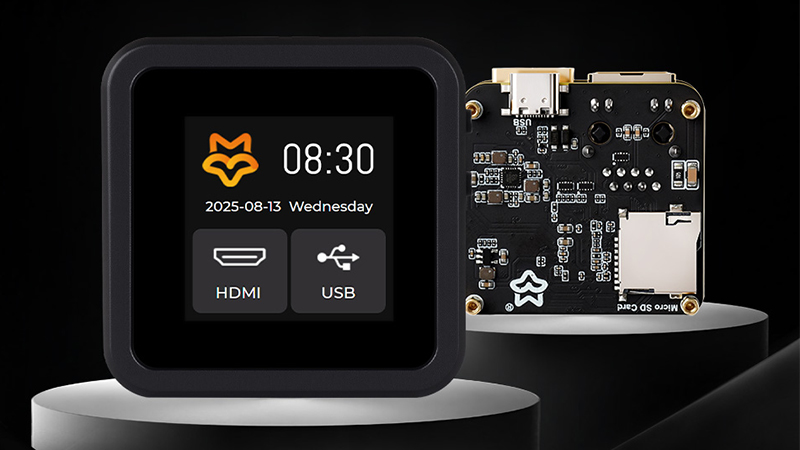
Luckfox PicoKVM – IP KVM device
In modern IT environments, administrators need dependable tools to manage systems remotely without direct physical access. An IP KVM device (Keyboard-Video-Mouse over IP) fulfills this requirement by providing full console control over the network, including access to BIOS and UEFI settings. It allows operators to view video output, send keyboard and mouse inputs, mount virtual USB drives, and manage power functions from any location.
The latest designs make KVM-over-IP compact, cost-effective, and efficient, offering real-time video streaming with low latency. Such devices simplify remote debugging, minimize downtime, and reduce the reliance on on-site maintenance, making them a vital part of modern infrastructure management.
We have previously covered several other KVM solutions, including the GL.iNet Comet (GL-RM1), Sipeed NanoKVM-USB, Sipeed NanoKVM-PCIe, and mini-KVM. You can explore those for additional options.

Luckfox PicoKVM front and back side
Luckfox PicoKVM Specifications:
- SoC: Rockchip RV1106G3
- CPU: Arm Cortex-A7 @ 1.2 GHz with integrated RISC-V co-processor
- NPU: 1 TOPS Rockchip 4th-gen NPU with hybrid quantization (int4/int8/int16)
- ISP: 3rd-gen 5MP high-performance ISP
- VPU: 3072×1728 (5MP) @ 30fps H.265/H.264 encoding, 16MP @ 60fps JPEG snapshot
- Memory and Storage:
- 256MB DDR3L on-chip memory
- 8GB eMMC flash
- MicroSD card slot for storage expansion
- Display and Video:
- 1.54-inch 240×240 touch LCD (included only in full version with case)
- HDMI input at up to 1080p60
- Networking: 10/100 Mbps Ethernet (RJ45) with status LEDs
- USB and I/O:
- USB Type-C port for programming and power
- USB HID emulation (keyboard, mouse)
- USB storage emulation (virtual USB drive)
- 2x serial terminals for debugging and logging
- I/O interface with GPIO, UART, and I²C
- Security and Management:
- Out-of-band management isolated from host OS
- BIOS/UEFI control support
- Wake-on-LAN (WOL)
- Remote host ON/OFF and restart control
- Virtual USB drive mounting
- Power:
- 5V via USB Type-C
- 3.3V via GPIO header
- Misc: Reset and Boot button
- Dimensions:
- PicoKVM with case: 48.5 x 48.5 x 29 mm
- PicoKVM Base: 44 x 42 x 23.6 mm
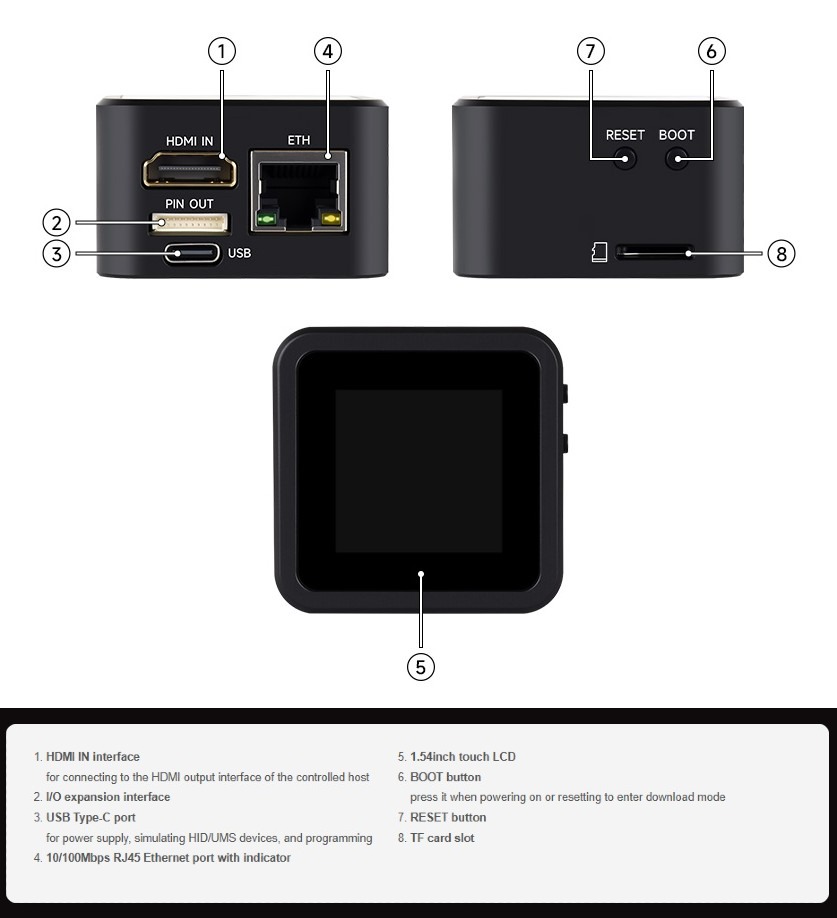
Luckfox PicoKVM Specifications
The firmware runs on a Linux Buildroot environment with a 5.10 kernel and U-Boot bootloader. It supports remote access through tools such as xEdge, Tailscale, and ZeroTier, enabling NAT traversal and secure tunneling. The core firmware is open source, while some media libraries and drivers remain proprietary. Users can manage scripts via the web terminal, mount virtual USB images, and establish secure remote console sessions that operate independently of the host operating system. More details and guides are available on the Luckfox wiki.
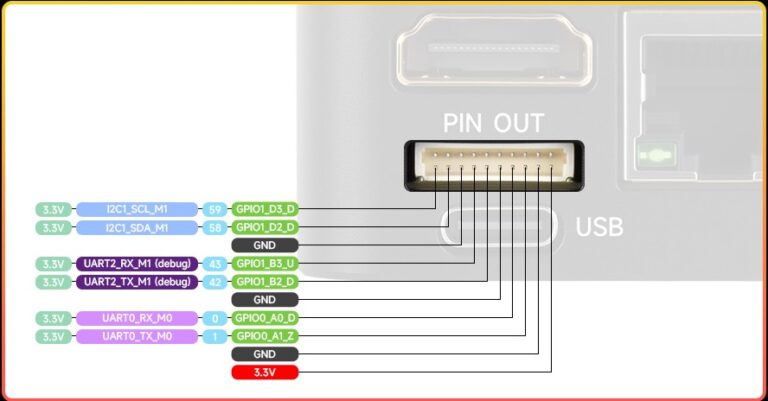
PicoKVM Pinout
The Luckfox PicoKVM is available through the Waveshare store, priced at $27.99 for the Base version and $55.99 for the Full version with a metal case and touch LCD. It can also be found on Amazon, where the Base version costs $37.99 and the Full version is listed at $69.99.
Images used courtesy of Waveshare and Electrotrio.


